

As an Amazon Associate we earn from qualifying purchases.
- The MSI MPG 321URX QD-OLED is for PC and console gamers who want a 32-inch-class 4K display, vivid QD-OLED contrast and a 240Hz refresh rate.
- Key specs include a 31.5-inch panel, 3840 x 2160 resolution, 240Hz refresh rate, 0.03ms GtG response time and USB-C power delivery up to 90W.
- For Black Friday 2026, compare retailer bundles, included cables, color availability, return windows and stock before choosing a listing.
- The MSI MPG 321URX QD-OLED is a strong buy for buyers who value 4K OLED image quality and fast gaming; consider a different display if glare or static desktop use is a concern.
- The MSI MPG 321URX QD-OLED combines a 31.5-inch 4K QD-OLED panel with a 240Hz refresh rate.
- HDMI 2.1, DisplayPort 1.4a, USB-C with up to 90W power delivery and a KVM switch support a flexible gaming setup.
- OLED contrast and a 0.03ms GtG response time suit fast games as well as detailed single-player titles.
- Black Friday shoppers should check bundle contents, retailer return terms, panel-care guidance and stock for the exact model.
The MSI MPG 321URX QD-OLED is a 31.5-inch 4K gaming monitor with a 240Hz refresh rate, QD-OLED contrast and USB-C power delivery up to 90W. For Black Friday 2026, I’d focus on the complete offer: the exact model, useful included accessories, retailer support and a return policy that gives you time to check the display in your own setup.
We researched and compared specs, reviews and owner feedback to assess the MSI MPG 321URX QD-OLED for gamers weighing resolution, speed and OLED image quality. My pick for most people who want a large, fast 4K screen is this model, provided its glossy finish and OLED care requirements fit their room and daily use.
How We Picked
- Compared the MSI MPG 321URX QD-OLED’s resolution, refresh rate, response-time claim and panel type against its intended gaming use.
- Reviewed connectivity details, including HDMI 2.1, DisplayPort 1.4a, USB-C power delivery and KVM functionality.
- Considered recurring owner feedback about OLED care, reflections, desktop text use and everyday setup needs.
- Prioritized Black Friday deal factors shoppers can verify: exact model identity, bundle contents, stock, returns and retailer support.
Our Verdict
#1 · Top pick
MSI MPG 321URX QD-OLED
The MSI MPG 321URX QD-OLED is a premium 31.5-inch 4K gaming monitor built around 240Hz QD-OLED performance, strong contrast and broad connectivity. Choose it when image quality and speed matter more than a matte screen or worry-free use with static content.
Best for: PC and console gamers seeking 4K, 240Hz QD-OLED performance
- Panel
- 31.5-inch QD-OLED
- Resolution
- 3840 x 2160
- Refresh rate
- 240Hz
- Response time
- 0.03ms GtG
- USB-C power delivery
- Up to 90W
- Video inputs
- 2 x HDMI 2.1, 1 x DisplayPort 1.4a
- 4K resolution and 240Hz refresh rate combine sharp detail with fluid motion.
- QD-OLED delivers per-pixel lighting and deep contrast.
- USB-C power delivery and KVM features help simplify multi-device desks.
- HDMI 2.1 supports modern gaming consoles and compatible PC setups.
- The glossy screen can reflect windows and bright room lighting.
- OLED care practices matter for users who leave static desktop elements onscreen for long periods.
Is the MSI MPG 321URX QD-OLED worth buying on Black Friday 2026?
The MSI MPG 321URX QD-OLED is worth considering if you want a 31.5-inch 4K QD-OLED screen with 240Hz gaming and USB-C power delivery up to 90W. Check the exact model, retailer return terms and bundle contents before deciding.
See today’s Black Friday price on Amazon
What are the MSI MPG 321URX QD-OLED’s key specifications?
The MSI MPG 321URX QD-OLED pairs a 31.5-inch 3840 x 2160 QD-OLED panel with a 240Hz refresh rate. That combination targets players who want the detail of 4K without settling for a conventional 60Hz desktop display.
MSI lists a 0.03ms GtG response time, while QD-OLED pixels produce their own light for high contrast and rich color. Real-world image quality depends on the content, settings, graphics hardware and room lighting, so treat the specification as a feature reference rather than a guarantee for every setup.
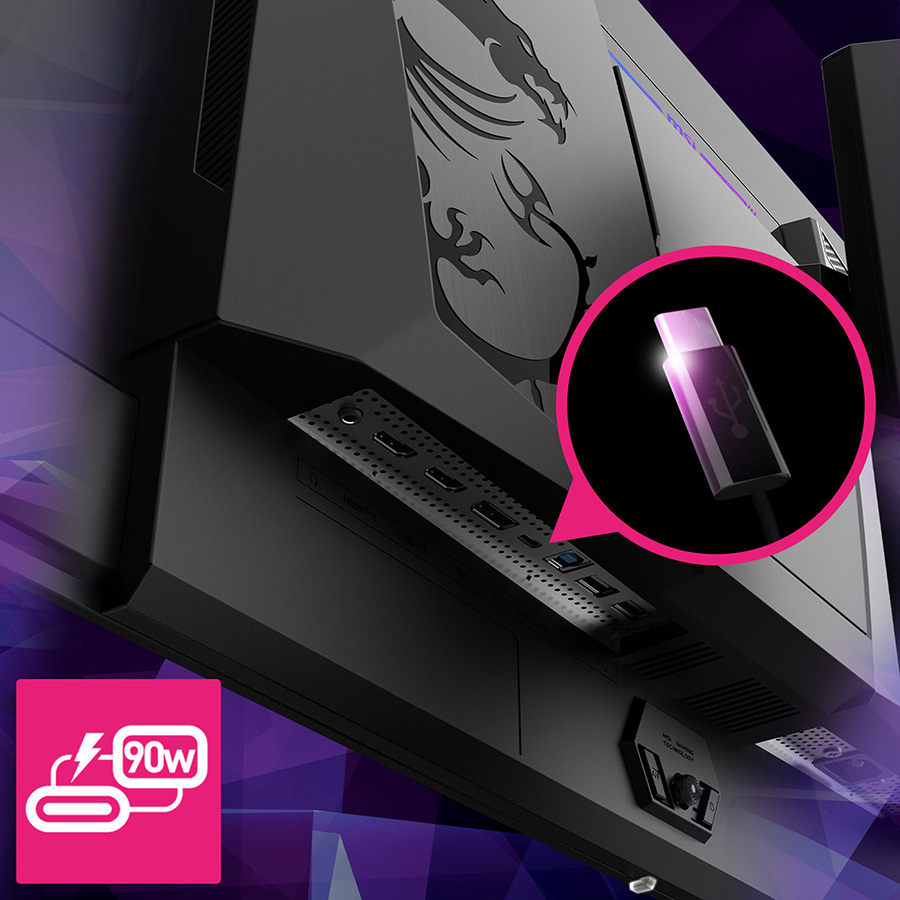
Connectivity includes two HDMI 2.1 inputs, one DisplayPort 1.4a input and USB-C with power delivery up to 90W. The KVM function is useful for switching control between compatible devices. Check the specific connection requirements of your PC, console and laptop before buying.
How does the MSI MPG 321URX QD-OLED perform for gaming?
The MSI MPG 321URX QD-OLED is designed for 4K gaming at up to 240Hz, provided your device and game can deliver the matching output. Fast motion, detailed environments and OLED contrast make the combination appealing for competitive and cinematic games alike.
The 0.03ms GtG response-time specification points to rapid pixel transitions, while per-pixel lighting gives dark scenes strong contrast. High resolution at a high refresh rate also places significant demands on a gaming PC, so check your graphics card and the game settings you plan to use.
Two HDMI 2.1 ports give console owners a way to connect compatible current-generation systems, while DisplayPort 1.4a serves desktop PCs. For a Black Friday purchase, confirm that the listing is for the full MSI MPG 321URX QD-OLED model and not a similarly named monitor.
Is the MSI MPG 321URX QD-OLED suitable for work and everyday use?
The MSI MPG 321URX QD-OLED can serve as a work-and-play display, with 31.5 inches of 4K workspace and USB-C power delivery up to 90W for a compatible laptop. One cable can carry video and provide power, depending on the laptop and setup.
KVM support helps people switch peripherals between compatible computers, reducing desk clutter. The high pixel count is useful for documents and creative applications, though text appearance on OLED panels is a personal preference; review display settings and owner feedback if your work involves long hours of small text.
OLED care deserves attention for office use because taskbars, menus and other fixed interface elements can stay in the same place for long sessions. Follow MSI’s current on-screen care prompts and product instructions. Skip it if you want to leave a static work screen displayed for extended periods without thinking about panel care.
What should shoppers know about reflections and OLED care?
The MSI MPG 321URX QD-OLED uses a glossy screen finish, so room lighting is an important part of the buying decision. A window or bright lamp behind the viewer can create visible reflections, especially in dark scenes.
A controlled-lighting setup helps the display’s deep contrast stand out. Before ordering, check where the monitor will sit and whether you can reposition a desk lamp or reduce direct light. Product photos rarely show how a screen will look in every home or office.
OLED panels also need sensible care around static imagery. Use the monitor’s built-in care features and follow MSI guidance rather than disabling protections for convenience. Warranty coverage and conditions vary by region and retailer, so read the terms attached to the exact MSI MPG 321URX QD-OLED listing.
Which connections and features matter most on the MSI MPG 321URX QD-OLED?
The MSI MPG 321URX QD-OLED offers two HDMI 2.1 ports, one DisplayPort 1.4a connection and USB-C power delivery up to 90W. Those inputs support a mixed setup with a PC, console and compatible laptop, although the best connection depends on each device’s output capabilities.
USB-C power delivery can reduce cable clutter for a compatible laptop, but the laptop still needs to support video over USB-C. The KVM feature can share connected peripherals between supported devices, a useful detail for people who use a gaming PC and a work computer at the same desk.
Check the included cable list before buying. A Black Friday bundle can add value when it includes accessories you need, but the MSI MPG 321URX QD-OLED’s core value rests on its panel, refresh rate and connections—not on extras that will stay unused.
What should you check before buying the MSI MPG 321URX QD-OLED on Black Friday?
The MSI MPG 321URX QD-OLED Black Friday deal is worth assessing by model number, retailer terms, bundle contents and stock—not by a headline alone. Confirm the product name matches the 31.5-inch 4K QD-OLED model with a 240Hz refresh rate.
Compare the listing across retailers and check whether the package includes the accessories your setup requires. Read the return window, shipping details and warranty conditions before checkout, especially for a large display that needs careful delivery and setup.
Keep an eye on availability for the exact finish or configuration shown in the listing. A clear product page and a retailer with straightforward support make it easier to resolve shipping damage or setup issues. For the MSI MPG 321URX QD-OLED, those practical details belong in the deal comparison alongside the monitor’s headline specifications.
Buying Guide
Verify the exact model
The MSI MPG 321URX QD-OLED should be identified by its full model name and 31.5-inch panel size in a Black Friday listing. Check the product details for 3840 x 2160 resolution and a 240Hz refresh rate so a similarly named monitor does not slip into your cart.
Compare the complete offer
The MSI MPG 321URX QD-OLED deal is more useful when its bundle includes an accessory you actually need. Compare included cables, delivery details and retailer support, then check stock for the exact configuration rather than relying on a banner or search result.
Read return and warranty terms
The MSI MPG 321URX QD-OLED deserves a careful check of the retailer’s return window and the applicable warranty before purchase. Look for the policy on display defects, shipping damage and OLED care coverage, since terms can vary by retailer and region.
Match the monitor to your setup
The MSI MPG 321URX QD-OLED needs a compatible device and connection to reach its 4K, 240Hz gaming potential. Confirm your PC, console or laptop supports the output you plan to use, and check that USB-C video and up to 90W charging match your laptop.
Alternatives to Consider
- ASUS ROG Swift OLED PG32UCDM: Pick the ASUS ROG Swift OLED PG32UCDM instead if its particular connectivity, software features or retailer bundle better match your gaming desk. Compare the exact specifications and warranty terms with the MSI MPG 321URX QD-OLED before choosing.
- Gigabyte AORUS FO32U2P: The Gigabyte AORUS FO32U2P is worth considering for shoppers prioritizing its port selection and gaming features. Choose it over the MSI MPG 321URX QD-OLED only after confirming the relevant inputs and included accessories meet your setup needs.
- Samsung Odyssey OLED G8 G80SD: Choose the Samsung Odyssey OLED G8 G80SD if its screen finish, design or smart features suit your room and routine better. Compare the exact size, refresh rate and connectivity against the MSI MPG 321URX QD-OLED listing.
FAQ
What is the MSI MPG 321URX QD-OLED refresh rate?
The MSI MPG 321URX QD-OLED has a maximum refresh rate of 240Hz, alongside a 3840 x 2160 resolution. Reaching that combination depends on the connected device, cable and game output. Check your graphics card or console specifications before expecting every title to run at 4K and 240Hz.
Does the MSI MPG 321URX QD-OLED support HDMI 2.1?
The MSI MPG 321URX QD-OLED includes two HDMI 2.1 inputs, plus one DisplayPort 1.4a input. HDMI 2.1 is useful for compatible gaming consoles and PCs, but output features depend on the connected device. Confirm the source and cable support the resolution and refresh rate you want.
Does the MSI MPG 321URX QD-OLED have USB-C charging?
The MSI MPG 321URX QD-OLED has USB-C with power delivery up to 90W. A compatible laptop can use the connection for charging and video, subject to that laptop’s USB-C capabilities. Confirm your device supports video output over USB-C and check the included cable details before purchase.
Is the MSI MPG 321URX QD-OLED a good monitor for PS5 or Xbox?
The MSI MPG 321URX QD-OLED suits compatible consoles through its two HDMI 2.1 inputs and 4K QD-OLED panel. Console output depends on the specific game and system settings, so the monitor’s 240Hz maximum does not mean every console title runs at that rate. Check console compatibility for the modes you use.
Does the MSI MPG 321URX QD-OLED have burn-in protection?
The MSI MPG 321URX QD-OLED includes OLED care features, but users should still follow the on-screen prompts and MSI’s current care instructions. Avoid leaving fixed images displayed for extended periods when practical. Read the warranty terms for your region to understand the coverage that applies.
What should I look for in an MSI MPG 321URX QD-OLED Black Friday deal?
For the MSI MPG 321URX QD-OLED, verify the exact model, 31.5-inch size, 4K resolution and 240Hz rate. Then compare retailer support, stock, return terms, warranty details and useful bundle contents. A clearly identified listing helps avoid buying a different monitor with a similar name.