

As an Amazon Associate we earn from qualifying purchases.
- Best overall: Logitech Brio 4K Webcam
- Best budget: Logitech Brio 300 Full HD Webcam
- Best premium: Razer Kiyo Pro Ultra 4K Streaming Webcam
- Best for compact lighting: Logitech Litra Glow Premium Streaming Light
- The Logitech Brio 4K Webcam is the strongest pick for shoppers who prioritize 4K video and a webcam-first setup.
- The Neewer 18-inch Ring Light Kit with Tripod Stand adds broad, adjustable light to a desk or creator setup.
- The Logitech Litra Glow Premium Streaming Light is a compact option for improving face lighting beside an existing webcam.
- The Logitech Brio 500 Full HD Webcam balances 1080p video with automatic framing and a privacy shutter.
- Choose a ring light to control your lighting; choose a Logitech Brio webcam to improve your camera feed.
The Logitech Brio 4K Webcam is the best choice for sharper webcam video, while a ring light is the better buy for brighter, more even face lighting. For Black Friday 2026, the right pick depends on whether your calls or streams need a better camera, better light, or both. A webcam captures your image; a ring light illuminates it.
I researched and compared specs, reviews and owner feedback across webcams and lighting, focusing on image quality, setup, desk space and useful features. The guide includes Logitech Brio models, competing webcams and standalone lights, so you can choose gear that suits your work calls, streaming sessions or video creation without paying for features you do not need.
How We Picked
- Video and lighting performance: We compared published resolution, frame-rate and light-output details to clarify what each product improves.
- Everyday usefulness: We considered privacy shutters, autofocus, automatic framing, adjustable brightness and color settings.
- Setup and space: We looked at whether a product sits on a monitor, attaches to a desk or needs a stand and dedicated room.
- Shopper feedback: We reviewed owner feedback for recurring comments about ease of use, image quality and setup experience.
- Category fit: We included webcams and lights separately so readers can compare a camera upgrade with a lighting upgrade on equal terms.
Comparison Table
| Product | Best for | Maximum video resolution | Maximum frame rate | Lighting feature |
|---|---|---|---|---|
| Logitech Brio 4K Webcam | 4K calls | 4K | 30 fps at 4K | Automatic light correction |
| Logitech Brio 500 Full HD Webcam | Work calls | 1080p | 30 fps | Automatic framing |
| Logitech Brio 300 Full HD Webcam | Everyday calls | 1080p | 30 fps | Automatic light correction |
| Razer Kiyo Pro Ultra 4K Streaming Webcam | Creator video | 4K | 30 fps at 4K | 1/1.2-inch sensor |
| Elgato Facecam MK.2 Full HD Webcam | Smooth streaming | 1080p | 60 fps | No built-in light |
| Logitech Litra Glow Premium Streaming Light | Compact face lighting | Not applicable | Not applicable | 2700K–6500K LED panel |
| Neewer 18-inch Ring Light Kit with Tripod Stand | Broad studio lighting | Not applicable | Not applicable | 18-inch ring; 3 color modes |
Best Picks Reviewed
#1 · Top pick
Logitech Brio 4K Webcam
The Logitech Brio 4K Webcam is the best webcam for detail-focused video calls and creators who want a 4K image. The Logitech Brio 4K Webcam's 4K resolution at 30 frames per second gives it a clear image-quality advantage over Full HD picks.

Best for: 4K calls and high-detail streaming
- Maximum resolution
- 4K
- 4K frame rate
- 30 fps
- Digital zoom
- 5x
- Video connection
- USB
- Captures 4K video at 30 fps
- Offers up to 5x digital zoom
- Includes automatic light correction
- Needs good lighting to make the most of its high resolution
- Costs more than basic Full HD webcams
Is the Logitech Brio 4K Webcam worth buying on Black Friday 2026?
Yes. The Logitech Brio 4K Webcam is a strong Black Friday 2026 pick for shoppers who want detailed video, with 4K capture at 30 fps and 5x digital zoom for flexible framing.
See today’s Black Friday price on Amazon
#2
Logitech Brio 500 Full HD Webcam
The Logitech Brio 500 Full HD Webcam is the best webcam for work calls that benefit from automatic framing and simple privacy controls. The Logitech Brio 500 Full HD Webcam's 1080p video at 30 frames per second covers everyday meetings without requiring a 4K workflow.
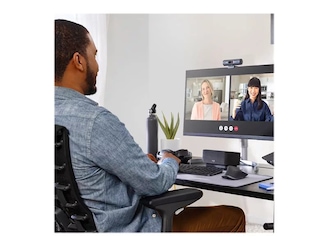
Best for: Work calls and flexible framing
- Maximum resolution
- 1080p
- Maximum frame rate
- 30 fps
- Field of view
- 90 degrees
- Privacy
- Integrated shutter
- Automatic framing helps keep the speaker in view
- Built-in privacy shutter
- Full HD resolution suits everyday meetings
- Does not record in 4K
- A standalone light is still useful in dim rooms
Is the Logitech Brio 500 Full HD Webcam worth buying on Black Friday 2026?
Yes. The Logitech Brio 500 Full HD Webcam is a practical choice for video calls, combining 1080p at 30 fps, a 90-degree field of view and an integrated privacy shutter.
See today’s Black Friday price on Amazon
#3
Logitech Brio 300 Full HD Webcam
The Logitech Brio 300 Full HD Webcam is the best webcam for shoppers who want a straightforward Full HD upgrade for a laptop or desktop. The Logitech Brio 300 Full HD Webcam's 1080p video at 30 frames per second supports clear everyday calls in a compact setup.
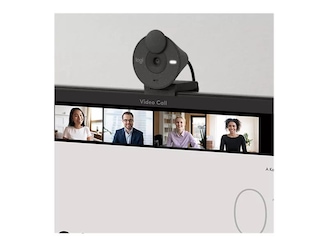
Best for: Simple everyday video calls
- Maximum resolution
- 1080p
- Maximum frame rate
- 30 fps
- Field of view
- 70 degrees
- Privacy
- Integrated shutter
- Compact design suits smaller desks
- Integrated privacy shutter
- Automatic light correction supports varied rooms
- No 4K recording
- Narrower field of view than the Brio 500
Is the Logitech Brio 300 Full HD Webcam worth buying on Black Friday 2026?
Yes. The Logitech Brio 300 Full HD Webcam suits everyday meetings with 1080p video at 30 fps, an integrated privacy shutter and a 70-degree field of view for a focused image.
See today’s Black Friday price on Amazon
#4
Razer Kiyo Pro Ultra 4K Streaming Webcam
The Razer Kiyo Pro Ultra 4K Streaming Webcam is the best webcam for streamers who want a large sensor and 4K capture. The Razer Kiyo Pro Ultra 4K Streaming Webcam's 1/1.2-inch sensor is designed to gather more light than a typical small webcam sensor.
Best for: High-detail creator video
- Maximum resolution
- 4K
- 4K frame rate
- 30 fps
- Sensor size
- 1/1.2 inch
- Lens aperture
- f/1.7
- Large sensor supports detailed image capture
- Records 4K video at 30 fps
- Wide aperture is designed for low-light scenes
- Requires more desk and setup attention than a basic webcam
- A separate light still offers more control over face illumination
Is the Razer Kiyo Pro Ultra 4K Streaming Webcam worth buying on Black Friday 2026?
Yes. The Razer Kiyo Pro Ultra 4K Streaming Webcam is a premium creator option, pairing 4K capture at 30 fps with a 1/1.2-inch sensor and f/1.7 lens aperture.
See today’s Black Friday price on Amazon
#5
Elgato Facecam MK.2 Full HD Webcam
The Elgato Facecam MK.2 Full HD Webcam is the best webcam for creators who prioritize smooth Full HD video and manual control. The Elgato Facecam MK.2 Full HD Webcam's 1080p capture at 60 frames per second supports fluid motion in streams and recorded clips.
Best for: Smooth 1080p streaming
- Maximum resolution
- 1080p
- Maximum frame rate
- 60 fps
- Field of view
- 82 degrees
- Connection
- USB
- Full HD capture reaches 60 fps
- 82-degree field of view fits desk setups
- Designed for creator-focused camera controls
- Does not capture 4K video
- No built-in ring light
Is the Elgato Facecam MK.2 Full HD Webcam worth buying on Black Friday 2026?
Yes. The Elgato Facecam MK.2 Full HD Webcam is a capable streaming camera for shoppers who value smooth motion, with 1080p resolution at 60 fps and an 82-degree field of view.
See today’s Black Friday price on Amazon
#6
Logitech Litra Glow Premium Streaming Light
The Logitech Litra Glow Premium Streaming Light is the best compact light for webcam users who want softer, adjustable face illumination. The Logitech Litra Glow Premium Streaming Light's color temperature range of 2700K to 6500K lets users tune the look from warm to cool.
Best for: Compact desk lighting
- Color temperature
- 2700K–6500K
- Light output
- Up to 250 lumens
- Light source
- LED panel
- Mounting
- Monitor mount
- Adjustable warmth and brightness
- Monitor mount keeps the desk clear
- Pairs with an existing webcam
- Does not capture video
- Smaller panel than a full-size ring light
Is the Logitech Litra Glow Premium Streaming Light worth buying on Black Friday 2026?
Yes. The Logitech Litra Glow Premium Streaming Light is a convenient add-on for webcam owners, offering up to 250 lumens and adjustable color temperature from 2700K to 6500K.
See today’s Black Friday price on Amazon
#7
Neewer 18-inch Ring Light Kit with Tripod Stand
The Neewer 18-inch Ring Light Kit with Tripod Stand is the best ring light for creators who want a large light source and flexible positioning. The Neewer 18-inch Ring Light Kit with Tripod Stand's 18-inch ring provides a broad lighting surface for desk video, makeup tutorials and home studios.
Best for: Large-area creator lighting
- Ring diameter
- 18 inches
- Color modes
- 3
- Brightness levels
- 10
- Included support
- Tripod stand
- Large ring spreads light across the face
- Multiple color modes and brightness levels
- Stand supports flexible placement
- Needs more floor and storage space than a monitor light
- Does not include a webcam
Is the Neewer 18-inch Ring Light Kit with Tripod Stand worth buying on Black Friday 2026?
Yes. The Neewer 18-inch Ring Light Kit with Tripod Stand is a useful lighting upgrade for creators, with a broad 18-inch ring, 3 color modes and 10 brightness levels.
See today’s Black Friday price on Amazon
Is a ring light or Logitech Brio webcam better for video calls?
A Logitech Brio webcam improves the camera feed, while a ring light improves illumination; shoppers who need both should pair a webcam with a light. The Logitech Brio 4K Webcam is a strong camera-first pick because it records up to 4K at 30 fps, while the Logitech Litra Glow Premium Streaming Light adds adjustable light without replacing a webcam.
Start by checking the problem you see on calls. A soft, grainy image often points to poor room lighting, so a light can make a visible difference without replacing a working camera. A low-resolution or poorly framed image points toward a webcam upgrade. A ring light alone cannot add pixels, autofocus or camera framing, and a Brio webcam alone does not control where room light falls.
Which product is best for low-light rooms?
The Logitech Litra Glow Premium Streaming Light and Neewer 18-inch Ring Light Kit with Tripod Stand add dedicated illumination, while the Razer Kiyo Pro Ultra 4K Streaming Webcam pairs a large 1/1.2-inch sensor with a wide f/1.7 aperture. For a dark office, adding a light offers direct control over the amount and direction of illumination.
The Logitech Litra Glow Premium Streaming Light fits a monitor setup and offers a 2700K–6500K color-temperature range. The Neewer 18-inch Ring Light Kit with Tripod Stand suits creators who have room for a separate stand and want a broader light source. Webcam features help, but a dedicated light gives more control over the room’s look.
Which Logitech Brio webcam should you choose?
The Logitech Brio 4K Webcam suits shoppers who want 4K capture, the Logitech Brio 500 Full HD Webcam suits flexible work calls, and the Logitech Brio 300 Full HD Webcam suits simple everyday meetings. The clearest difference is resolution: the Brio 4K captures 4K video, while both Full HD models capture 1080p.
Choose the Brio 500 when automatic framing and a 90-degree field of view are useful for presentations or shared calls. Choose the Brio 300 for a straightforward 70-degree view and an integrated privacy shutter. Choose the Brio 4K when fine detail matters and your computer and meeting software support the resolution you want to use.
Do you need a webcam and a separate light?
A webcam and a separate light solve different problems, so a Logitech Brio webcam paired with the Logitech Litra Glow Premium Streaming Light is a flexible two-part setup. The Brio captures the picture; the Litra Glow adds up to 250 lumens and adjustable color temperature for face lighting.
A separate light is useful when your room has a bright window behind you, uneven overhead lighting or a dim desk. The Neewer 18-inch Ring Light Kit with Tripod Stand is a larger option for creators who want more placement flexibility. Shoppers with balanced room lighting and a webcam they already like can start with the camera upgrade instead.
What should you prioritize for streaming?
Streamers should prioritize frame rate, image detail and lighting control; the Elgato Facecam MK.2 Full HD Webcam records 1080p at 60 fps, while the Logitech Brio 4K Webcam records 4K at 30 fps. Smooth motion and fine detail serve different needs, so match the camera to the content and streaming workflow.
For a creator who moves on camera, 60 fps is a useful distinction. For a static talking-head shot, 4K detail can be the more appealing upgrade. Lighting also shapes the final image: the Logitech Litra Glow Premium Streaming Light saves desk space, while the Neewer 18-inch Ring Light Kit with Tripod Stand offers a larger ring and adjustable output.
Buying Guide
Decide whether the camera or the light needs an upgrade
A Logitech Brio webcam improves capture resolution and framing; a ring light changes the illumination on your face. Identify which issue bothers you most before choosing. If a current webcam looks dim, begin with lighting; if the image lacks detail, prioritize a camera.
Match resolution and frame rate to your use
The Logitech Brio 4K Webcam records 4K at 30 fps, while the Elgato Facecam MK.2 Full HD Webcam records 1080p at 60 fps. Choose detail for static calls or smoother motion for active streaming, and confirm the computer supports the selected format.
Check available desk and floor space
The Logitech Litra Glow Premium Streaming Light attaches to a monitor, while the Neewer 18-inch Ring Light Kit with Tripod Stand occupies more space. Measure the setup area and consider storage before choosing a stand-mounted light.
Look for practical controls
A privacy shutter, automatic framing, adjustable brightness and color temperature all affect everyday convenience. The Logitech Brio 500 Full HD Webcam includes an integrated shutter and automatic framing; the Logitech Litra Glow Premium Streaming Light provides adjustable color temperature.
Plan for your full setup
A webcam does not replace room lighting, and a light does not capture video. Combine a Logitech Brio webcam with a compact light for a simple call setup, or add a larger ring light when a creator workspace needs broader illumination.
FAQ
Is a ring light better than the Logitech Brio 4K Webcam?
A ring light is better for adding illumination, while the Logitech Brio 4K Webcam is better for capturing a detailed 4K image at 30 fps. The right choice depends on whether the main problem is a dim room or limited camera detail.
Does the Logitech Brio 4K Webcam have a built-in ring light?
No. The Logitech Brio 4K Webcam is a webcam, not a light, and it does not include a built-in ring light. Pair the camera with a Logitech Litra Glow Premium Streaming Light or another standalone light for added face illumination.
Can a ring light improve webcam picture quality?
Yes. A ring light adds illumination to the subject, which can improve how a webcam image looks in a dim or unevenly lit room. A ring light does not change the camera’s resolution, so pair it with a suitable webcam for sharper capture.
Which is better for streaming, the Logitech Brio 4K Webcam or Elgato Facecam MK.2 Full HD Webcam?
The Logitech Brio 4K Webcam is the stronger choice for 4K detail at 30 fps. The Elgato Facecam MK.2 Full HD Webcam is the better fit for 1080p streaming at 60 fps. Choose detail or smoother motion based on the content.
Is the Logitech Litra Glow Premium Streaming Light a replacement for a webcam?
No. The Logitech Litra Glow Premium Streaming Light provides illumination and does not capture video. Pair the light with a webcam such as the Logitech Brio 300 Full HD Webcam to improve both face lighting and camera capture.
What is the best ring light for a desk setup?
The Logitech Litra Glow Premium Streaming Light is a strong desk choice because its monitor mount saves space and its color temperature spans 2700K to 6500K. Choose the Neewer 18-inch Ring Light Kit with Tripod Stand for a larger standalone light.