

As an Amazon Associate we earn from qualifying purchases.
- Best overall: LG UltraGear OLED 32GS95UE-B 32-Inch Dual-Mode Gaming Monitor
- Best budget: LG UltraGear OLED 27GS95QE-B 27-Inch QHD Gaming Monitor
- Best premium: LG UltraGear OLED 32GS95UE-B 32-Inch Dual-Mode Gaming Monitor
- Best for creative work: Samsung ViewFinity S9 27-Inch 5K Smart Monitor (S90PC)
- Samsung ViewFinity S9 27-Inch 5K Smart Monitor (S90PC) is the work-first pick, with a 5K panel and Thunderbolt 4.
- LG UltraGear OLED 32GS95UE-B 32-Inch Dual-Mode Gaming Monitor pairs 4K at 240Hz with Full HD at 480Hz.
- LG UltraGear OLED 27GS95QE-B 27-Inch QHD Gaming Monitor is a focused choice for high-refresh PC gaming.
- Samsung Odyssey OLED G8 32-Inch 4K UHD Gaming Monitor (G80SD) combines 4K resolution and a 240Hz QD-OLED panel.
- Match screen size, resolution, refresh rate and desk space before choosing a Black Friday 2026 monitor.
Samsung ViewFinity S9 versus LG UltraGear OLED is a choice between a sharp, work-focused 5K display and gaming monitors built for fast refresh rates. For Black Friday 2026, we researched and compared specs, reviews and owner feedback across seven Samsung and LG options. The right pick depends on whether your desk is for design work, competitive play, cinematic single-player games or a mix.
Here's the bottom line: Samsung ViewFinity S9 27-Inch 5K Smart Monitor (S90PC) leads for detailed productivity, while LG UltraGear OLED 32GS95UE-B 32-Inch Dual-Mode Gaming Monitor is a versatile gaming centerpiece. The guide also covers QHD OLED and curved ultrawide choices, plus Samsung Odyssey OLED G8 32-Inch 4K UHD Gaming Monitor (G80SD) as another 4K, high-refresh option. Compare the actual specifications and your setup before deciding.
How We Picked
- Compared resolution, panel type and refresh rate to separate creative-work monitors from gaming-first displays.
- Checked the published features that matter at a desk, including connection options, screen curvature and dual-mode display support.
- Reviewed owner feedback and recurring themes around intended use, setup and everyday display experience.
- Included seven models across 27-inch, 32-inch and ultrawide formats for different desk sizes and gaming styles.
- Prioritized clear use cases over promotional language; Black Friday 2026 shoppers should select a monitor based on fit and specifications.
Comparison Table
| Product | Best for | Resolution | Refresh rate | Panel |
|---|---|---|---|---|
| Samsung ViewFinity S9 27-Inch 5K Smart Monitor (S90PC) | 5K creative work | 5120 x 2880 | 60Hz | IPS |
| LG UltraGear OLED 32GS95UE-B 32-Inch Dual-Mode Gaming Monitor | Dual-mode gaming | 3840 x 2160 | 240Hz / 480Hz | OLED |
| LG UltraGear OLED 27GS95QE-B 27-Inch QHD Gaming Monitor | Compact QHD gaming | 2560 x 1440 | 240Hz | OLED |
| LG UltraGear OLED 34GS95QE-B 34-Inch Curved WQHD Gaming Monitor | Curved ultrawide gaming | 3440 x 1440 | 240Hz | OLED |
| LG UltraGear OLED 39GS95QE-B 39-Inch Curved WQHD Gaming Monitor | Large ultrawide gaming | 3440 x 1440 | 240Hz | OLED |
| LG UltraGear OLED 45GS95QE-B 45-Inch Curved WQHD Gaming Monitor | Extra-large gaming | 3440 x 1440 | 240Hz | OLED |
| Samsung Odyssey OLED G8 32-Inch 4K UHD Gaming Monitor (G80SD) | 4K QD-OLED gaming | 3840 x 2160 | 240Hz | QD-OLED |
Samsung ViewFinity S9 vs LG UltraGear OLED Black Friday Deals 2026
#1
Samsung ViewFinity S9 27-Inch 5K Smart Monitor (S90PC)
The Samsung ViewFinity S9 27-Inch 5K Smart Monitor (S90PC) is the best 5K productivity monitor for creators who value workspace detail, with a 5120 x 2880 resolution and Thunderbolt 4 connectivity.
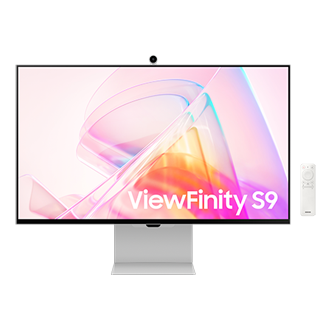
Best for: 5K creative work and sharp text
- Screen size
- 27 inches
- Resolution
- 5120 x 2880
- Refresh rate
- 60Hz
- Connection
- Thunderbolt 4
- High pixel density suits detailed layouts and text.
- Thunderbolt 4 supports a tidy compatible workstation.
- Smart monitor features add standalone entertainment options.
- The 60Hz refresh rate is less suited to competitive gaming.
- A 27-inch screen is smaller than the ultrawide options here.
Is the Samsung ViewFinity S9 27-Inch 5K Smart Monitor (S90PC) worth buying on Black Friday 2026?
Yes. The Samsung ViewFinity S9 27-Inch 5K Smart Monitor (S90PC) is a strong Black Friday 2026 pick for design work, sharp text and a clean desk setup. The Samsung ViewFinity S9 27-Inch 5K Smart Monitor (S90PC)'s 5K resolution prioritizes detail over high-refresh gaming.
See today’s Black Friday price on Amazon
#2 · Top pick
LG UltraGear OLED 32GS95UE-B 32-Inch Dual-Mode Gaming Monitor
The LG UltraGear OLED 32GS95UE-B 32-Inch Dual-Mode Gaming Monitor is the best premium all-round gaming monitor for players who switch genres, with 4K at 240Hz and Full HD at 480Hz.

Best for: Premium gaming across genres
- Screen size
- 32 inches
- Resolution
- 3840 x 2160
- Refresh rate
- 240Hz at 4K; 480Hz at Full HD
- Panel
- OLED
- Dual mode serves detailed games and high-speed play.
- OLED contrast suits dark, cinematic scenes.
- 32-inch size offers room for immersive gaming.
- The top refresh modes call for a capable gaming PC.
- A 32-inch screen needs more desk space than a 27-inch monitor.
Is the LG UltraGear OLED 32GS95UE-B 32-Inch Dual-Mode Gaming Monitor worth buying on Black Friday 2026?
Yes. The LG UltraGear OLED 32GS95UE-B 32-Inch Dual-Mode Gaming Monitor is a compelling pick for gamers who want both 4K detail and a high-refresh competitive mode. The LG UltraGear OLED 32GS95UE-B 32-Inch Dual-Mode Gaming Monitor's 240Hz and 480Hz modes make it more flexible than a single-mode display.
See today’s Black Friday price on Amazon
#3
LG UltraGear OLED 27GS95QE-B 27-Inch QHD Gaming Monitor
The LG UltraGear OLED 27GS95QE-B 27-Inch QHD Gaming Monitor is the best compact OLED gaming pick for players who want a high refresh rate without a 32-inch footprint, with QHD resolution at 240Hz.
Best for: QHD PC gaming at a desk
- Screen size
- 27 inches
- Resolution
- 2560 x 1440
- Refresh rate
- 240Hz
- Response time
- 0.03ms
- QHD resolution is a practical match for many gaming PCs.
- 240Hz refresh rate supports fast-paced play.
- Compact screen size fits more desks.
- QHD has less workspace detail than a 4K display.
- The 27-inch format is less immersive than the larger models.
Is the LG UltraGear OLED 27GS95QE-B 27-Inch QHD Gaming Monitor worth buying on Black Friday 2026?
Yes. The LG UltraGear OLED 27GS95QE-B 27-Inch QHD Gaming Monitor is worth considering for players who want OLED contrast and 240Hz gaming in a desk-friendly size. QHD resolution also keeps the graphics load below 4K.
See today’s Black Friday price on Amazon
#4
LG UltraGear OLED 34GS95QE-B 34-Inch Curved WQHD Gaming Monitor
The LG UltraGear OLED 34GS95QE-B 34-Inch Curved WQHD Gaming Monitor is the best curved ultrawide for immersive PC gaming, with a 3440 x 1440 resolution and 240Hz refresh rate.
Best for: Curved ultrawide gaming
- Screen size
- 34 inches
- Resolution
- 3440 x 1440
- Refresh rate
- 240Hz
- Curvature
- 800R
- Ultrawide aspect ratio expands the game view.
- OLED panel supports rich contrast.
- 240Hz refresh rate suits fast PC play.
- The curved ultrawide format is not ideal for every desk.
- Console games do not always use the full screen width.
Is the LG UltraGear OLED 34GS95QE-B 34-Inch Curved WQHD Gaming Monitor worth buying on Black Friday 2026?
Yes. The LG UltraGear OLED 34GS95QE-B 34-Inch Curved WQHD Gaming Monitor is a strong fit for PC players who want an expansive curved display. The LG UltraGear OLED 34GS95QE-B 34-Inch Curved WQHD Gaming Monitor's 34-inch ultrawide panel and 240Hz refresh rate balance immersion with quick motion.
See today’s Black Friday price on Amazon
#5
LG UltraGear OLED 39GS95QE-B 39-Inch Curved WQHD Gaming Monitor
The LG UltraGear OLED 39GS95QE-B 39-Inch Curved WQHD Gaming Monitor is the best larger ultrawide for immersive single-player gaming, with a 39-inch screen, 3440 x 1440 resolution and 240Hz refresh rate.
Best for: Large-format ultrawide play
- Screen size
- 39 inches
- Resolution
- 3440 x 1440
- Refresh rate
- 240Hz
- Curvature
- 800R
- Large screen boosts immersion from a desk.
- OLED panel delivers strong contrast for dark scenes.
- 240Hz refresh rate is ready for high-frame-rate play.
- The wide screen needs substantial desk space.
- QHD resolution is less dense than 4K at this size.
Is the LG UltraGear OLED 39GS95QE-B 39-Inch Curved WQHD Gaming Monitor worth buying on Black Friday 2026?
Yes. The LG UltraGear OLED 39GS95QE-B 39-Inch Curved WQHD Gaming Monitor suits players who prioritize a big, curved view over a compact setup. The 240Hz refresh rate adds speed, while the ultrawide format favors compatible PC games.
See today’s Black Friday price on Amazon
#6
LG UltraGear OLED 45GS95QE-B 45-Inch Curved WQHD Gaming Monitor
The LG UltraGear OLED 45GS95QE-B 45-Inch Curved WQHD Gaming Monitor is the best extreme-size pick for players who want a wraparound-style view, with a 45-inch screen and 240Hz refresh rate.
Best for: Big-screen immersive gaming
- Screen size
- 45 inches
- Resolution
- 3440 x 1440
- Refresh rate
- 240Hz
- Curvature
- 800R
- Huge curved screen creates an immersive view.
- 240Hz refresh rate supports fast gaming.
- OLED contrast adds depth to dark scenes.
- The large footprint demands careful desk planning.
- 3440 x 1440 resolution is less dense than 4K.
Is the LG UltraGear OLED 45GS95QE-B 45-Inch Curved WQHD Gaming Monitor worth buying on Black Friday 2026?
Yes. The LG UltraGear OLED 45GS95QE-B 45-Inch Curved WQHD Gaming Monitor is a bold choice for players seeking a very large curved gaming display. Choose it for immersion and high refresh rather than a compact setup or 4K pixel density.
See today’s Black Friday price on Amazon
#7
Samsung Odyssey OLED G8 32-Inch 4K UHD Gaming Monitor (G80SD)
The Samsung Odyssey OLED G8 32-Inch 4K UHD Gaming Monitor (G80SD) is the best Samsung gaming alternative for players who want QD-OLED contrast and a high-resolution screen, with 4K at 240Hz.
Best for: 4K QD-OLED gaming
- Screen size
- 32 inches
- Resolution
- 3840 x 2160
- Refresh rate
- 240Hz
- Panel
- QD-OLED
- 4K resolution offers detailed game visuals.
- QD-OLED panel combines deep contrast and vivid color.
- 240Hz refresh rate suits high-performance gaming.
- A 4K gaming setup needs strong graphics hardware.
- The 32-inch panel takes more desk room than a 27-inch model.
Is the Samsung Odyssey OLED G8 32-Inch 4K UHD Gaming Monitor (G80SD) worth buying on Black Friday 2026?
Yes. The Samsung Odyssey OLED G8 32-Inch 4K UHD Gaming Monitor (G80SD) is a strong Black Friday 2026 choice for gamers who want 4K detail, QD-OLED contrast and 240Hz motion. Check that your PC or console setup supports your preferred resolution and refresh rate.
See today’s Black Friday price on Amazon
Which is better, Samsung ViewFinity S9 or LG UltraGear OLED?
Samsung ViewFinity S9 27-Inch 5K Smart Monitor (S90PC) is better for detailed productivity, while LG UltraGear OLED 32GS95UE-B 32-Inch Dual-Mode Gaming Monitor is better for high-refresh gaming.
The Samsung ViewFinity S9 gives you a 27-inch 5K workspace and Thunderbolt 4 connection. The 60Hz panel is designed for clarity and everyday work, not competitive frame rates. Creators, editors and people who spend the day reading fine text should put resolution and desktop space first.
The LG UltraGear OLED 32GS95UE-B brings a different advantage: 4K at 240Hz, with a Full HD 480Hz mode for fast play. OLED contrast also favors cinematic games. Worth it for most players who want one display for varied genres, provided their system and desk are ready for it.
Is the Samsung ViewFinity S9 good for gaming?
Samsung ViewFinity S9 27-Inch 5K Smart Monitor (S90PC) is best for casual gaming at 60Hz, rather than competitive play that benefits from 240Hz or higher.
The 5K resolution keeps game artwork and text detailed, and the smart monitor features support entertainment without a dedicated PC connection. The 60Hz refresh rate sets the limit for fast motion, so esports players should compare it with the LG UltraGear OLED models instead.
For a mixed-use home office, the Samsung ViewFinity S9 still makes sense when work takes priority and games are occasional. For a gaming-first setup, pick an LG UltraGear OLED with a refresh rate that fits your PC, console and favorite genres.
Which LG UltraGear OLED size should you choose?
LG UltraGear OLED 27GS95QE-B 27-Inch QHD Gaming Monitor suits compact desks, while LG UltraGear OLED 45GS95QE-B 45-Inch Curved WQHD Gaming Monitor suits players who have room for a large curved screen.
A 27-inch QHD screen is the practical choice for a closer viewing distance and a more manageable desk footprint. The 34-inch and 39-inch models stretch the view into ultrawide territory, making them appealing for PC games that support wider aspect ratios.
The 45-inch model gives the biggest presentation, but needs careful desk and viewing-distance planning. Compare the width of your desk, the distance from your chair and your graphics hardware before settling on an ultrawide. All four LG options listed here offer 240Hz.
Is a 4K OLED gaming monitor worth choosing for Black Friday 2026?
LG UltraGear OLED 32GS95UE-B 32-Inch Dual-Mode Gaming Monitor and Samsung Odyssey OLED G8 32-Inch 4K UHD Gaming Monitor (G80SD) are 4K OLED picks with 240Hz refresh rates.
A 4K panel puts more detail on screen than QHD, while OLED gives dark scenes strong contrast. Both benefits suit immersive games and sharp visuals. High-resolution gaming also places a greater demand on a PC graphics card, so confirm that your system can drive the resolution and frame rates you want.
The LG adds a Full HD 480Hz mode for players who shift into competitive play. The Samsung Odyssey OLED G8 gives you a 4K QD-OLED option from Samsung. Choose based on the mode, screen technology and setup features that match your routine.
What should you compare before buying a monitor on Black Friday?
Black Friday 2026 monitor shoppers should compare resolution, refresh rate, screen size and connections before choosing a product.
Start with the job: 5K suits detailed work, QHD can balance gaming performance with sharpness, and 4K prioritizes fine detail. Then match refresh rate to your games and the frame rates your hardware delivers. A 240Hz display only helps when your connected system can output a suitable signal.
Finally, measure desk space and check connection requirements. Thunderbolt 4 makes the Samsung ViewFinity S9 attractive for compatible workstations, while the LG UltraGear OLED screens prioritize gaming. The best buy is the display whose strengths fit your use, not simply the biggest model.
Buying Guide
Choose a resolution for your main task
Samsung ViewFinity S9 27-Inch 5K Smart Monitor (S90PC) offers 5120 x 2880 for detailed work. LG UltraGear OLED QHD models use 2560 x 1440, and the 32-inch gaming options reach 3840 x 2160. Pick the resolution your work and hardware can use.
Match refresh rate to your games
LG UltraGear OLED 27GS95QE-B 27-Inch QHD Gaming Monitor runs at 240Hz, while Samsung ViewFinity S9 is a 60Hz monitor. Fast multiplayer players should focus on refresh rate and system frame output; office and creative users should weigh clarity and connections.
Measure your setup before choosing screen size
LG UltraGear OLED 45GS95QE-B 45-Inch Curved WQHD Gaming Monitor demands more room than a 27-inch screen. Measure available desk width and viewing distance before committing to an ultrawide. A smaller monitor can be the smarter fit for close seating.
Compare OLED and work-first features
LG UltraGear OLED models put gaming motion and OLED contrast first. Samsung ViewFinity S9 puts 5K detail and Thunderbolt 4 connectivity first. Samsung Odyssey OLED G8 32-Inch 4K UHD Gaming Monitor (G80SD) is the Samsung option here for high-refresh QD-OLED gaming.
Check compatibility before checkout
LG UltraGear OLED 32GS95UE-B 32-Inch Dual-Mode Gaming Monitor offers 4K at 240Hz and Full HD at 480Hz. Confirm your PC, console, cable and chosen connection support your target mode. Check desk mounting, audio needs and inputs too.
FAQ
Samsung ViewFinity S9 vs LG UltraGear OLED: which is better for gaming?
LG UltraGear OLED 32GS95UE-B 32-Inch Dual-Mode Gaming Monitor is better for high-refresh gaming, with 4K at 240Hz and Full HD at 480Hz. Samsung ViewFinity S9 27-Inch 5K Smart Monitor (S90PC) is the work-first choice, with 5K detail and a 60Hz refresh rate.
Is the Samsung ViewFinity S9 a 5K monitor?
Yes. Samsung ViewFinity S9 27-Inch 5K Smart Monitor (S90PC) has a 27-inch display with 5120 x 2880 resolution and a 60Hz refresh rate. The high pixel count makes the model especially suited to detailed productivity and creative workflows.
Which LG UltraGear OLED monitor has dual mode?
LG UltraGear OLED 32GS95UE-B 32-Inch Dual-Mode Gaming Monitor has dual mode. The display supports 3840 x 2160 at 240Hz and Full HD at 480Hz, giving players a choice between higher detail and a faster refresh setting.
Is the LG UltraGear OLED 27GS95QE-B good for PC gaming?
Yes. LG UltraGear OLED 27GS95QE-B 27-Inch QHD Gaming Monitor combines a 2560 x 1440 resolution with a 240Hz refresh rate. The 27-inch size is desk-friendly, and QHD is a practical resolution for many gaming PC setups.
Which Samsung monitor is best for 4K OLED gaming?
Samsung Odyssey OLED G8 32-Inch 4K UHD Gaming Monitor (G80SD) is the Samsung 4K gaming choice in this guide. Its 32-inch QD-OLED panel combines 3840 x 2160 resolution with a 240Hz refresh rate for detailed, fast-paced play.
Should I buy an ultrawide OLED gaming monitor?
LG UltraGear OLED 34GS95QE-B 34-Inch Curved WQHD Gaming Monitor is a good ultrawide fit for players who want a 3440 x 1440 view and 240Hz refresh rate. Measure desk space first, and check that your favorite games support ultrawide layouts.