

As an Amazon Associate we earn from qualifying purchases.
- Best overall: Keychron V1 Max QMK Wireless Custom Mechanical Keyboard Knob Version
- Best budget: SteelSeries Apex 3 RGB Gaming Keyboard
- Best premium: Keychron Q1 Pro QMK/VIA Wireless Custom Mechanical Keyboard
- Best for macros: Razer BlackWidow V4 Pro Mechanical Gaming Keyboard
- SteelSeries Apex 3 is the quiet, spill-resistant pick for budget-conscious gaming setups.
- Keychron Q1 Pro delivers a premium 75% layout, Bluetooth connectivity and extensive QMK/VIA customization.
- Logitech G915 X LIGHTSPEED suits players who want low-profile wireless keys and a full-size layout.
- Razer BlackWidow V4 Pro adds an 8-key macro setup and a command dial for shortcut-heavy play.
- Match your keyboard to your preferred layout, switch feel, connection type and desk space before choosing.
SteelSeries Apex 3 and Keychron Q1 Pro serve very different players: one prioritizes quiet, straightforward gaming, while the other is a customizable mechanical keyboard with a compact 75% layout. I’m Jake Morrison, and we researched and compared specs, reviews and owner feedback to make the choice easier for Black Friday 2026.
Here's the bottom line: choose SteelSeries Apex 3 for quiet membrane keys and simple setup, or choose Keychron Q1 Pro for a metal build, mechanical switches and deeper customization. The guide also compares five alternatives, from low-profile wireless keyboards to compact wired picks, so you can find the right fit for your games and desk.
How We Picked
- Compared layouts, connection options and gaming-focused features across seven keyboards.
- Checked manufacturer specifications for switch type, wireless support, key counts and customization tools.
- Reviewed owner feedback for recurring notes about sound, comfort, build quality and setup.
- Balanced straightforward budget-friendly choices against premium mechanical and wireless options.
- Prioritized products with clear strengths for distinct player needs rather than treating every keyboard as interchangeable.
Comparison Table
| Product | Best for | Layout | Connection | Standout feature |
|---|---|---|---|---|
| SteelSeries Apex 3 RGB Gaming Keyboard | Quiet, simple gaming | Full-size, 104 keys | Wired | 10-zone RGB; IP32 |
| Keychron Q1 Pro QMK/VIA Wireless Custom Mechanical Keyboard | Premium customization | 75% | Bluetooth 5.1; USB-C | QMK/VIA |
| Logitech G915 X LIGHTSPEED Wireless Gaming Keyboard | Low-profile wireless gaming | Full-size | LIGHTSPEED; Bluetooth; USB | Low-profile mechanical keys |
| Razer BlackWidow V4 Pro Mechanical Gaming Keyboard | Macros and shortcuts | Full-size | Wired | 8 macro keys; command dial |
| Corsair K70 CORE RGB Mechanical Gaming Keyboard | Full-size linear keys | Full-size | Wired | MLX Red switches |
| HyperX Alloy Origins Core Tenkeyless Mechanical Gaming Keyboard | Compact wired gaming | Tenkeyless, 87 keys | USB-C wired | Up to 80 million keystrokes |
| Keychron V1 Max QMK Wireless Custom Mechanical Keyboard Knob Version | Compact wireless customization | 75% | 2.4 GHz; Bluetooth 5.1; USB-C | QMK/VIA; 4,000 mAh |
Best Picks Reviewed
#1
SteelSeries Apex 3 RGB Gaming Keyboard
The SteelSeries Apex 3 RGB Gaming Keyboard is the best quiet gaming keyboard for players who want simple, low-maintenance control, with 10-zone RGB lighting and a water-resistant design.

Best for: Quiet gaming and everyday typing
- Layout
- Full-size, 104 keys
- Switch type
- Whisper-quiet membrane
- Lighting
- 10-zone RGB
- Water resistance
- IP32 rated
- Quiet keys suit shared rooms
- Dedicated media controls
- Simple wired setup
- Membrane feel lacks the crisp response of mechanical switches
Is the SteelSeries Apex 3 RGB Gaming Keyboard worth buying on Black Friday 2026?
Yes. SteelSeries Apex 3 RGB Gaming Keyboard is a sensible Black Friday 2026 pick for players who want quiet full-size keys, 10-zone RGB and IP32-rated water resistance without moving to a mechanical board.
See today’s Black Friday price on Amazon
#2
Keychron Q1 Pro QMK/VIA Wireless Custom Mechanical Keyboard
The Keychron Q1 Pro QMK/VIA Wireless Custom Mechanical Keyboard is the best customizable premium keyboard for enthusiasts who want a compact layout, with a 75% design and Bluetooth 5.1.
Best for: Mechanical-keyboard customization
- Layout
- 75%
- Connection
- Bluetooth 5.1 and USB-C wired
- Battery
- 4,000 mAh
- Customization
- QMK and VIA support
- Programmable keys and layers
- Wireless and wired modes
- Solid aluminum case
- Heavier and more involved than a basic gaming keyboard
Is the Keychron Q1 Pro QMK/VIA Wireless Custom Mechanical Keyboard worth buying on Black Friday 2026?
Yes. Keychron Q1 Pro QMK/VIA Wireless Custom Mechanical Keyboard is worth considering for players who value a premium 75% mechanical layout, Bluetooth 5.1 and QMK/VIA programming more than a lightweight, plug-and-play design.
See today’s Black Friday price on Amazon
#3
Logitech G915 X LIGHTSPEED Wireless Gaming Keyboard
The Logitech G915 X LIGHTSPEED Wireless Gaming Keyboard is the best low-profile wireless keyboard for players who want full-size controls, with LIGHTSPEED wireless and a slim mechanical design.
Best for: Low-profile wireless gaming
- Layout
- Full-size
- Connection
- LIGHTSPEED wireless, Bluetooth and USB
- Switch profile
- Low-profile mechanical
- Lighting
- Per-key RGB
- Multiple connection options
- Slim profile frees up visual desk space
- Full-size layout keeps the number pad
- Low-profile keys feel different from standard-height mechanical switches
Is the Logitech G915 X LIGHTSPEED Wireless Gaming Keyboard worth buying on Black Friday 2026?
Yes. Logitech G915 X LIGHTSPEED Wireless Gaming Keyboard suits players who want a slim full-size mechanical board with wireless flexibility, Bluetooth and per-key RGB. The low-profile switch feel is the key detail to weigh before choosing.
See today’s Black Friday price on Amazon
#4
Razer BlackWidow V4 Pro Mechanical Gaming Keyboard
The Razer BlackWidow V4 Pro Mechanical Gaming Keyboard is the best feature-rich keyboard for players who rely on macros, with 8 dedicated macro keys and a command dial.
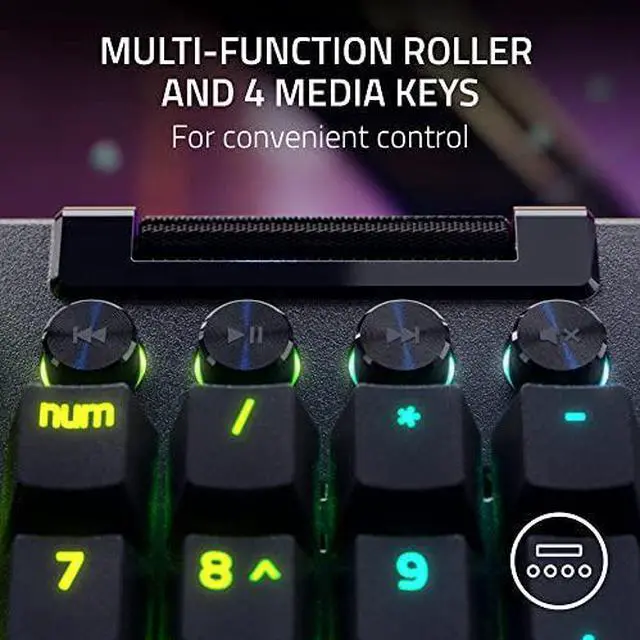
Best for: Macros and shortcut-heavy games
- Layout
- Full-size
- Macro keys
- 8 dedicated keys
- Control dial
- 1 command dial
- Lighting
- Per-key RGB
- Dedicated macro controls
- Command dial adds quick-access functions
- Full-size keys suit varied game genres
- Extra controls take up more desk space
Is the Razer BlackWidow V4 Pro Mechanical Gaming Keyboard worth buying on Black Friday 2026?
Yes. Razer BlackWidow V4 Pro Mechanical Gaming Keyboard is a strong fit for players who use macros and shortcuts, thanks to its 8 dedicated macro keys and command dial. Players who prefer a compact board should look elsewhere.
See today’s Black Friday price on Amazon
#5
Corsair K70 CORE RGB Mechanical Gaming Keyboard
The Corsair K70 CORE RGB Mechanical Gaming Keyboard is the best straightforward full-size mechanical pick for players who want linear keys, with MLX Red switches and RGB lighting.
Best for: Everyday mechanical gaming
- Layout
- Full-size
- Switch type
- Corsair MLX Red linear
- Lighting
- Per-key RGB
- Sound design
- Two-layer sound dampening
- Linear switches offer a smooth keypress
- Full-size layout includes a number pad
- Sound-dampening layers refine key noise
- Wired connection offers less placement freedom than wireless boards
Is the Corsair K70 CORE RGB Mechanical Gaming Keyboard worth buying on Black Friday 2026?
Yes. Corsair K70 CORE RGB Mechanical Gaming Keyboard is a practical option for players who want a full-size wired board with linear MLX Red switches, per-key RGB and sound-dampening layers. Choose another model if wireless play is essential.
See today’s Black Friday price on Amazon
#6
HyperX Alloy Origins Core Tenkeyless Mechanical Gaming Keyboard
The HyperX Alloy Origins Core Tenkeyless Mechanical Gaming Keyboard is the best compact wired pick for players who want room for mouse movement, with an 87-key tenkeyless layout.
Best for: Compact wired gaming
- Layout
- Tenkeyless, 87 keys
- Connection
- Detachable USB-C cable
- Switch option
- HyperX mechanical switches
- Durability rating
- Up to 80 million keystrokes
- Smaller footprint than a full-size board
- Detachable cable helps with storage
- Aluminum body
- No number pad
Is the HyperX Alloy Origins Core Tenkeyless Mechanical Gaming Keyboard worth buying on Black Friday 2026?
Yes. HyperX Alloy Origins Core Tenkeyless Mechanical Gaming Keyboard is a good choice for players who want a compact wired board, an aluminum body and an 87-key layout. The missing number pad is the main trade-off.
See today’s Black Friday price on Amazon
#7 · Top pick
Keychron V1 Max QMK Wireless Custom Mechanical Keyboard Knob Version
The Keychron V1 Max QMK Wireless Custom Mechanical Keyboard Knob Version is the best flexible compact keyboard for players who want multiple connection modes, with a 75% layout and 2.4 GHz wireless.
Best for: Compact wireless customization
- Layout
- 75%
- Connection
- 2.4 GHz, Bluetooth 5.1 and USB-C
- Battery
- 4,000 mAh
- Customization
- QMK and VIA support
- Three connection modes
- Compact layout retains function keys
- Knob and QMK/VIA support add flexibility
- Setup and customization take more effort than a basic board
Is the Keychron V1 Max QMK Wireless Custom Mechanical Keyboard Knob Version worth buying on Black Friday 2026?
Yes. Keychron V1 Max QMK Wireless Custom Mechanical Keyboard Knob Version suits players who want compact mechanical keys, 2.4 GHz wireless and QMK/VIA customization. The Keychron V1 Max QMK Wireless Custom Mechanical Keyboard Knob Version's 75% layout saves space while retaining the function row.
See today’s Black Friday price on Amazon
Which is better, SteelSeries Apex 3 or Keychron Q1 Pro?
SteelSeries Apex 3 RGB Gaming Keyboard is better for quiet, uncomplicated gaming, while Keychron Q1 Pro QMK/VIA Wireless Custom Mechanical Keyboard is better for mechanical feel and customization. The choice comes down to what you value at your desk.
SteelSeries Apex 3 has whisper-quiet membrane keys, a full-size layout and 10-zone RGB lighting. Its IP32 water resistance adds reassurance for everyday use. The straightforward wired design keeps setup simple, and dedicated media controls give quick access to common functions.
Keychron Q1 Pro packs a 75% layout, Bluetooth 5.1 and QMK/VIA support into an aluminum mechanical keyboard. Players who enjoy changing key assignments, layers and the typing setup get far more control. For a no-fuss, quiet board, pick Apex 3; for a customizable mechanical board, pick Q1 Pro.
Which keyboard is best for gaming on Black Friday 2026?
Keychron V1 Max QMK Wireless Custom Mechanical Keyboard Knob Version is the best all-around gaming pick for players who want a compact 75% layout and three connection modes. Its 2.4 GHz wireless option, Bluetooth 5.1 and USB-C wired connection give it flexibility across setups.
Players who value responsiveness and competitive wireless play should also compare Logitech G915 X LIGHTSPEED Wireless Gaming Keyboard. Its LIGHTSPEED connection and low-profile mechanical design make it a distinct alternative, especially for a full-size setup.
For macro-heavy games, Razer BlackWidow V4 Pro Mechanical Gaming Keyboard brings 8 dedicated macro keys and a command dial. For quieter shared spaces, SteelSeries Apex 3 is a simpler membrane option. Start with your preferred connection and layout, then narrow the shortlist by key feel.
Is a mechanical keyboard better than the SteelSeries Apex 3?
Mechanical keyboards offer distinct switch choices and more customization than SteelSeries Apex 3 RGB Gaming Keyboard, while Apex 3 prioritizes quiet membrane typing and straightforward use. Neither design wins for every player.
Keychron Q1 Pro QMK/VIA Wireless Custom Mechanical Keyboard and Keychron V1 Max both support QMK/VIA, making them strong picks for people who want programmable keys. Corsair K70 CORE RGB Mechanical Gaming Keyboard offers linear MLX Red switches in a full-size wired layout, while HyperX Alloy Origins Core keeps the footprint compact.
SteelSeries Apex 3 is the better fit when quiet keys, media controls and a simple wired setup matter most. Mechanical boards suit players who want a more defined switch feel, custom layouts or additional wireless options. Consider shared-room noise and typing preference alongside gaming features.
Which gaming keyboard layout should you choose?
Full-size keyboards keep the number pad, tenkeyless removes that section, and 75% layouts save more space while retaining a function row. The right layout depends on how much desk room you want to preserve and which keys you use.
SteelSeries Apex 3 RGB Gaming Keyboard, Logitech G915 X LIGHTSPEED Wireless Gaming Keyboard and Corsair K70 CORE RGB Mechanical Gaming Keyboard suit players who want a number pad. HyperX Alloy Origins Core Tenkeyless Mechanical Gaming Keyboard gives mouse movement more room without cutting down to a compact 75% board.
Keychron Q1 Pro and Keychron V1 Max both use 75% layouts. Those boards keep frequently used navigation and function keys in a smaller footprint. Check the exact key arrangement before ordering if your workflow depends on dedicated navigation keys, a number pad or macro controls.
What should you compare before buying a gaming keyboard?
Compare switch feel, layout, connection and customization before choosing a Black Friday 2026 gaming keyboard. Those four details shape everyday use more than a long feature list.
Membrane keys on SteelSeries Apex 3 are quieter, while mechanical options such as Corsair K70 CORE RGB and Keychron Q1 Pro provide a different switch feel. Wireless options also vary: Logitech G915 X LIGHTSPEED and Keychron V1 Max offer distinct connections, while wired models keep the setup direct.
Next, check desk space and software needs. A full-size layout adds a number pad; a 75% or tenkeyless board saves room. QMK/VIA support is useful for custom key assignments, while macro controls help with shortcuts. Choose a feature you will use often over extras that add bulk.
Buying Guide
Choose the layout that fits your desk
Pick full-size for a number pad, tenkeyless for a smaller footprint or 75% for compact access to function keys. Measure available desk space and consider mouse movement before settling on a layout.
Match the key feel to your room
SteelSeries Apex 3 uses quiet membrane keys, while mechanical keyboards offer different switch feels. Shared spaces favor a quieter sound profile; players focused on switch choice and customization should compare mechanical models.
Decide between wired and wireless
Wired keyboards keep setup direct. Wireless models offer more placement freedom, and connection options differ by model. Check whether your preferred keyboard supports 2.4 GHz, Bluetooth, USB or a combination.
Check software and control features
QMK/VIA support gives Keychron models flexible key programming. Macro keys and dials add quick access to commands, while media controls simplify common adjustments. Focus on controls that suit your regular games.
Use Black Friday 2026 to compare the right models
Build a shortlist around your top needs instead of choosing by lighting alone. Compare the exact model, layout, switch type and connection for each listing so the selected keyboard matches your setup.
FAQ
Is the SteelSeries Apex 3 or Keychron Q1 Pro better for gaming?
SteelSeries Apex 3 is better for quiet, uncomplicated gaming, while Keychron Q1 Pro suits players who want a mechanical board with Bluetooth 5.1 and QMK/VIA customization. Choose Apex 3 for membrane keys and simplicity; choose Q1 Pro for switch feel and programmable controls.
Does the SteelSeries Apex 3 have mechanical switches?
No. SteelSeries Apex 3 RGB Gaming Keyboard uses whisper-quiet membrane switches rather than mechanical switches. The design favors quieter typing and straightforward use, while mechanical alternatives in this guide offer different switch feels and deeper options for customization.
Is the Keychron Q1 Pro wireless?
Yes. Keychron Q1 Pro QMK/VIA Wireless Custom Mechanical Keyboard supports Bluetooth 5.1 and USB-C wired operation. Its 75% layout, 4,000 mAh battery and QMK/VIA support make it a premium option for players who want wireless flexibility and extensive key programming.
Which keyboard is best for a small gaming desk?
HyperX Alloy Origins Core Tenkeyless Mechanical Gaming Keyboard uses an 87-key layout that removes the number pad. Keychron Q1 Pro and Keychron V1 Max use compact 75% layouts. Choose based on whether you want tenkeyless simplicity or a smaller layout with retained function keys.
Which gaming keyboard has the most macro controls?
Razer BlackWidow V4 Pro Mechanical Gaming Keyboard has 8 dedicated macro keys and a command dial. The additional controls suit players who map repeated commands or shortcuts. Players who prefer a simpler, less expansive desk setup should compare compact or standard-layout alternatives.
What is the best wireless gaming keyboard in this guide?
Keychron V1 Max QMK Wireless Custom Mechanical Keyboard Knob Version is the most flexible compact option, with 2.4 GHz, Bluetooth 5.1 and USB-C connections. Logitech G915 X LIGHTSPEED Wireless Gaming Keyboard is the alternative for players who want a low-profile, full-size wireless board.