

As an Amazon Associate we earn from qualifying purchases.
- Best overall: Dell UltraSharp U2723QE 27-inch 4K USB-C Hub Monitor
- Best budget: Lenovo ThinkVision P27h-30 27-inch QHD USB-C Monitor
- Best premium: Samsung ViewFinity S9 27-inch 5K S90PC Monitor
- Best for travel: ASUS ZenScreen MB16ACV 15.6-inch Portable USB-C Monitor
- The Dell UltraSharp U2723QE 27-inch 4K USB-C Hub Monitor is the strongest all-around choice for a sharp screen, 90W charging and built-in connectivity.
- The ASUS ZenScreen MB16ACV 15.6-inch Portable USB-C Monitor suits travel and second-screen work with a compact Full HD panel.
- The Samsung ViewFinity S9 27-inch 5K S90PC Monitor is the premium pick for detailed creative work and high-resolution Mac setups.
- Compare resolution, USB-C power delivery and port selection before choosing a monitor for Black Friday 2026.
- A USB-C monitor with enough power delivery can connect a laptop and charge it through one cable.
The 7 USB-C monitors in this 2026 guide cover practical office displays, creator-focused 4K screens and one portable travel pick. I researched and compared specs, reviews and owner feedback to identify models with useful USB-C connectivity, clear strengths and sensible use cases. The right choice depends on how much screen space you need, whether you want laptop charging and how demanding your color or resolution needs are.
My pick for most people is the Dell UltraSharp U2723QE 27-inch 4K USB-C Hub Monitor, thanks to its 4K resolution, 90W USB-C power delivery and hub-style connections. For Black Friday shopping, compare the full product name and specifications carefully: a similar-looking monitor without power delivery or a needed video port can change the value of the setup. Each pick below includes a direct verdict, key specifications and the type of buyer it suits.
How We Picked
- USB-C usefulness: We favored models that carry video and data over USB-C, with power delivery when available.
- Screen quality: Resolution, panel type, screen size and stated color coverage helped distinguish office and creator options.
- Workstation features: We compared port selection, docking features, stands and other practical desk conveniences.
- Range of use: The shortlist includes monitors for general work, color-conscious tasks, premium setups and travel.
- Owner feedback: We researched and compared specifications, reviews and owner feedback to identify recurring strengths and trade-offs.
Comparison Table
| Product | Best for | Resolution | USB-C power delivery | Screen size |
|---|---|---|---|---|
| Dell UltraSharp U2723QE 27-inch 4K USB-C Hub Monitor | All-around office use | 3840 × 2160 | 90W | 27 inches |
| LG 27UP850-W 27-inch UHD 4K IPS Monitor | Everyday 4K work | 3840 × 2160 | 96W | 27 inches |
| ASUS ProArt Display PA279CV 27-inch 4K UHD Monitor | Color-conscious creative work | 3840 × 2160 | 65W | 27 inches |
| BenQ PD3225U 31.5-inch 4K UHD Thunderbolt 3 Monitor | Large creative workspace | 3840 × 2160 | 85W | 31.5 inches |
| Samsung ViewFinity S9 27-inch 5K S90PC Monitor | Premium 5K setups | 5120 × 2880 | 90W | 27 inches |
| Lenovo ThinkVision P27h-30 27-inch QHD USB-C Monitor | Office docking | 2560 × 1440 | 100W | 27 inches |
| ASUS ZenScreen MB16ACV 15.6-inch Portable USB-C Monitor | Travel and second-screen work | 1920 × 1080 | Not stated | 15.6 inches |
Best Picks Reviewed
#1 · Top pick
Dell UltraSharp U2723QE 27-inch 4K USB-C Hub Monitor
The Dell UltraSharp U2723QE 27-inch 4K USB-C Hub Monitor is the best all-around monitor for laptop-based work, with a 27-inch 4K panel and 90W USB-C power delivery.
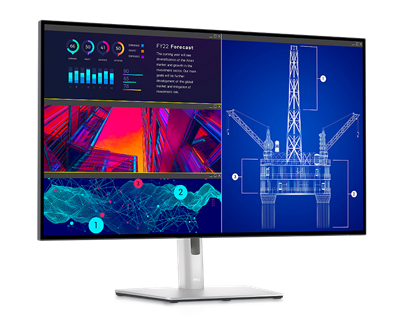
Best for: A polished home-office or work-from-home desk
- Screen size
- 27 inches
- Resolution
- 3840 × 2160
- USB-C power delivery
- 90W
- Panel contrast
- 2000:1
- Sharp 4K resolution for text and detailed work
- USB-C hub supports a tidy laptop-centered desk
- IPS Black panel offers higher contrast than standard IPS
- Premium features are unnecessary for a basic secondary screen
Is the Dell UltraSharp U2723QE 27-inch 4K USB-C Hub Monitor worth buying on Black Friday 2026?
Yes. The Dell UltraSharp U2723QE 27-inch 4K USB-C Hub Monitor combines a 27-inch 4K screen, 90W charging and hub connectivity, making it a strong one-cable workstation display for compatible laptops.
See today’s Black Friday price on Amazon
#2
LG 27UP850-W 27-inch UHD 4K IPS Monitor
The LG 27UP850-W 27-inch UHD 4K IPS Monitor is the best 4K pick for laptop owners who want 96W USB-C charging and a versatile screen for everyday work.

Best for: Mixed productivity, streaming and light creative work
- Screen size
- 27 inches
- Resolution
- 3840 × 2160
- USB-C power delivery
- 96W
- HDR rating
- DisplayHDR 400
- High USB-C charging capacity for compatible laptops
- 4K resolution suits text, images and video
- USB-C video and data support a simple desk connection
- HDR support is not a substitute for a dedicated high-end HDR display
Is the LG 27UP850-W 27-inch UHD 4K IPS Monitor worth buying on Black Friday 2026?
Yes. The LG 27UP850-W 27-inch UHD 4K IPS Monitor is a flexible desk upgrade with a 4K panel and 96W USB-C power delivery. Check your laptop’s charging needs and available ports before choosing it.
See today’s Black Friday price on Amazon
#3
ASUS ProArt Display PA279CV 27-inch 4K UHD Monitor
The ASUS ProArt Display PA279CV 27-inch 4K UHD Monitor is the best value-minded creator monitor for photographers and designers who want a 27-inch 4K workspace.
Best for: Photo editing and color-conscious creative work
- Screen size
- 27 inches
- Resolution
- 3840 × 2160
- USB-C power delivery
- 65W
- sRGB coverage
- 100 percent
- Factory-calibrated color focus for creative workflows
- USB-C supports display, data and laptop charging
- Ergonomic stand supports height, tilt, swivel and pivot adjustments
- 65W charging is a closer fit for ultraportables than power-hungry laptops
Is the ASUS ProArt Display PA279CV 27-inch 4K UHD Monitor worth buying on Black Friday 2026?
Yes. The ASUS ProArt Display PA279CV 27-inch 4K UHD Monitor offers 100 percent sRGB coverage, a 4K panel and 65W USB-C power delivery. The ASUS ProArt Display PA279CV 27-inch 4K UHD Monitor suits creators who want a color-focused screen for a home desk.
See today’s Black Friday price on Amazon
#4
BenQ PD3225U 31.5-inch 4K UHD Thunderbolt 3 Monitor
The BenQ PD3225U 31.5-inch 4K UHD Thunderbolt 3 Monitor is the best large creator display for design professionals who want generous workspace and an 85W laptop connection.
Best for: Designers who need a large, color-focused desk display
- Screen size
- 31.5 inches
- Resolution
- 3840 × 2160
- USB-C power delivery
- 85W
- Panel contrast
- 2000:1
- Large 4K screen leaves room for timelines and multiple windows
- Thunderbolt 3 supports a capable connected workstation
- Wide-gamut display targets professional color workflows
- Large size calls for a deeper desk and a considered viewing distance
Is the BenQ PD3225U 31.5-inch 4K UHD Thunderbolt 3 Monitor worth buying on Black Friday 2026?
Yes. The BenQ PD3225U 31.5-inch 4K UHD Thunderbolt 3 Monitor is a strong fit for design work, with a large 4K screen, 85W charging and Thunderbolt connectivity. Confirm your computer supports the connection you plan to use.
See today’s Black Friday price on Amazon
#5
Samsung ViewFinity S9 27-inch 5K S90PC Monitor
The Samsung ViewFinity S9 27-inch 5K S90PC Monitor is the best premium high-resolution pick for Mac users and creative professionals who want a 5K screen.
Best for: Premium Mac and high-detail creative setups
- Screen size
- 27 inches
- Resolution
- 5120 × 2880
- USB-C power delivery
- 90W
- Color coverage
- 99 percent DCI-P3
- 5K resolution provides fine detail on a 27-inch screen
- Thunderbolt 4 supports high-bandwidth connections
- Includes a webcam for compatible video-call setups
- A 5K panel costs more to justify than a standard 4K work monitor
Is the Samsung ViewFinity S9 27-inch 5K S90PC Monitor worth buying on Black Friday 2026?
Yes. The Samsung ViewFinity S9 27-inch 5K S90PC Monitor stands out with 5120 × 2880 resolution, 90W USB-C charging and Thunderbolt 4. The Samsung ViewFinity S9 27-inch 5K S90PC Monitor is best suited to buyers who value extra pixel detail and a premium desk setup.
See today’s Black Friday price on Amazon
#6
Lenovo ThinkVision P27h-30 27-inch QHD USB-C Monitor
The Lenovo ThinkVision P27h-30 27-inch QHD USB-C Monitor is the best practical office pick for buyers who want a 27-inch screen and 100W USB-C power delivery.
Best for: Office productivity and laptop docking
- Screen size
- 27 inches
- Resolution
- 2560 × 1440
- USB-C power delivery
- 100W
- Color coverage
- 99 percent sRGB
- 100W charging suits many work laptops
- QHD resolution balances desktop space and system demands
- USB-C hub features support a cleaner workstation
- QHD is less detailed than 4K at the same screen size
Is the Lenovo ThinkVision P27h-30 27-inch QHD USB-C Monitor worth buying on Black Friday 2026?
Yes. The Lenovo ThinkVision P27h-30 27-inch QHD USB-C Monitor pairs a roomy 27-inch screen with 100W power delivery. The Lenovo ThinkVision P27h-30 27-inch QHD USB-C Monitor is a practical choice for office work when laptop charging and a built-in USB-C hub matter more than 4K resolution.
See today’s Black Friday price on Amazon
#7
ASUS ZenScreen MB16ACV 15.6-inch Portable USB-C Monitor
The ASUS ZenScreen MB16ACV 15.6-inch Portable USB-C Monitor is the best travel pick for laptop users who need a lightweight second screen with a 15.6-inch Full HD panel.
Best for: Travel, hybrid work and temporary second-screen setups
- Screen size
- 15.6 inches
- Resolution
- 1920 × 1080
- Panel type
- IPS
- Screen format
- 16:9
- Portable size suits travel and shared workspaces
- Full HD resolution works well for documents and side-by-side apps
- USB-C connection supports a simple laptop setup
- Small screen is less comfortable for a permanent main display
Is the ASUS ZenScreen MB16ACV 15.6-inch Portable USB-C Monitor worth buying on Black Friday 2026?
Yes. The ASUS ZenScreen MB16ACV 15.6-inch Portable USB-C Monitor gives mobile workers a 15.6-inch Full HD second screen in a travel-friendly format. Check that your laptop’s USB-C port supports display output before purchase.
See today’s Black Friday price on Amazon
Which USB-C monitor is the best overall pick for Black Friday 2026?
The Dell UltraSharp U2723QE 27-inch 4K USB-C Hub Monitor is the best overall pick for a work desk, pairing a 27-inch 4K display with 90W USB-C power delivery. That combination handles detailed documents, spreadsheets and laptop charging without requiring a separate charger for many compatible laptops.
The Dell UltraSharp U2723QE 27-inch 4K USB-C Hub Monitor also works as a hub-style center for a desk, reducing the need to connect every accessory directly to a laptop. The LG 27UP850-W 27-inch UHD 4K IPS Monitor is a sensible alternative when 96W charging is the priority. For shoppers who do not need 4K, the Lenovo ThinkVision P27h-30 27-inch QHD USB-C Monitor offers 100W power delivery and a sharp QHD workspace.
Which USB-C monitor is best for a MacBook?
The Samsung ViewFinity S9 27-inch 5K S90PC Monitor is the premium Mac-oriented pick, with 5120 × 2880 resolution and 90W USB-C power delivery. The extra resolution makes fine details and text a key part of its appeal for buyers who want a high-density desktop screen.
The BenQ PD3225U 31.5-inch 4K UHD Thunderbolt 3 Monitor is another strong option for a Mac-centered design setup, particularly when a larger canvas matters more than 5K resolution. The Dell UltraSharp U2723QE 27-inch 4K USB-C Hub Monitor suits general laptop work and offers a strong mix of charging and hub features. Check the computer’s supported display output and charging requirements before choosing a monitor.
Which USB-C monitor is best for photo and design work?
The ASUS ProArt Display PA279CV 27-inch 4K UHD Monitor is a strong creator pick, with 100 percent sRGB coverage, factory-calibrated color focus and 4K detail. Those features suit photographers and designers who want a dedicated screen for color-conscious work without stepping up to a larger premium display.
The BenQ PD3225U 31.5-inch 4K UHD Thunderbolt 3 Monitor gives design professionals more screen area for image tools, timelines and open documents. The Samsung ViewFinity S9 27-inch 5K S90PC Monitor is worth considering when crisp detail and a high-resolution panel take priority. For any color-critical workflow, check the exact color-space requirements of the work and plan for calibration when needed.
Are USB-C monitors good for a one-cable laptop setup?
The Dell UltraSharp U2723QE 27-inch 4K USB-C Hub Monitor supports a simple one-cable desk setup with 90W power delivery and hub features. A compatible USB-C connection can carry video and data while charging a connected laptop, helping keep a desk clear of extra cables.
Charging capacity matters: the Lenovo ThinkVision P27h-30 27-inch QHD USB-C Monitor provides 100W, while the ASUS ProArt Display PA279CV 27-inch 4K UHD Monitor provides 65W. Compare that rating with the laptop’s power needs, and confirm the USB-C port supports video output. Some computers require a separate charger during demanding workloads even when a monitor supplies power.
What should I compare when shopping for Black Friday USB-C monitor deals?
The LG 27UP850-W 27-inch UHD 4K IPS Monitor, Lenovo ThinkVision P27h-30 27-inch QHD USB-C Monitor and ASUS ZenScreen MB16ACV 15.6-inch Portable USB-C Monitor show how much monitor choices differ in resolution, size and intended use. Start with the kind of work you do, then decide how much screen space and detail are useful.
Check USB-C power delivery, the number and type of video inputs, stand adjustments and any hub features before selecting a deal. A monitor that charges a laptop and supports your accessories can offer better practical value than a higher-resolution screen without the right connections. Skip it if the USB-C port only handles data or if the monitor’s power delivery falls short of your laptop’s needs.
Buying Guide
Choose a resolution for the work
A 4K monitor such as the Dell UltraSharp U2723QE 27-inch 4K USB-C Hub Monitor offers fine detail for text, photos and video. QHD, as on the Lenovo ThinkVision P27h-30 27-inch QHD USB-C Monitor, gives a roomy desktop while asking less of the computer. Full HD works well for a portable second screen.
Match USB-C charging to your laptop
Check the laptop’s charging requirement and compare it with the monitor’s power delivery. The Lenovo ThinkVision P27h-30 27-inch QHD USB-C Monitor supplies 100W, while the ASUS ProArt Display PA279CV 27-inch 4K UHD Monitor supplies 65W. Confirm that the same USB-C port supports video.
Count the connections you need
List the devices you plan to connect, such as a keyboard, storage drive or webcam. The Dell UltraSharp U2723QE 27-inch 4K USB-C Hub Monitor is designed for a hub-style desk. Also check for HDMI, DisplayPort and the right USB-C or Thunderbolt connection for your computer.
Consider screen size and desk space
A 27-inch monitor is a flexible size for many desks, while the BenQ PD3225U 31.5-inch 4K UHD Thunderbolt 3 Monitor gives creative projects more room. The ASUS ZenScreen MB16ACV 15.6-inch Portable USB-C Monitor is easier to pack but is better as a travel companion than a permanent main screen.
Compare the full specification, not only the deal label
For Black Friday 2026, compare exact model names and specifications before choosing a listing. Check resolution, USB-C charging, panel features, included stand and port selection. Similar model names do not guarantee matching specifications, so confirm the product variant and whether the connection fits your setup.
FAQ
What is the best USB-C monitor for Black Friday 2026?
The Dell UltraSharp U2723QE 27-inch 4K USB-C Hub Monitor is the best all-around pick in this guide. It combines 4K resolution, 90W USB-C power delivery and hub features for a flexible laptop-centered desk setup.
Can a USB-C monitor charge a laptop?
Yes, a USB-C monitor with power delivery can charge a compatible laptop through its USB-C connection. The Lenovo ThinkVision P27h-30 27-inch QHD USB-C Monitor supplies 100W. Check your laptop’s charging requirement and confirm its USB-C port supports video.
Is 4K worth it on a 27-inch USB-C monitor?
A 4K 27-inch monitor offers fine detail for text, photos and design work. The LG 27UP850-W 27-inch UHD 4K IPS Monitor is one example. QHD remains a practical option for general productivity when screen detail is less important.
Which USB-C monitor is best for travel?
The ASUS ZenScreen MB16ACV 15.6-inch Portable USB-C Monitor is the travel pick in this guide. Its 15.6-inch Full HD screen serves as a compact second display for mobile work. Confirm that your laptop’s USB-C port supports display output.
Which USB-C monitor is best for creative work?
The ASUS ProArt Display PA279CV 27-inch 4K UHD Monitor suits color-conscious creative work with 100 percent sRGB coverage and 4K resolution. The BenQ PD3225U 31.5-inch 4K UHD Thunderbolt 3 Monitor is a larger alternative for design workflows.
What USB-C power delivery should I look for in a monitor?
Choose a power-delivery rating that meets your laptop’s charging needs. Options in this guide range from 65W on the ASUS ProArt Display PA279CV 27-inch 4K UHD Monitor to 100W on the Lenovo ThinkVision P27h-30 27-inch QHD USB-C Monitor.