

As an Amazon Associate we earn from qualifying purchases.
- Best overall: ASUS RT-AXE7800 Tri-Band WiFi 6E Router
- Best budget: TP-Link Archer AXE75 AXE5400 Tri-Band Wi-Fi 6E Router
- Best premium: ASUS ROG Rapture GT-AXE16000 Quad-Band WiFi 6E Gaming Router
- Best for Wi-Fi 7 gaming: TP-Link Archer GE800 BE19000 Tri-Band Wi-Fi 7 Gaming Router
- Wi-Fi 6E routers add a 6 GHz band for compatible devices; gaming routers focus on traffic controls, latency tools and prioritization.
- The TP-Link Archer AXE75 AXE5400 Tri-Band Wi-Fi 6E Router is a strong value pick for homes with compatible 6 GHz devices.
- The ASUS ROG Rapture GT-AXE16000 Quad-Band WiFi 6E Gaming Router pairs 6 GHz access with dual 10G ports.
- A wired Ethernet connection remains the simplest way to reduce wireless interference for a stationary console or gaming PC.
- Match router capacity to your internet plan, home layout, connected devices and the ports your gear can use.
The ASUS ROG Rapture GT-AXE16000 Quad-Band WiFi 6E Gaming Router is the standout for players who want 6 GHz Wi-Fi, gaming features and dual 10G ports in one high-end setup. For a tighter budget, the TP-Link Archer AXE75 AXE5400 Tri-Band Wi-Fi 6E Router brings 6 GHz connectivity to a more modest home network. Both approaches can suit gaming; the right choice depends on your devices and priorities.
For this Black Friday 2026 guide, I researched and compared specs, reviews and owner feedback across Wi-Fi 6E and gaming-focused routers. Wi-Fi 6E describes wireless capability, while gaming models add features such as device prioritization and latency controls. Here's the bottom line: choose the router that solves your actual network bottleneck, not the one with the most dramatic gaming label.
How We Picked
- Compared wireless standards, bands and advertised combined speed classes, with attention to which models include 6 GHz.
- Checked wired connectivity, including multi-gigabit and 10G ports that support fast internet plans, local transfers and wired gaming.
- Considered gaming software features such as device prioritization, traffic controls and latency-focused tools.
- Reviewed product specifications alongside owner feedback, setup considerations and reported coverage needs.
- Included a range of router styles and capabilities, from value-focused Wi-Fi 6E options to premium gaming hardware.
Comparison Table
| Product | Best for | Wireless class | Bands | Fastest wired port |
|---|---|---|---|---|
| TP-Link Archer AXE75 AXE5400 Tri-Band Wi-Fi 6E Router | Value-conscious Wi-Fi 6E | AXE5400 | 3, including 6 GHz | 1 Gbps |
| ASUS RT-AXE7800 Tri-Band WiFi 6E Router | Balanced home networking | AXE7800 | 3, including 6 GHz | 2.5 Gbps |
| NETGEAR Nighthawk RAXE300 Tri-Band WiFi 6E Router | Busy connected homes | AXE7800 | 3, including 6 GHz | 2.5 Gbps |
| ASUS ROG Rapture GT-AXE16000 Quad-Band WiFi 6E Gaming Router | Premium Wi-Fi 6E gaming | AXE16000 | 4, including 6 GHz | 10 Gbps |
| ASUS ROG Rapture GT-AX11000 Pro Tri-Band WiFi 6 Gaming Router | Gaming controls and wired speed | AX11000 | 3 | 10 Gbps |
| NETGEAR Nighthawk Pro Gaming XR1000 WiFi 6 Router | DumaOS gaming tools | AX5400 | 2 | 1 Gbps |
| TP-Link Archer GE800 BE19000 Tri-Band Wi-Fi 7 Gaming Router | Wi-Fi 7 gaming | BE19000 | 3 | 10 Gbps |
Best Picks Reviewed
#1
TP-Link Archer AXE75 AXE5400 Tri-Band Wi-Fi 6E Router
The TP-Link Archer AXE75 AXE5400 Tri-Band Wi-Fi 6E Router is the best value 6E pick for households adding compatible phones, laptops or VR headsets. The TP-Link Archer AXE75 AXE5400 Tri-Band Wi-Fi 6E Router's AXE5400 class includes a 2,402 Mbps 6 GHz band.
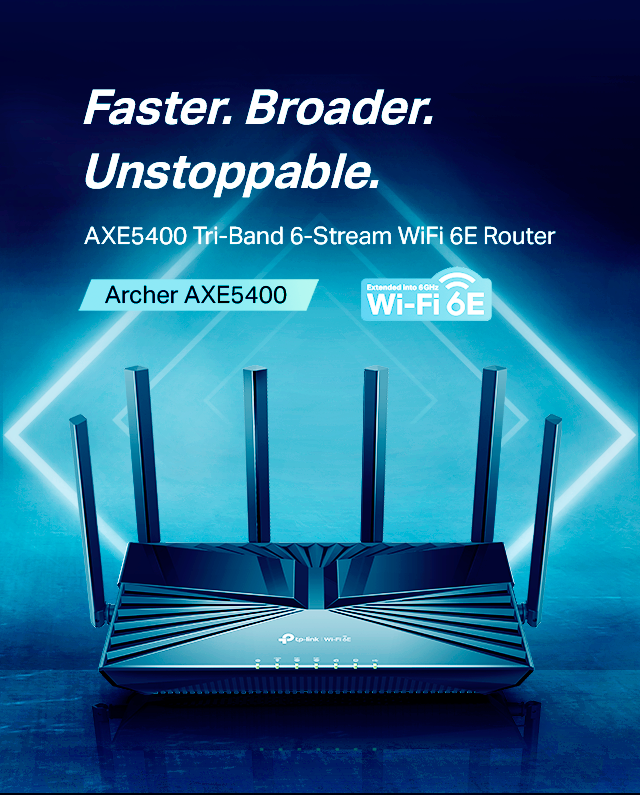
Best for: Value-conscious homes wanting Wi-Fi 6E
- Wireless class
- AXE5400
- Bands
- Tri-band, including 6 GHz
- 6 GHz band rate
- 2,402 Mbps
- Ethernet ports
- 1 Gbps class
- Adds a 6 GHz band without a premium gaming-router feature set.
- Three bands help separate compatible devices from older Wi-Fi gear.
- Straightforward option for everyday gaming and streaming.
- Lacks multi-gigabit Ethernet for faster wired internet plans.
Is the TP-Link Archer AXE75 AXE5400 Tri-Band Wi-Fi 6E Router worth buying on Black Friday 2026?
Yes. The TP-Link Archer AXE75 AXE5400 Tri-Band Wi-Fi 6E Router is a sensible value choice when 6 GHz access matters more than premium gaming controls or multi-gigabit wired ports. Check that your main devices support Wi-Fi 6E.
See today’s Black Friday price on Amazon
#2 · Top pick
ASUS RT-AXE7800 Tri-Band WiFi 6E Router
The ASUS RT-AXE7800 Tri-Band WiFi 6E Router is the best balanced choice for homes that want 6 GHz and flexible network management. The ASUS RT-AXE7800 Tri-Band WiFi 6E Router's AXE7800 class delivers up to 7,800 Mbps of combined advertised wireless capacity.

Best for: Households mixing gaming, streaming and smart devices
- Wireless class
- AXE7800
- Bands
- Tri-band, including 6 GHz
- Combined advertised rate
- 7,800 Mbps
- Multi-gigabit port
- 1 x 2.5 Gbps
- 6 GHz support provides an additional band for compatible devices.
- Includes a 2.5 Gbps port for a faster internet service or wired link.
- A practical feature mix for varied household use.
- Does not offer the dual 10G connectivity of the premium ASUS gaming model.
Is the ASUS RT-AXE7800 Tri-Band WiFi 6E Router worth buying on Black Friday 2026?
Yes. The ASUS RT-AXE7800 Tri-Band WiFi 6E Router suits a mixed-device home that wants Wi-Fi 6E, a 2.5 Gbps port and a broad set of network controls. The ASUS RT-AXE7800 Tri-Band WiFi 6E Router balances modern wireless support with everyday household flexibility.
See today’s Black Friday price on Amazon
#3
NETGEAR Nighthawk RAXE300 Tri-Band WiFi 6E Router
The NETGEAR Nighthawk RAXE300 Tri-Band WiFi 6E Router is the best streamlined 6E upgrade for busy homes that want a fast wireless backbone. The NETGEAR Nighthawk RAXE300 Tri-Band WiFi 6E Router's AXE7800 class advertises up to 7,800 Mbps across three bands.
Best for: Busy homes with compatible 6 GHz devices
- Wireless class
- AXE7800
- Bands
- 3, including 6 GHz
- Combined advertised rate
- 7,800 Mbps
- Multi-gigabit Ethernet
- 1 x 2.5 Gbps
- Three bands support distributing compatible devices across the network.
- A 2.5 Gbps Ethernet port adds useful wired flexibility.
- Designed for homes with several connected devices and high-bandwidth use.
- Gaming-specific controls are less central than on dedicated gaming models.
Is the NETGEAR Nighthawk RAXE300 Tri-Band WiFi 6E Router worth buying on Black Friday 2026?
Yes. The NETGEAR Nighthawk RAXE300 Tri-Band WiFi 6E Router is a good fit when your priority is tri-band Wi-Fi 6E for a connected household. The NETGEAR Nighthawk RAXE300 Tri-Band WiFi 6E Router's 2.5 Gbps port also helps connect a compatible modem, switch or wired device.
See today’s Black Friday price on Amazon
#4
ASUS ROG Rapture GT-AXE16000 Quad-Band WiFi 6E Gaming Router
The ASUS ROG Rapture GT-AXE16000 Quad-Band WiFi 6E Gaming Router is the best premium pick for players who want 6 GHz and extensive wired capacity. The ASUS ROG Rapture GT-AXE16000 Quad-Band WiFi 6E Gaming Router's AXE16000 class pairs four bands with dual 10G ports.
Best for: Premium gaming networks and multi-gigabit setups
- Wireless class
- AXE16000
- Bands
- Quad-band, including 6 GHz
- 10G ports
- 2
- Advertised combined rate
- Up to 16,000 Mbps
- Combines Wi-Fi 6E and gaming-focused network tools.
- Dual 10G ports support high-speed wired devices and networking.
- Four bands offer room to distribute compatible devices.
- The ASUS ROG Rapture GT-AXE16000 Quad-Band WiFi 6E Gaming Router's extensive hardware is excessive for a small home or basic internet plan.
Is the ASUS ROG Rapture GT-AXE16000 Quad-Band WiFi 6E Gaming Router worth buying on Black Friday 2026?
Yes, for a premium setup. The ASUS ROG Rapture GT-AXE16000 Quad-Band WiFi 6E Gaming Router brings together quad-band Wi-Fi 6E, gaming features and dual 10G ports. The ASUS ROG Rapture GT-AXE16000 Quad-Band WiFi 6E Gaming Router makes the most sense when your devices and internet plan can use that capacity.
See today’s Black Friday price on Amazon
#5
ASUS ROG Rapture GT-AX11000 Pro Tri-Band WiFi 6 Gaming Router
The ASUS ROG Rapture GT-AX11000 Pro Tri-Band WiFi 6 Gaming Router is the best gaming-first choice for players who want traffic controls and strong wired options without making 6 GHz a requirement. The ASUS ROG Rapture GT-AX11000 Pro Tri-Band WiFi 6 Gaming Router's AX11000 class advertises up to 11,000 Mbps.
Best for: Competitive play on Wi-Fi 6 devices
- Wireless class
- AX11000
- Bands
- Tri-band
- Multi-gigabit port
- 1 x 2.5 Gbps
- 10G port
- 1
- Gaming-focused controls help prioritize selected devices and traffic.
- A 10G port and 2.5 Gbps port support demanding wired setups.
- Three bands offer flexibility for busy households.
- Wi-Fi 6E and its 6 GHz band are not included.
Is the ASUS ROG Rapture GT-AX11000 Pro Tri-Band WiFi 6 Gaming Router worth buying on Black Friday 2026?
Yes. The ASUS ROG Rapture GT-AX11000 Pro Tri-Band WiFi 6 Gaming Router is a strong match for players who value gaming controls and multi-gigabit connections over Wi-Fi 6E. The ASUS ROG Rapture GT-AX11000 Pro Tri-Band WiFi 6 Gaming Router's AX11000 class and 10G port suit a high-capacity wired setup.
See today’s Black Friday price on Amazon
#6
NETGEAR Nighthawk Pro Gaming XR1000 WiFi 6 Router
The NETGEAR Nighthawk Pro Gaming XR1000 WiFi 6 Router is the best focused gaming pick for players who want DumaOS traffic tools on a dual-band router. The NETGEAR Nighthawk Pro Gaming XR1000 WiFi 6 Router's AX5400 class supports an advertised combined wireless rate of up to 5,400 Mbps.
Best for: Players prioritizing gaming traffic controls
- Wireless class
- AX5400
- Bands
- Dual-band
- Wi-Fi standard
- Wi-Fi 6
- Advertised combined rate
- Up to 5,400 Mbps
- DumaOS includes gaming-oriented traffic and connection tools.
- A focused option for gaming without a quad-band feature set.
- Wi-Fi 6 support fits many current consoles and gaming devices.
- No 6 GHz band or multi-gigabit Ethernet port.
Is the NETGEAR Nighthawk Pro Gaming XR1000 WiFi 6 Router worth buying on Black Friday 2026?
Yes. The NETGEAR Nighthawk Pro Gaming XR1000 WiFi 6 Router suits players who want DumaOS gaming tools and Wi-Fi 6 in a dual-band model. Choose a different router if 6 GHz access or multi-gigabit Ethernet is central to your setup.
See today’s Black Friday price on Amazon
#7
TP-Link Archer GE800 BE19000 Tri-Band Wi-Fi 7 Gaming Router
The TP-Link Archer GE800 BE19000 Tri-Band Wi-Fi 7 Gaming Router is the best forward-looking option for players building around Wi-Fi 7 and multi-gigabit wired gear. The TP-Link Archer GE800 BE19000 Tri-Band Wi-Fi 7 Gaming Router's BE19000 class advertises up to 19,000 Mbps of combined wireless capacity.
Best for: Wi-Fi 7 gaming setups and fast wired networks
- Wireless class
- BE19000
- Bands
- Tri-band
- Wi-Fi standard
- Wi-Fi 7
- 10G Ethernet ports
- 2
- Wi-Fi 7 support suits compatible newer devices.
- Two 10G ports offer substantial wired-network flexibility.
- Gaming-focused design and controls target demanding play.
- Older Wi-Fi devices do not use its newest wireless features.
Is the TP-Link Archer GE800 BE19000 Tri-Band Wi-Fi 7 Gaming Router worth buying on Black Friday 2026?
Yes, for a Wi-Fi 7 build. The TP-Link Archer GE800 BE19000 Tri-Band Wi-Fi 7 Gaming Router brings a BE19000 wireless class and two 10G ports to a gaming-focused setup. Check device compatibility before choosing it over a Wi-Fi 6E router.
See today’s Black Friday price on Amazon
What is the difference between a Wi-Fi 6E router and a gaming router?
The ASUS RT-AXE7800 Tri-Band WiFi 6E Router adds a 6 GHz band, while the NETGEAR Nighthawk Pro Gaming XR1000 WiFi 6 Router focuses on gaming software and traffic controls. Wi-Fi 6E is a wireless standard; gaming router is a product category built around features for play.
A 6 GHz band gives compatible devices another wireless lane, though a device needs Wi-Fi 6E support to use it. Gaming tools help users prioritize traffic or manage latency-sensitive connections. A router can combine both: the ASUS ROG Rapture GT-AXE16000 Quad-Band WiFi 6E Gaming Router includes 6 GHz and gaming features. Choose based on your devices, congestion and home network needs.
Does Wi-Fi 6E improve gaming latency?
The TP-Link Archer AXE75 AXE5400 Tri-Band Wi-Fi 6E Router can give compatible devices a less crowded 6 GHz band, but Wi-Fi 6E alone does not guarantee lower gaming latency. Distance, walls, interference, router placement and your internet connection all affect responsiveness.
A console connected by Ethernet avoids wireless interference on its local link. For wireless play, use 6 GHz when the router and device both support it and the signal reaches your gaming space. Gaming features such as prioritization can help manage busy household traffic, but they do not fix every source of lag. Check the connection from your actual play area before replacing hardware.
Should gamers choose 6 GHz or gaming-focused software?
The ASUS ROG Rapture GT-AXE16000 Quad-Band WiFi 6E Gaming Router offers both 6 GHz and gaming tools, while the ASUS ROG Rapture GT-AX11000 Pro Tri-Band WiFi 6 Gaming Router emphasizes gaming controls without 6 GHz. The better fit depends on which devices need wireless capacity.
Choose 6 GHz when your newer laptop, phone or VR headset supports Wi-Fi 6E and you want an extra band. Choose gaming-focused software when traffic management and prioritization matter more than adding a band. A wired connection still makes sense for a stationary console or PC. Check your household's device mix before paying for features your hardware will not use.
Are gaming routers worth it for PS5 and Xbox?
The NETGEAR Nighthawk Pro Gaming XR1000 WiFi 6 Router is useful for players who want gaming traffic tools, while a compatible Ethernet cable remains the most direct connection for a console. A gaming router does not automatically make online play faster or improve a game server.
Router controls can help prioritize a console when several people stream, download or join video calls at once. Players with a reliable internet plan and wired console connection often benefit more from good placement and stable service than from extra gaming branding. Compare the features with your current router, console location and household traffic before choosing an upgrade.
Which router should VR gamers choose?
The TP-Link Archer AXE75 AXE5400 Tri-Band Wi-Fi 6E Router is a value-minded choice for Wi-Fi 6E VR gear, while the ASUS ROG Rapture GT-AXE16000 Quad-Band WiFi 6E Gaming Router targets a premium setup. Both offer a 6 GHz band for compatible devices.
Wireless VR benefits from a clear, stable connection between headset and host device, so placement and interference matter. Confirm that the headset and computer support the same Wi-Fi features before buying. A dedicated band can help separate VR traffic from other devices, but the best result still depends on signal strength and the room layout. Start with the headset maker's network recommendations.
Buying Guide
Check device compatibility
Wi-Fi 6E requires compatible devices to access 6 GHz. The ASUS RT-AXE7800 Tri-Band WiFi 6E Router supports that band, but older consoles and laptops connect using their supported Wi-Fi generation instead.
Match the router to your internet plan
A high wireless class does not raise the speed supplied by your internet provider. Compare service speed with Ethernet port capacity, especially when considering 2.5 Gbps or 10G models.
Plan for your home layout
Walls and distance affect every wireless band. Place the router centrally and compare coverage needs before choosing a high-capacity single router. Larger homes benefit from a suitable mesh plan.
Prioritize wired connections for fixed gear
Connect a stationary console or gaming PC by Ethernet when practical. A wired link avoids local Wi-Fi interference and uses the router's available LAN speed.
Choose features you will use
Gaming controls, 6 GHz and 10G ports serve different needs. The NETGEAR Nighthawk Pro Gaming XR1000 WiFi 6 Router centers on gaming tools; the TP-Link Archer GE800 BE19000 Tri-Band Wi-Fi 7 Gaming Router adds Wi-Fi 7.
FAQ
Is Wi-Fi 6E better than a gaming router for gaming?
The ASUS RT-AXE7800 Tri-Band WiFi 6E Router adds a 6 GHz band, while the NETGEAR Nighthawk Pro Gaming XR1000 WiFi 6 Router adds gaming-focused traffic tools. Neither feature wins for every setup. Choose based on device compatibility, interference and the controls you value.
Does PS5 support Wi-Fi 6E?
The TP-Link Archer AXE75 AXE5400 Tri-Band Wi-Fi 6E Router offers a 6 GHz band, but a device needs Wi-Fi 6E support to connect on that band. Check the current PS5 model specifications and your region's product details before shopping for a 6E upgrade.
Is a tri-band router better for gaming?
The NETGEAR Nighthawk RAXE300 Tri-Band WiFi 6E Router has three bands, which gives a household more wireless distribution options. Tri-band does not automatically reduce latency. Device compatibility, distance, congestion and a wired console connection remain important factors.
Should I use Ethernet or Wi-Fi for console gaming?
The ASUS ROG Rapture GT-AX11000 Pro Tri-Band WiFi 6 Gaming Router includes a 10G port, but a console uses only the connection its own port supports. Ethernet is a strong choice for fixed consoles because it avoids local wireless interference.
Is Wi-Fi 7 worth choosing over Wi-Fi 6E?
The TP-Link Archer GE800 BE19000 Tri-Band Wi-Fi 7 Gaming Router suits a setup with compatible Wi-Fi 7 devices and fast wired gear. Wi-Fi 6E remains a sound choice when your devices use 6 GHz and you do not need Wi-Fi 7 features.