

As an Amazon Associate we earn from qualifying purchases.
- Best overall: Schlage Encode Smart WiFi Deadbolt with Camelot Trim, Satin Nickel
- Best budget: Wyze Lock Bolt Fingerprint Keypad Deadbolt, Matte Black
- Best premium: Aqara Smart Lock U100, Black
- Best for retrofit installation: Wyze Lock WiFi & Bluetooth Smart Door Lock with Gateway, Satin Nickel
- Wyze Lock Bolt Fingerprint Keypad Deadbolt is the Wyze pick for fingerprint entry and a built-in keypad.
- Wyze Lock WiFi & Bluetooth Smart Door Lock is a retrofit option for shoppers who want to keep their existing exterior deadbolt.
- Schlage Encode Smart WiFi Deadbolt offers built-in Wi-Fi and support for up to 100 access codes.
- Choose a lock based on your door, preferred unlocking method, smart-home setup, and need for remote access.
Black Friday 2026 is a good time to compare Wyze Lock models with smart locks from Schlage, Yale, August, Aqara, and eufy. We researched and compared specs, reviews and owner feedback to identify the strengths of each pick, from fingerprint entry and keypad codes to retrofit installation and remote access.
The best fit depends on how you use your door. Wyze Lock Bolt Fingerprint Keypad Deadbolt puts fingerprint and code entry at the door, while Wyze Lock WiFi & Bluetooth Smart Door Lock keeps your existing exterior hardware. Our guide also compares full-replacement locks for shoppers who want built-in Wi-Fi or wider smart-home features.
How We Picked
- Compared access methods, including physical keys, keypad codes, fingerprints, phone apps, and Apple Home Key.
- Reviewed connectivity details to distinguish built-in Wi-Fi from Bluetooth or hub-dependent remote access.
- Considered installation style, including retrofit models and full deadbolt replacements.
- Checked manufacturer specifications for useful details such as battery type, access-code capacity, and supported smart-home platforms.
- Weighed owner feedback and product features against common household needs, including guest access and everyday convenience.
Comparison Table
| Product | Best for | Entry methods | Connectivity | Power |
|---|---|---|---|---|
| Wyze Lock Bolt Fingerprint Keypad Deadbolt, Matte Black | Fingerprint and keypad entry | Fingerprint, keypad, key | Bluetooth | 4 AA batteries |
| Wyze Lock WiFi & Bluetooth Smart Door Lock with Gateway, Satin Nickel | Retrofit installation | App and existing key | Bluetooth and Wi-Fi gateway | Battery powered |
| Schlage Encode Smart WiFi Deadbolt with Camelot Trim, Satin Nickel | Remote access and guest codes | Keypad and physical key | Built-in Wi-Fi | 4 AA batteries |
| Yale Assure Lock 2 Wi-Fi Smart Lock with Keypad, Satin Nickel | High-capacity keypad access | Keypad and app | Wi-Fi model | 4 AA batteries |
| August Home Wi-Fi Smart Lock (4th Generation), Silver | Discreet retrofit design | App and existing key | Built-in Wi-Fi | 2 CR123 batteries |
| Aqara Smart Lock U100, Black | Apple Home Key households | Fingerprint, keypad, key, Home Key | Bluetooth and Zigbee | 8 AA batteries |
| eufy Security Smart Lock C220, Black | Fingerprint entry with Wi-Fi | Fingerprint, keypad, app, key | Built-in Wi-Fi | 8 AA batteries |
Best Picks Reviewed
#1
Wyze Lock Bolt Fingerprint Keypad Deadbolt, Matte Black
The Wyze Lock Bolt Fingerprint Keypad Deadbolt, Matte Black is the best Wyze pick for households that want quick keypad or fingerprint entry, with storage for up to 50 fingerprints.

Best for: Fingerprint and keypad entry
- Fingerprint capacity
- Up to 50 fingerprints
- Keypad capacity
- Up to 20 access codes
- Power
- 4 AA batteries
- Connectivity
- Bluetooth
- Built-in fingerprint reader
- Keypad works without a separate accessory
- Straightforward app-based management
- Remote access requires a separate connection solution
- Replaces the existing deadbolt
Is the Wyze Lock Bolt Fingerprint Keypad Deadbolt worth buying on Black Friday 2026?
The Wyze Lock Bolt Fingerprint Keypad Deadbolt, Matte Black is a strong buy for households that value fingerprint entry and a built-in keypad. The Wyze Lock Bolt Fingerprint Keypad Deadbolt, Matte Black's capacity for 50 fingerprints suits family use, while Bluetooth connectivity favors nearby app control over built-in remote access.
See today’s Black Friday price on Amazon
#2
Wyze Lock WiFi & Bluetooth Smart Door Lock with Gateway, Satin Nickel
The Wyze Lock WiFi & Bluetooth Smart Door Lock with Gateway, Satin Nickel is the best retrofit pick for renters and homeowners who want to keep their exterior deadbolt and use a gateway for remote control.
Best for: Retrofit installation
- Installation
- Interior retrofit
- Connectivity
- Bluetooth and Wi-Fi gateway
- Door position
- Built-in sensor
- Access
- Wyze app and existing key
- Keeps existing exterior hardware
- Includes gateway for remote access
- Door position sensor adds status information
- Does not include a built-in keypad
- Gateway needs a suitable location
Is the Wyze Lock WiFi & Bluetooth Smart Door Lock worth buying on Black Friday 2026?
The Wyze Lock WiFi & Bluetooth Smart Door Lock with Gateway, Satin Nickel is worth considering when keeping existing exterior hardware is a priority. The included gateway enables remote app control, and the built-in door position sensor reports whether the door is open or closed.
See today’s Black Friday price on Amazon
#3 · Top pick
Schlage Encode Smart WiFi Deadbolt with Camelot Trim, Satin Nickel
The Schlage Encode Smart WiFi Deadbolt with Camelot Trim, Satin Nickel is the best connected keypad pick for busy households, with capacity for up to 100 access codes.
Best for: Remote access and guest codes
- Access-code capacity
- Up to 100 codes
- Connectivity
- Built-in Wi-Fi
- Power
- 4 AA batteries
- Entry
- Keypad and physical key
- Built-in Wi-Fi supports remote control
- Large access-code capacity
- Keypad and key offer backup options
- Requires replacing the deadbolt
- Needs a compatible door and reliable Wi-Fi
Is the Schlage Encode Smart WiFi Deadbolt worth buying on Black Friday 2026?
The Schlage Encode Smart WiFi Deadbolt with Camelot Trim, Satin Nickel is a strong choice for homes that need remote access and separate guest codes. Capacity for up to 100 codes helps organize household access, and built-in Wi-Fi avoids a separate bridge.
See today’s Black Friday price on Amazon
#4
Yale Assure Lock 2 Wi-Fi Smart Lock with Keypad, Satin Nickel
The Yale Assure Lock 2 Wi-Fi Smart Lock with Keypad, Satin Nickel is the best modern keypad option for households seeking app control, with capacity for up to 250 access codes.
Best for: High-capacity keypad access
- Access-code capacity
- Up to 250 codes
- Connectivity
- Wi-Fi model
- Entry
- Keypad and app
- Power
- 4 AA batteries
- High access-code capacity
- Keypad entry avoids reliance on a phone
- App control supports remote management
- Check the specific trim and key option before ordering
- Requires deadbolt replacement
Is the Yale Assure Lock 2 Wi-Fi Smart Lock worth buying on Black Friday 2026?
The Yale Assure Lock 2 Wi-Fi Smart Lock with Keypad, Satin Nickel is a good fit for households that manage frequent visitors or recurring access. The Yale Assure Lock 2 Wi-Fi Smart Lock with Keypad, Satin Nickel's capacity for up to 250 codes provides room for separate users, and the Wi-Fi model supports app-based control.
See today’s Black Friday price on Amazon
#5
August Home Wi-Fi Smart Lock (4th Generation), Silver
The August Home Wi-Fi Smart Lock (4th Generation), Silver is the best discreet retrofit pick for owners who want smart features while keeping the outside of their deadbolt unchanged.
Best for: Discreet retrofit design
- Installation
- Interior retrofit
- Connectivity
- Built-in Wi-Fi
- Power
- 2 CR123 batteries
- Entry
- App and existing key
- Leaves exterior hardware in place
- Built-in Wi-Fi supports remote app access
- Works with a compatible existing deadbolt
- No built-in keypad
- Compatibility depends on the existing deadbolt
Is the August Home Wi-Fi Smart Lock worth buying on Black Friday 2026?
The August Home Wi-Fi Smart Lock (4th Generation), Silver is worth considering when a low-profile exterior matters. The interior retrofit design preserves the existing outside hardware, while built-in Wi-Fi adds remote app access without a separate bridge.
See today’s Black Friday price on Amazon
#6
Aqara Smart Lock U100, Black
The Aqara Smart Lock U100, Black is the best Apple Home Key pick for Apple-focused households, with fingerprint, keypad, and physical-key entry options.
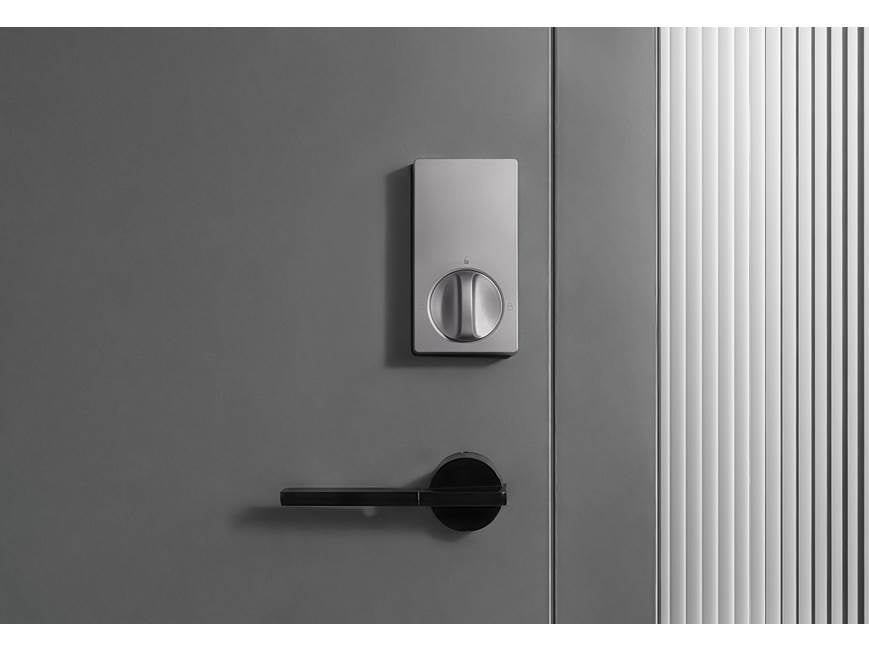
Best for: Apple Home Key households
- Entry methods
- Fingerprint, keypad, key, and Home Key
- Connectivity
- Bluetooth and Zigbee
- Power
- 8 AA batteries
- Emergency power
- USB-C port
- Supports Apple Home Key
- Offers several entry methods
- USB-C emergency power option
- Remote smart-home functions can require an Aqara hub
- Full deadbolt replacement is required
Is the Aqara Smart Lock U100 worth buying on Black Friday 2026?
The Aqara Smart Lock U100, Black is a strong option for Apple households that want Home Key alongside fingerprint and keypad entry. Check hub requirements against your preferred remote-control setup, and confirm the lock fits your door before choosing it.
See today’s Black Friday price on Amazon
#7
eufy Security Smart Lock C220, Black
The eufy Security Smart Lock C220, Black is the best all-in-one fingerprint pick for households that want multiple entry methods and built-in Wi-Fi.
Best for: Fingerprint entry with Wi-Fi
- Entry methods
- Fingerprint, keypad, app, and key
- Connectivity
- Built-in Wi-Fi
- Power
- 8 AA batteries
- Fingerprint capacity
- Up to 100 fingerprints
- Combines fingerprint, keypad, and key access
- Built-in Wi-Fi supports remote management
- Fingerprint capacity supports multiple users
- Replaces the existing deadbolt
- Check door dimensions before purchase
Is the eufy Security Smart Lock C220 worth buying on Black Friday 2026?
The eufy Security Smart Lock C220, Black is worth a close look for households seeking fingerprint access without giving up keypad or key entry. Built-in Wi-Fi supports remote management, and capacity for up to 100 fingerprints suits a shared home.
See today’s Black Friday price on Amazon
Which Wyze Lock is best for Black Friday 2026?
Wyze Lock Bolt Fingerprint Keypad Deadbolt, Matte Black is the better Wyze pick for fingerprint entry, while Wyze Lock WiFi & Bluetooth Smart Door Lock with Gateway, Satin Nickel suits retrofit installation.
The distinction is simple: Wyze Lock Bolt replaces the deadbolt and adds fingerprint and keypad access at the door. Wyze Lock attaches inside and turns a compatible existing deadbolt, preserving its exterior hardware and key. The retrofit model includes a gateway for remote app control, while the Bolt uses Bluetooth for nearby control. Neither choice is right for every door, so check the product’s compatibility details and your household’s need for remote access before ordering.
How does Wyze Lock compare with a full smart deadbolt?
Schlage Encode Smart WiFi Deadbolt with Camelot Trim, Satin Nickel adds built-in Wi-Fi and up to 100 access codes, while Wyze Lock focuses on retrofit convenience.
A full smart deadbolt replaces the existing lock hardware and typically puts the keypad or reader on the exterior. That design suits shoppers who want a cohesive, all-in-one unit. A retrofit lock is appealing when preserving a familiar key or exterior finish matters. Compare installation requirements, connectivity, and code management before deciding: the most feature-rich lock is not automatically the right choice if it does not suit your door or daily routine.
Do smart locks need Wi-Fi for remote access?
Schlage Encode Smart WiFi Deadbolt with Camelot Trim, Satin Nickel has built-in Wi-Fi, while Wyze Lock Bolt Fingerprint Keypad Deadbolt, Matte Black relies on Bluetooth for nearby app control.
A built-in Wi-Fi lock connects to a home network for remote app functions, while a Bluetooth lock is designed for local control unless paired with a separate compatible connection product. Hub-based locks also depend on the right hub and setup. Before choosing, decide whether you need to lock or manage access while away from home. Shoppers who mainly unlock at the door can prioritize keypad, fingerprint, or key access instead.
Which smart lock works best for guests and family?
Yale Assure Lock 2 Wi-Fi Smart Lock with Keypad, Satin Nickel supports up to 250 access codes, making it a strong pick for households that manage many users.
Separate codes help households assign access to family, visitors, and service providers without sharing one everyday code. Schlage Encode Smart WiFi Deadbolt with Camelot Trim, Satin Nickel supports up to 100 codes, while Wyze Lock Bolt Fingerprint Keypad Deadbolt, Matte Black supports up to 20. Match capacity to the number of people who need entry, then check how each app manages, changes, and removes codes. Fingerprint access is another convenient option for regular users.
What should I check before buying a smart lock?
A smart lock’s door fit, connectivity, and entry methods matter more than its feature list alone, so check all three before buying.
Start with door thickness, backset, deadbolt type, and clearance around the handle. Then identify whether the product replaces the lock or attaches to its interior. Confirm the connection method matches your home network and smart-home setup, including any hub requirements. Finally, consider who uses the door and how they prefer to unlock it. A keypad helps when phones are not convenient; a physical key offers a familiar backup; fingerprint or Apple Home Key can simplify daily entry for compatible users.
Buying Guide
Choose retrofit or replacement
Wyze Lock WiFi & Bluetooth Smart Door Lock with Gateway, Satin Nickel and August Home Wi-Fi Smart Lock (4th Generation), Silver install inside an existing deadbolt. Full replacements such as Schlage Encode Smart WiFi Deadbolt with Camelot Trim, Satin Nickel change the exterior hardware too. Check fit and installation needs first.
Match the lock to your preferred entry method
Wyze Lock Bolt Fingerprint Keypad Deadbolt, Matte Black and eufy Security Smart Lock C220, Black offer fingerprint entry. Keypad-only and app-first shoppers have other choices, while Aqara Smart Lock U100, Black adds Apple Home Key. Pick the options your household will use every day.
Decide how much remote control you need
Built-in Wi-Fi models connect directly to a home network. Wyze Lock Bolt Fingerprint Keypad Deadbolt, Matte Black uses Bluetooth, and hub-based features depend on compatible equipment. Confirm what remote access requires before choosing a lock.
Review battery and backup details
Compare the listed battery type, battery access, and backup entry method. Physical keys, emergency power ports, and app alerts vary by model. Keep the manufacturer’s recommended replacement batteries on hand and review the setup instructions.
Check smart-home compatibility
A lock’s app, voice-assistant support, and platform integrations vary by model and configuration. Confirm compatibility with the devices already in your home, especially when choosing a hub-based lock or Apple Home Key model.
FAQ
Wyze Lock Bolt vs Wyze Lock: which is better?
Wyze Lock Bolt Fingerprint Keypad Deadbolt, Matte Black is better for fingerprint and keypad entry at the door. Wyze Lock WiFi & Bluetooth Smart Door Lock with Gateway, Satin Nickel is better for retrofit installation that keeps exterior deadbolt hardware in place. Choose based on access style and installation.
Does Wyze Lock Bolt have Wi-Fi?
Wyze Lock Bolt Fingerprint Keypad Deadbolt, Matte Black uses Bluetooth for local app control and does not include built-in Wi-Fi. Shoppers who need remote access should compare a Wi-Fi model or check compatible connection options before purchase.
Can Wyze Lock work with an existing deadbolt?
Wyze Lock WiFi & Bluetooth Smart Door Lock with Gateway, Satin Nickel is an interior retrofit model designed to operate a compatible existing deadbolt. Check door and deadbolt compatibility before ordering, and remember that Wyze Lock Bolt Fingerprint Keypad Deadbolt replaces the deadbolt instead.
Which smart lock has the most access codes?
Yale Assure Lock 2 Wi-Fi Smart Lock with Keypad, Satin Nickel supports up to 250 access codes among the locks in this guide. Schlage Encode Smart WiFi Deadbolt with Camelot Trim, Satin Nickel supports up to 100, while code capacity varies across the other products.
Which smart lock supports Apple Home Key?
Aqara Smart Lock U100, Black supports Apple Home Key, along with fingerprint, keypad, and physical-key entry. Check the compatible Apple devices and smart-home setup required for the features you plan to use, including remote access.
Are smart locks safe if the batteries run out?
Backup options vary by model. Wyze Lock Bolt Fingerprint Keypad Deadbolt, Matte Black and Schlage Encode Smart WiFi Deadbolt with Camelot Trim, Satin Nickel include physical-key access, while Aqara Smart Lock U100, Black has a USB-C emergency power port. Review each manufacturer’s instructions.