

As an Amazon Associate we earn from qualifying purchases.
- Best overall: SteelSeries Apex Pro TKL Gen 3 Mechanical Gaming Keyboard
- Best budget: Keychron C3 Pro QMK/VIA Wired Mechanical Keyboard (Red Backlight, Red Switches)
- Best premium: Logitech G915 X LIGHTSPEED TKL Wireless Gaming Keyboard (Tactile, Black)
- Best for travel: Logitech G515 LIGHTSPEED TKL Wireless Gaming Keyboard (Black)
- Gaming keyboard describes a keyboard’s purpose; mechanical describes its switch technology, so one product can be both.
- SteelSeries Apex Pro TKL Gen 3 is the competitive pick, with adjustable actuation from 0.1 to 4.0 mm.
- Keychron C3 Pro QMK/VIA Wired Mechanical Keyboard is the straightforward budget-friendly wired choice.
- Logitech G915 X LIGHTSPEED TKL Wireless Gaming Keyboard suits players who want a low-profile wireless design.
- Compare switch feel, layout, connection and software before choosing a Black Friday 2026 keyboard.
Gaming keyboards and mechanical keyboards are not opposing categories: gaming describes the intended use, while mechanical describes how the keys register. Many gaming keyboards use mechanical switches, so the right Black Friday 2026 choice comes down to features, feel and fit.
I’m Jake Morrison, and I researched and compared specs, reviews and owner feedback to build this shortlist. The SteelSeries Apex Pro TKL Gen 3 stands out for competitive control, while the Keychron C3 Pro QMK/VIA Wired Mechanical Keyboard keeps the basics focused. Here's the bottom line: choose the keyboard that suits your games and desk, not a label alone.
How We Picked
- Compared switch types, key feel and adjustment options that affect everyday gaming.
- Prioritized useful gaming features, including rapid input, macro support and dependable connections.
- Included full-size, tenkeyless and low-profile designs for different desk and travel needs.
- Reviewed owner feedback and product specifications for build, software, connectivity and layout.
- Selected options across wired, wireless, enthusiast and budget-friendly categories.
Comparison Table
| Product | Best for | Layout | Connection | Switch or actuation |
|---|---|---|---|---|
| SteelSeries Apex Pro TKL Gen 3 Mechanical Gaming Keyboard | Competitive play | Tenkeyless, 87 keys | Wired USB | OmniPoint 3.0, 0.1–4.0 mm |
| Razer BlackWidow V4 75% Mechanical Gaming Keyboard | Switch customization | 75-percent | Wired USB | Hot-swappable mechanical |
| Logitech G915 X LIGHTSPEED TKL Wireless Gaming Keyboard (Tactile, Black) | Low-profile wireless | Tenkeyless | LIGHTSPEED, Bluetooth, wired | Low-profile tactile |
| Logitech G515 LIGHTSPEED TKL Wireless Gaming Keyboard (Black) | Travel and flexible setups | Tenkeyless, 87 keys | LIGHTSPEED, Bluetooth, wired | Low-profile mechanical |
| Corsair K70 CORE RGB Mechanical Gaming Keyboard (MLX Red) | Full-size controls | Full-size, 100-percent | Wired USB | MLX Red linear |
| Keychron C3 Pro QMK/VIA Wired Mechanical Keyboard (Red Backlight, Red Switches) | Budget-minded wired gaming | Tenkeyless, 87 keys | Wired USB | Keychron Red linear |
| HyperX Alloy Origins Core PBT Mechanical Gaming Keyboard (Aqua Switches) | Compact tactile typing | Tenkeyless, 87 keys | Detachable USB-C | HyperX Aqua tactile |
Best Picks Reviewed
#1 · Top pick
SteelSeries Apex Pro TKL Gen 3 Mechanical Gaming Keyboard
The SteelSeries Apex Pro TKL Gen 3 Mechanical Gaming Keyboard is the best competitive pick for players who want adjustable key response; its OmniPoint 3.0 switches offer actuation from 0.1 to 4.0 mm.

Best for: Competitive play and adjustable key response
- Layout
- Tenkeyless, 87 keys
- Switch
- OmniPoint 3.0 adjustable magnetic
- Actuation range
- 0.1–4.0 mm
- Connection
- Wired USB
- Adjustable actuation supports different play styles.
- Tenkeyless layout leaves more room for mouse movement.
- Gaming features include Rapid Trigger.
- Advanced controls and software take time to learn.
- Wired connection limits desk flexibility.
Is the SteelSeries Apex Pro TKL Gen 3 Mechanical Gaming Keyboard worth buying on Black Friday 2026?
Yes. The SteelSeries Apex Pro TKL Gen 3 Mechanical Gaming Keyboard is a strong Black Friday 2026 choice for competitive players who want adjustable response. The SteelSeries Apex Pro TKL Gen 3 Mechanical Gaming Keyboard's 0.1–4.0 mm actuation range gives more control than a fixed-actuation board.
See today’s Black Friday price on Amazon
#2
Razer BlackWidow V4 75% Mechanical Gaming Keyboard
The Razer BlackWidow V4 75% Mechanical Gaming Keyboard is the best compact enthusiast pick for players who want customization; its 75-percent layout pairs hot-swappable switches with per-key RGB.
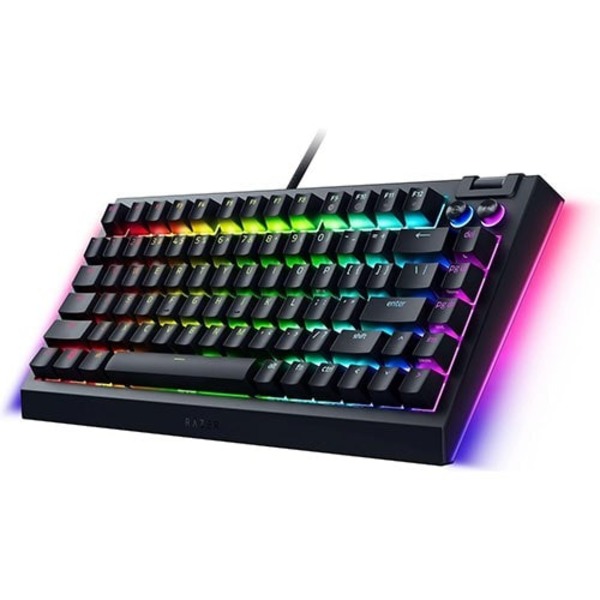
Best for: Compact customization and switch swapping
- Layout
- 75-percent
- Switch compatibility
- 3-pin and 5-pin mechanical
- Lighting
- Per-key RGB and underglow
- Connection
- Wired USB
- Hot-swap design supports compatible switch changes.
- Compact layout keeps dedicated arrow and navigation keys.
- RGB lighting is configurable.
- Wired-only setup is less flexible.
- Compact layout takes adjustment for full-size keyboard users.
Is the Razer BlackWidow V4 75% Mechanical Gaming Keyboard worth buying on Black Friday 2026?
Yes. The Razer BlackWidow V4 75% Mechanical Gaming Keyboard is a compelling pick for gamers who want a compact board with customization. The Razer BlackWidow V4 75% Mechanical Gaming Keyboard's hot-swap support accepts compatible 3-pin and 5-pin switches, making future switch changes simpler.
See today’s Black Friday price on Amazon
#3
Logitech G915 X LIGHTSPEED TKL Wireless Gaming Keyboard (Tactile, Black)
The Logitech G915 X LIGHTSPEED TKL Wireless Gaming Keyboard (Tactile, Black) is the best low-profile wireless pick for players who value a clean desk; its tenkeyless design supports three connection modes.
Best for: Low-profile wireless gaming
- Layout
- Tenkeyless
- Switch
- Low-profile tactile mechanical
- Connections
- LIGHTSPEED, Bluetooth, wired
- Battery life
- Up to 36 hours with RGB lighting
- Three connection options support different devices.
- Low-profile keys create a slim setup.
- Tenkeyless format saves desk space.
- Low-profile feel differs from standard-height switches.
- Wireless features add setup choices to manage.
Is the Logitech G915 X LIGHTSPEED TKL Wireless Gaming Keyboard (Tactile, Black) worth buying on Black Friday 2026?
Yes. The Logitech G915 X LIGHTSPEED TKL Wireless Gaming Keyboard (Tactile, Black) suits players who want a slim wireless board for gaming and everyday use. LIGHTSPEED, Bluetooth and wired connections give it flexibility across compatible devices.
See today’s Black Friday price on Amazon
#4
Logitech G515 LIGHTSPEED TKL Wireless Gaming Keyboard (Black)
The Logitech G515 LIGHTSPEED TKL Wireless Gaming Keyboard (Black) is the best travel-friendly wireless pick for players who want low-profile keys; its 87-key layout connects through three modes.
Best for: Wireless setups and travel
- Layout
- Tenkeyless, 87 keys
- Switch
- Low-profile mechanical
- Connections
- LIGHTSPEED, Bluetooth, wired
- Battery life
- Up to 36 hours with RGB lighting
- Three connection modes support multiple setups.
- Slim tenkeyless build is easy to place on a desk.
- Low-profile switches suit players who prefer shorter key travel.
- No number pad for spreadsheet-heavy use.
- Low-profile typing feel is a personal preference.
Is the Logitech G515 LIGHTSPEED TKL Wireless Gaming Keyboard (Black) worth buying on Black Friday 2026?
Yes. The Logitech G515 LIGHTSPEED TKL Wireless Gaming Keyboard (Black) is a practical choice for players moving between gaming and general use. Three connection modes and a compact 87-key layout make it easy to fit into a flexible setup.
See today’s Black Friday price on Amazon
#5
Corsair K70 CORE RGB Mechanical Gaming Keyboard (MLX Red)
The Corsair K70 CORE RGB Mechanical Gaming Keyboard (MLX Red) is the best full-size wired pick for players who want familiar controls; its 100-percent layout includes a number pad and dedicated media controls.
Best for: Full-size gaming and everyday typing
- Layout
- Full-size, 100-percent
- Switch
- Corsair MLX Red linear
- Controls
- Dedicated media dial and buttons
- Connection
- Wired USB
- Full-size layout includes a number pad.
- Dedicated media controls are easy to reach.
- Linear switches suit quick, smooth key presses.
- Full-size footprint needs more desk space.
- Wired connection does not suit cable-free setups.
Is the Corsair K70 CORE RGB Mechanical Gaming Keyboard (MLX Red) worth buying on Black Friday 2026?
Yes. The Corsair K70 CORE RGB Mechanical Gaming Keyboard (MLX Red) is a solid fit for players who want a full-size board for gaming and daily tasks. The number pad and dedicated media controls add convenience beyond core gameplay.
See today’s Black Friday price on Amazon
#6
Keychron C3 Pro QMK/VIA Wired Mechanical Keyboard (Red Backlight, Red Switches)
The Keychron C3 Pro QMK/VIA Wired Mechanical Keyboard (Red Backlight, Red Switches) is the best budget-friendly pick for players who want a straightforward wired board; its 87-key layout supports 1000 Hz polling.
Best for: Budget-minded wired gaming
- Layout
- Tenkeyless, 87 keys
- Switch
- Keychron Red linear
- Polling rate
- 1000 Hz
- Software
- QMK and VIA support
- QMK and VIA support key remapping.
- Tenkeyless layout leaves mouse space.
- Linear switches suit smooth key presses.
- Wired-only connection.
- Red backlighting is less flexible than per-key RGB.
Is the Keychron C3 Pro QMK/VIA Wired Mechanical Keyboard (Red Backlight, Red Switches) worth buying on Black Friday 2026?
Yes. The Keychron C3 Pro QMK/VIA Wired Mechanical Keyboard (Red Backlight, Red Switches) is a value-focused option for players who prefer a simple wired setup. The Keychron C3 Pro QMK/VIA Wired Mechanical Keyboard (Red Backlight, Red Switches)'s 1000 Hz polling and programmable controls cover the essentials without a wireless feature set.
See today’s Black Friday price on Amazon
#7
HyperX Alloy Origins Core PBT Mechanical Gaming Keyboard (Aqua Switches)
The HyperX Alloy Origins Core PBT Mechanical Gaming Keyboard (Aqua Switches) is the best compact tactile pick for players who want a sturdy wired board; its tenkeyless design has 87 keys.
Best for: Tactile feedback in a compact layout
- Layout
- Tenkeyless, 87 keys
- Switch
- HyperX Aqua tactile
- Keycaps
- PBT
- Connection
- Detachable USB-C
- Tactile switches provide a noticeable response.
- PBT keycaps are suited to regular use.
- Detachable USB-C cable simplifies desk setup.
- No number pad.
- Wired connection is less convenient for multi-device use.
Is the HyperX Alloy Origins Core PBT Mechanical Gaming Keyboard (Aqua Switches) worth buying on Black Friday 2026?
Yes. The HyperX Alloy Origins Core PBT Mechanical Gaming Keyboard (Aqua Switches) fits players who want tactile feedback in a space-saving format. The 87-key layout, PBT keycaps and detachable USB-C connection make it a focused wired gaming choice.
See today’s Black Friday price on Amazon
Is a gaming keyboard different from a mechanical keyboard?
Gaming keyboards and mechanical keyboards describe different things: gaming is a use case, while mechanical refers to the switch design. A single keyboard can fit both labels, as the SteelSeries Apex Pro TKL Gen 3 Mechanical Gaming Keyboard shows.
Gaming-focused models often add software profiles, lighting, macro controls or fast-input features. Mechanical models focus on individual switches beneath the keys, with options such as linear, tactile or clicky feedback. Membrane gaming keyboards also exist, so the gaming label alone does not guarantee mechanical switches.
Check the switch type and feature list before buying. For competitive play, response controls can matter most; for typing and general use, switch feel and layout often make the bigger difference.
Which keyboard is best for competitive gaming?
The SteelSeries Apex Pro TKL Gen 3 Mechanical Gaming Keyboard is the strongest competitive pick, with adjustable actuation from 0.1 to 4.0 mm. That range lets players tune how far a key travels before registering.
A tenkeyless layout removes the number pad and gives the mouse more room. Rapid Trigger support is useful for games where repeated, fast inputs matter. Players who prefer familiar fixed switches can look at the Keychron C3 Pro QMK/VIA Wired Mechanical Keyboard or Corsair K70 CORE RGB Mechanical Gaming Keyboard.
Prioritize a comfortable switch feel and reliable connection over flashy extras. A feature-rich board only helps when its controls fit the games you play and you have time to configure them.
Are mechanical keyboards better for gaming?
Mechanical keyboards such as the Razer BlackWidow V4 75% Mechanical Gaming Keyboard provide distinct switch choices, but no switch type is best for every player. Linear switches feel smooth, tactile switches add a bump, and clicky switches add audible feedback.
Mechanical boards appeal to players who want a defined key feel, customization or replaceable switches. Membrane boards can be quieter and simpler, and remain a valid gaming choice. The key factors are comfort, consistency and the games on your screen.
For shared rooms, consider sound before picking clicky switches. For a quieter desk, linear switches and a suitable keyboard build are a more sensible starting point. Read the exact model’s switch description, since product names alone do not tell the full story.
Should I choose a full-size or tenkeyless keyboard?
The Corsair K70 CORE RGB Mechanical Gaming Keyboard (MLX Red) gives players a full-size layout, while the 87-key SteelSeries Apex Pro TKL Gen 3 Mechanical Gaming Keyboard frees up desk space. The best fit depends on whether a number pad is part of your routine.
Full-size keyboards suit users who enter numbers often or want dedicated keys and controls close by. Tenkeyless designs drop the number pad to create more room for mouse movement, which many PC gamers value.
Compact 75-percent boards, such as the Razer BlackWidow V4 75% Mechanical Gaming Keyboard, keep more navigation keys than smaller layouts. Check the key arrangement before buying; compact layouts can take a short adjustment period.
What should I look for in a Black Friday 2026 keyboard?
The Logitech G915 X LIGHTSPEED TKL Wireless Gaming Keyboard (Tactile, Black) and Keychron C3 Pro QMK/VIA Wired Mechanical Keyboard show why connection type, layout and switch feel matter in a Black Friday 2026 comparison. Start with the features you will use daily.
Choose wired for a direct, simple desk setup; choose wireless when fewer cables and multi-device connections matter. Compare battery details, included software and device compatibility. For mechanical models, confirm the switch variant rather than assuming every version feels the same.
Use the product name and model details when comparing listings. Check the layout, switch type, connection, keycap material and warranty information. A clear feature match is more useful than buying a keyboard only because a seasonal promotion catches your eye.
Buying Guide
Choose the switch feel
Linear switches feel smooth through a press; tactile switches add a bump, and clicky switches add sound. Match the feel to your games, typing habits and room. The HyperX Alloy Origins Core PBT Mechanical Gaming Keyboard (Aqua Switches) is a tactile example.
Pick a layout for your desk
Full-size boards include a number pad, while tenkeyless models reclaim mouse space. Compact 75-percent layouts keep key navigation while reducing width. Measure your desk and check the exact key arrangement before choosing.
Decide between wired and wireless
Wired keyboards keep charging out of the routine. Wireless models reduce cable clutter and can connect to multiple devices. The Logitech G515 LIGHTSPEED TKL Wireless Gaming Keyboard (Black) supports LIGHTSPEED, Bluetooth and wired connections.
Compare gaming features
Look for adjustable actuation, rapid input, remapping, macros and lighting only when those features suit your routine. Software support can matter as much as hardware. The SteelSeries Apex Pro TKL Gen 3 Mechanical Gaming Keyboard offers adjustable actuation.
Check the exact variant
One product family can include different switches, layouts, colors or connection options. Confirm the full model and variant before checkout, then compare warranty and compatibility details. Worth it for most players: a keyboard that fits the setup and feels right.
FAQ
What is the difference between a gaming keyboard and a mechanical keyboard?
A gaming keyboard is designed with gaming use in mind; a mechanical keyboard uses individual mechanical switches beneath its keys. One model can be both. Compare switch type, layout, software and connection to see whether a specific keyboard fits your needs.
Are mechanical keyboards good for gaming?
Yes. Mechanical keyboards suit gaming when their switch feel, layout and features match the player. Linear, tactile and clicky switches offer different feedback. Models such as the SteelSeries Apex Pro TKL Gen 3 Mechanical Gaming Keyboard also add adjustable actuation for more input control.
Is a tenkeyless keyboard better for gaming?
A tenkeyless keyboard is a strong gaming choice for players who want more mouse space and do not need a number pad. The 87-key Logitech G515 LIGHTSPEED TKL Wireless Gaming Keyboard (Black) is one compact option. Full-size layouts remain useful for number entry.
Which keyboard is the best budget pick for Black Friday 2026?
The Keychron C3 Pro QMK/VIA Wired Mechanical Keyboard (Red Backlight, Red Switches) is the guide’s budget pick. The tenkeyless board offers QMK and VIA support, red linear switches and 1000 Hz polling in a straightforward wired setup.
Is a wireless gaming keyboard good for competitive play?
A wireless keyboard with a gaming-focused connection is a sound choice for players who want fewer cables. The Logitech G915 X LIGHTSPEED TKL Wireless Gaming Keyboard (Tactile, Black) supports LIGHTSPEED, Bluetooth and wired connections. Check the connection mode that suits your setup.
What keyboard layout should I buy for gaming?
Choose full-size if you use a number pad, tenkeyless if you want extra mouse room, or 75-percent for a compact board with more navigation keys. The Corsair K70 CORE RGB Mechanical Gaming Keyboard (MLX Red) is full-size; the SteelSeries Apex Pro TKL Gen 3 is tenkeyless.