

As an Amazon Associate we earn from qualifying purchases.
- Best overall: Dell Alienware AW3423DWF 34-Inch QD-OLED Gaming Monitor
- Best budget: AOC CU34G3S 34-Inch Curved Gaming Monitor
- Best premium: ASUS ROG Swift OLED PG34WCDM 34-Inch Gaming Monitor
- Best for maximum immersion: Samsung 49-Inch Odyssey Neo G9 G95NA Gaming Monitor
- OLED monitors deliver deep blacks, vivid contrast and fast pixel response; ultrawide describes a screen shape, not a panel type.
- The Dell Alienware AW3423DWF combines a 34-inch QD-OLED panel with a 165Hz refresh rate.
- The AOC CU34G3S is a 34-inch ultrawide LCD option with a 165Hz refresh rate for buyers prioritizing screen space and value.
- The Samsung 49-Inch Odyssey Neo G9 G95NA has a 49-inch, 5120 x 1440 display for expansive multitasking and gaming.
- Compare resolution, refresh rate, connectivity and return terms before choosing a Black Friday 2026 monitor.
For Black Friday 2026, the Dell Alienware AW3423DWF offers a 34-inch QD-OLED screen at 165Hz, while the AOC CU34G3S delivers a 34-inch ultrawide LCD at the same refresh rate. The key distinction is that ultrawide describes a wide aspect ratio, while OLED describes a display technology. An OLED monitor can also be ultrawide, as several picks below demonstrate.
I’m Marcus Reed, and we researched and compared specs, reviews and owner feedback to find monitors suited to gaming, productivity and mixed use. My pick for most people is a 34-inch OLED ultrawide: it pairs expansive desktop space with strong contrast. Choose a conventional ultrawide LCD when screen area and practical value matter more than OLED’s pixel-level lighting.
How We Picked
- Panel and format: We included OLED ultrawides and LCD ultrawides to make the technology and screen-shape trade-offs clear.
- Core specifications: We compared screen size, resolution, refresh rate, curvature and stated response time.
- Use cases: We considered gaming, work, multitasking, movie viewing and desk space.
- Practical ownership: Connectivity, ergonomic features, burn-in considerations and owner feedback informed the shortlist.
- Shopping value: We focused on models with a clear benefit for their intended buyer, rather than assuming the highest specification fits everyone.
Comparison Table
| Product | Best for | Refresh rate | Resolution | Panel type |
|---|---|---|---|---|
| Dell Alienware AW3423DWF 34-Inch QD-OLED Gaming Monitor | OLED gaming and mixed use | 165Hz | 3440 x 1440 | QD-OLED |
| MSI MPG 341CQPX QD-OLED 34-Inch Gaming Monitor | Fast-paced PC gaming | 240Hz | 3440 x 1440 | QD-OLED |
| ASUS ROG Swift OLED PG34WCDM 34-Inch Gaming Monitor | Premium curved OLED gaming | 240Hz | 3440 x 1440 | WOLED |
| LG UltraGear 34GS95QE-B 34-Inch OLED Curved Gaming Monitor | Immersive single-player gaming | 240Hz | 3440 x 1440 | OLED |
| Samsung 49-Inch Odyssey Neo G9 G95NA Gaming Monitor | Maximum immersion and multitasking | 240Hz | 5120 x 1440 | Quantum Mini LED LCD |
| LG 38WN95C-W 38-Inch UltraWide Nano IPS Monitor | Work and mixed-use setups | 144Hz | 3840 x 1600 | Nano IPS |
| AOC CU34G3S 34-Inch Curved Gaming Monitor | Value-focused ultrawide gaming | 165Hz | 3440 x 1440 | VA LCD |
Best Picks Reviewed
#1 · Top pick
Dell Alienware AW3423DWF 34-Inch QD-OLED Gaming Monitor
The Dell Alienware AW3423DWF 34-Inch QD-OLED Gaming Monitor is the best all-around OLED ultrawide for PC gamers who want rich contrast and a 165Hz refresh rate. The Dell Alienware AW3423DWF 34-Inch QD-OLED Gaming Monitor's 34-inch, 3440 x 1440 curved panel balances immersive play with a desk-friendly footprint.
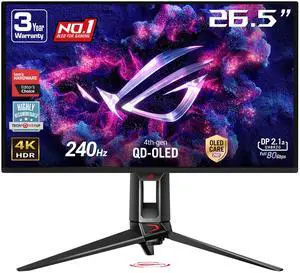
Best for: OLED gaming and mixed use
- Screen size
- 34 inches
- Resolution
- 3440 x 1440
- Refresh rate
- 165Hz
- Panel
- QD-OLED
- Deep OLED blacks and vivid color
- 165Hz refresh rate suits fast PC games
- Ultrawide resolution supports side-by-side windows
- OLED care and bright-room use deserve consideration
Is the Dell Alienware AW3423DWF 34-Inch QD-OLED Gaming Monitor worth buying on Black Friday 2026?
Yes. The Dell Alienware AW3423DWF 34-Inch QD-OLED Gaming Monitor pairs a 34-inch 3440 x 1440 screen with a 165Hz refresh rate and OLED contrast. Choose it for immersive PC gaming and a wide desktop, while keeping OLED care guidance in mind.
See today’s Black Friday price on Amazon
#2
MSI MPG 341CQPX QD-OLED 34-Inch Gaming Monitor
The MSI MPG 341CQPX QD-OLED 34-Inch Gaming Monitor is the best high-refresh OLED ultrawide for competitive PC players who value fluid motion. The MSI MPG 341CQPX QD-OLED 34-Inch Gaming Monitor's 34-inch 3440 x 1440 display runs at 240Hz, giving it a speed advantage over 165Hz alternatives.

Best for: Fast-paced PC gaming
- Screen size
- 34 inches
- Resolution
- 3440 x 1440
- Refresh rate
- 240Hz
- Panel
- QD-OLED
- 240Hz refresh rate supports fast gameplay
- OLED contrast adds depth to dark scenes
- Wide resolution offers room for game interfaces
- A powerful graphics card helps take advantage of 240Hz
Is the MSI MPG 341CQPX QD-OLED 34-Inch Gaming Monitor worth buying on Black Friday 2026?
Yes. The MSI MPG 341CQPX QD-OLED 34-Inch Gaming Monitor combines a 240Hz refresh rate with a 34-inch 3440 x 1440 QD-OLED panel. The MSI MPG 341CQPX QD-OLED 34-Inch Gaming Monitor suits fast PC gaming and vivid entertainment, especially when the computer can drive high frame rates.
See today’s Black Friday price on Amazon
#3
ASUS ROG Swift OLED PG34WCDM 34-Inch Gaming Monitor
The ASUS ROG Swift OLED PG34WCDM 34-Inch Gaming Monitor is the best premium OLED pick for players seeking a 240Hz ultrawide with a pronounced curve. The ASUS ROG Swift OLED PG34WCDM 34-Inch Gaming Monitor's 34-inch 3440 x 1440 WOLED screen is built for enveloping gaming and high-refresh PC setups.
Best for: Premium curved OLED gaming
- Screen size
- 34 inches
- Resolution
- 3440 x 1440
- Refresh rate
- 240Hz
- Panel
- WOLED
- 240Hz refresh rate for responsive play
- 800R curve draws the screen around the viewer
- OLED technology produces deep blacks
- The strong curve is not ideal for every desk or workflow
Is the ASUS ROG Swift OLED PG34WCDM 34-Inch Gaming Monitor worth buying on Black Friday 2026?
Yes. The ASUS ROG Swift OLED PG34WCDM 34-Inch Gaming Monitor stands out with a 240Hz refresh rate, 800R curve and 3440 x 1440 WOLED panel. The ASUS ROG Swift OLED PG34WCDM 34-Inch Gaming Monitor fits gamers who want a highly immersive screen and have room for its curved format.
See today’s Black Friday price on Amazon
#4
LG UltraGear 34GS95QE-B 34-Inch OLED Curved Gaming Monitor
The LG UltraGear 34GS95QE-B 34-Inch OLED Curved Gaming Monitor is the best strongly curved OLED option for gamers who want a 240Hz screen. The LG UltraGear 34GS95QE-B 34-Inch OLED Curved Gaming Monitor's 800R curve and 3440 x 1440 resolution put action close to the viewer across the 34-inch panel.
Best for: Immersive single-player gaming
- Screen size
- 34 inches
- Resolution
- 3440 x 1440
- Refresh rate
- 240Hz
- Curve
- 800R
- 240Hz refresh rate supports smooth motion
- Deep OLED blacks suit cinematic games
- 800R curve enhances an enveloping view
- The curve can complicate some precision work
Is the LG UltraGear 34GS95QE-B 34-Inch OLED Curved Gaming Monitor worth buying on Black Friday 2026?
Yes. The LG UltraGear 34GS95QE-B 34-Inch OLED Curved Gaming Monitor brings a 240Hz refresh rate, 800R curve and 3440 x 1440 resolution together. The LG UltraGear 34GS95QE-B 34-Inch OLED Curved Gaming Monitor is a strong fit for immersive gaming, though a less curved screen suits some work setups better.
See today’s Black Friday price on Amazon
#5
Samsung 49-Inch Odyssey Neo G9 G95NA Gaming Monitor
The Samsung 49-Inch Odyssey Neo G9 G95NA Gaming Monitor is the best maximum-screen-space pick for multitaskers and sim gamers who want a 49-inch LCD. The Samsung 49-Inch Odyssey Neo G9 G95NA Gaming Monitor's 5120 x 1440 resolution and 240Hz refresh rate create a vast, high-speed desktop.
Best for: Maximum immersion and multitasking
- Screen size
- 49 inches
- Resolution
- 5120 x 1440
- Refresh rate
- 240Hz
- Panel
- Quantum Mini LED LCD
- Very wide workspace can replace two screens
- 240Hz refresh rate supports fast gaming
- Mini LED backlighting improves LCD contrast
- Large size requires a wide desk and suitable viewing distance
Is the Samsung 49-Inch Odyssey Neo G9 G95NA Gaming Monitor worth buying on Black Friday 2026?
Yes. The Samsung 49-Inch Odyssey Neo G9 G95NA Gaming Monitor offers a 49-inch 5120 x 1440 display and 240Hz refresh rate. The Samsung 49-Inch Odyssey Neo G9 G95NA Gaming Monitor suits expansive gaming and multitasking, provided the desk can accommodate its unusually wide screen.
See today’s Black Friday price on Amazon
#6
LG 38WN95C-W 38-Inch UltraWide Nano IPS Monitor
The LG 38WN95C-W 38-Inch UltraWide Nano IPS Monitor is the best work-focused ultrawide for buyers who want extra vertical room and broad connectivity. The LG 38WN95C-W 38-Inch UltraWide Nano IPS Monitor's 3840 x 1600 resolution and 144Hz refresh rate serve productivity and casual gaming.
Best for: Work and mixed-use setups
- Screen size
- 38 inches
- Resolution
- 3840 x 1600
- Refresh rate
- 144Hz
- Panel
- Nano IPS
- More vertical pixels than 3440 x 1440 screens
- 144Hz refresh rate suits casual gaming
- USB-C connectivity supports compatible laptops
- IPS blacks do not match OLED in a dark room
Is the LG 38WN95C-W 38-Inch UltraWide Nano IPS Monitor worth buying on Black Friday 2026?
Yes. The LG 38WN95C-W 38-Inch UltraWide Nano IPS Monitor combines 3840 x 1600 resolution with a 144Hz refresh rate, leaving room for work and play. Choose it for a larger productivity canvas and laptop-friendly connectivity rather than OLED-level blacks.
See today’s Black Friday price on Amazon
#7
AOC CU34G3S 34-Inch Curved Gaming Monitor
The AOC CU34G3S 34-Inch Curved Gaming Monitor is the best budget-oriented ultrawide for gamers who prioritize screen space over OLED contrast. The AOC CU34G3S 34-Inch Curved Gaming Monitor's 3440 x 1440 VA panel reaches 165Hz, a useful combination for immersive PC play.
Best for: Value-focused ultrawide gaming
- Screen size
- 34 inches
- Resolution
- 3440 x 1440
- Refresh rate
- 165Hz
- Panel
- VA LCD
- 165Hz refresh rate supports responsive gaming
- Ultrawide resolution expands the view
- VA panel offers stronger contrast than many IPS screens
- LCD contrast and response do not equal OLED performance
Is the AOC CU34G3S 34-Inch Curved Gaming Monitor worth buying on Black Friday 2026?
Yes. The AOC CU34G3S 34-Inch Curved Gaming Monitor gives value-focused buyers a 34-inch 3440 x 1440 ultrawide with a 165Hz refresh rate. The AOC CU34G3S 34-Inch Curved Gaming Monitor is a practical gaming choice when screen space matters more than OLED contrast or premium motion performance.
See today’s Black Friday price on Amazon
Is an ultrawide monitor or an OLED monitor better for Black Friday 2026?
The Dell Alienware AW3423DWF 34-Inch QD-OLED Gaming Monitor demonstrates that 1 monitor can be both ultrawide and OLED. Ultrawide describes the screen’s broad shape, commonly with a 21:9 aspect ratio; OLED describes how the pixels produce light. The terms are not competing categories.
An OLED ultrawide is a compelling fit for games and movies because each pixel can switch off for deep blacks, while the wide format extends the view. A conventional LCD ultrawide, such as the AOC CU34G3S 34-Inch Curved Gaming Monitor, puts more emphasis on desktop width and practical value. Pick by panel, size and work habits rather than by label alone.
What are the main differences between OLED and LCD ultrawide monitors?
The Samsung 49-Inch Odyssey Neo G9 G95NA Gaming Monitor uses a 49-inch LCD panel, while the 34-inch OLED picks use self-emissive pixels. OLED generally provides the more dramatic black levels and strong contrast in dark games or movies. LCD technology remains a sound choice for bright workspaces and long sessions with static desktop elements.
LCD backlights, including Mini LED systems, illuminate the screen from behind; OLED pixels illuminate individually. That distinction affects contrast and care considerations, not screen shape. Compare brightness, reflections, text clarity, warranty coverage and everyday use alongside headline panel technology. For a screen used mainly for documents, an OLED upgrade is not automatically the best use of a Black Friday budget.
Which ultrawide monitor size and resolution should I choose?
The LG 38WN95C-W 38-Inch UltraWide Nano IPS Monitor offers 3840 x 1600 pixels, while most 34-inch picks here use 3440 x 1440. The LG’s additional vertical resolution gives documents, timelines and browser windows more room. A 34-inch display is often easier to fit on a standard desk and remains a strong gaming size.
The Samsung 49-Inch Odyssey Neo G9 G95NA Gaming Monitor reaches 5120 x 1440, essentially providing two 1440-pixel-high work areas side by side. Check desk width, viewing distance, stand depth and graphics-card capacity before choosing a very wide screen. Higher resolution and refresh rates demand more from a gaming PC, so match the monitor to the computer you already own.
Is an OLED ultrawide good for gaming and work?
The MSI MPG 341CQPX QD-OLED 34-Inch Gaming Monitor combines 3440 x 1440 resolution with a 240Hz refresh rate, suiting fast games and immersive single-player titles. OLED’s quick pixel response and contrast also make dark scenes look striking. Check whether your PC can render games at frame rates that make full use of 240Hz.
For work, an ultrawide can keep multiple windows visible without a second monitor. OLED is usable for productivity, but static elements such as taskbars and spreadsheets call for sensible screen-care habits and attention to the manufacturer’s warranty. Choose an LCD ultrawide for an all-day document setup if you prefer not to manage OLED-specific care.
What should I check before buying a monitor on Black Friday 2026?
The Dell Alienware AW3423DWF 34-Inch QD-OLED Gaming Monitor pairs a 165Hz refresh rate with 3440 x 1440 resolution, illustrating why a spec sheet needs context. Confirm that the graphics card supports the target resolution and refresh rate, then check available DisplayPort, HDMI and USB-C connections against your devices.
Compare the exact model and variant, stand adjustments, warranty terms, return window and included cables before checkout. OLED shoppers should read panel-care guidance and coverage details; ultrawide shoppers should measure the desk and confirm game compatibility. Black Friday 2026 is a useful time to compare specifications and retailer terms, not a reason to buy a screen that does not fit the setup.
Buying Guide
Match panel type to the way you use the screen
The Dell Alienware AW3423DWF 34-Inch QD-OLED Gaming Monitor is an OLED ultrawide, combining 2 distinct features. Favor OLED for deep blacks and vivid gaming; favor LCD for a straightforward work display or a Mini LED backlight.
Set a refresh-rate target
The MSI MPG 341CQPX QD-OLED 34-Inch Gaming Monitor reaches 240Hz, while the AOC CU34G3S 34-Inch Curved Gaming Monitor reaches 165Hz. Choose a rate your computer can use rather than paying attention to the largest number alone.
Check resolution and desk fit
The Samsung 49-Inch Odyssey Neo G9 G95NA Gaming Monitor provides 5120 x 1440 pixels across a 49-inch screen. Measure your desk and check viewing distance before selecting a screen that wide.
Review ports, warranty and return terms
The LG 38WN95C-W 38-Inch UltraWide Nano IPS Monitor includes USB-C connectivity for compatible laptops. Verify the exact model’s ports, stand features, warranty and return terms before placing an order.
Consider OLED care for static content
The ASUS ROG Swift OLED PG34WCDM 34-Inch Gaming Monitor uses a 34-inch OLED panel. Follow the manufacturer’s screen-care instructions and review warranty coverage if the display will show fixed work elements for extended periods.
FAQ
Is an ultrawide monitor the same as an OLED monitor?
No. Ultrawide describes a wide screen format, while OLED describes panel technology. The Dell Alienware AW3423DWF 34-Inch QD-OLED Gaming Monitor is both: it has a 34-inch ultrawide screen and a QD-OLED panel.
Is OLED better than ultrawide for gaming?
OLED and ultrawide are not mutually exclusive choices. The MSI MPG 341CQPX QD-OLED 34-Inch Gaming Monitor combines both, with a 34-inch 3440 x 1440 screen and 240Hz refresh rate. Choose OLED for contrast and ultrawide for a wider field of view.
Which ultrawide monitor is best for a budget gaming setup?
The AOC CU34G3S 34-Inch Curved Gaming Monitor is a value-focused option with 3440 x 1440 resolution and a 165Hz refresh rate. Its VA LCD panel provides a wide gaming canvas without the OLED panel technology found in premium picks.
Is a 49-inch ultrawide monitor worth it for work?
The Samsung 49-Inch Odyssey Neo G9 G95NA Gaming Monitor provides 5120 x 1440 pixels, giving multitaskers substantial side-by-side workspace. Check desk width, viewing distance and application compatibility first; a 34-inch or 38-inch screen fits more compact work areas.
Should I buy an OLED monitor for office work?
The LG 38WN95C-W 38-Inch UltraWide Nano IPS Monitor is a strong work-focused alternative with 3840 x 1600 resolution and a 144Hz refresh rate. OLED also serves productivity, but buyers should consider static screen elements, care guidance and warranty terms.