

As an Amazon Associate we earn from qualifying purchases.
- Best overall: AOC AGON PRO AG276QZD2 27-inch QD-OLED Gaming Monitor
- Best budget: AOC Q27G3XMN 27-inch QHD Mini LED Gaming Monitor
- Best premium: Dell Alienware AW2725DF 27-inch QD-OLED Gaming Monitor
- Best for competitive 1080p gaming: ViewSonic XG2431 24-inch 240Hz Gaming Monitor
- AOC AGON PRO AG276QZD2 is the QHD 240Hz QD-OLED choice for contrast, detail and fast play.
- ViewSonic XG2431 pairs a 24-inch 1080p IPS panel with a 240Hz refresh rate and motion-blur controls.
- AOC Q27G3XMN is a value-focused QHD Mini LED option with 180Hz refresh and 336 dimming zones.
- Dell Alienware AW2725DF targets players who prioritize a 360Hz QD-OLED refresh rate.
- Match resolution, refresh rate, panel type and desk space before choosing a Black Friday 2026 gaming monitor.
AOC AGON PRO AG276QZD2 leads for detailed QHD OLED gaming at 240Hz, while ViewSonic XG2431 is the better fit for 24-inch 1080p play at 240Hz. We researched and compared specs, reviews and owner feedback to identify the strengths, trade-offs and best use cases for both monitors, then added five alternatives for shoppers weighing speed, contrast and value.
My pick for most people depends on the games and graphics card: AOC AGON PRO AG276QZD2 gives single-player games more resolution and OLED contrast, while ViewSonic XG2431 suits competitive players who want a compact screen and clear motion. The guide also covers Mini LED, standard IPS and faster QD-OLED options, so you can compare the feature that matters most before choosing a Black Friday 2026 monitor.
How We Picked
- Compared resolution, refresh rate and response-time specifications for each monitor.
- Considered panel technology, including QD-OLED, OLED, IPS, VA and Mini LED.
- Reviewed connectivity and gaming features that affect PC and console setups.
- Used published specifications, reviews and owner feedback rather than detailed claims.
- Selected alternatives for different priorities, from compact competitive gaming to premium QD-OLED performance.
Comparison Table
| Product | Best for | Resolution | Refresh rate | Panel |
|---|---|---|---|---|
| AOC AGON PRO AG276QZD2 27-inch QD-OLED Gaming Monitor | QHD OLED contrast | 2560 x 1440 | 240Hz | QD-OLED |
| ViewSonic XG2431 24-inch 240Hz Gaming Monitor | Compact competitive play | 1920 x 1080 | 240Hz | IPS |
| AOC Q27G3XMN 27-inch QHD Mini LED Gaming Monitor | QHD Mini LED HDR | 2560 x 1440 | 180Hz | VA Mini LED |
| MSI MAG 271QPX QD-OLED E2 27-inch Gaming Monitor | QHD QD-OLED | 2560 x 1440 | 240Hz | QD-OLED |
| LG 27GS95QE-B 27-inch OLED Gaming Monitor | QHD OLED gaming | 2560 x 1440 | 240Hz | OLED |
| GIGABYTE M27Q X 27-inch QHD Gaming Monitor | Fast IPS gaming | 2560 x 1440 | 240Hz | IPS |
| Dell Alienware AW2725DF 27-inch QD-OLED Gaming Monitor | Premium high-refresh play | 2560 x 1440 | 360Hz | QD-OLED |
Best Picks Reviewed
#1 · Top pick
AOC AGON PRO AG276QZD2 27-inch QD-OLED Gaming Monitor
The AOC AGON PRO AG276QZD2 27-inch QD-OLED Gaming Monitor is the best premium all-rounder for players who want detailed, high-contrast gaming, with a 240Hz refresh rate.

Best for: QHD OLED gaming and rich contrast
- Screen size
- 27 inches
- Resolution
- 2560 x 1440
- Refresh rate
- 240Hz
- Panel
- QD-OLED
- QHD resolution gives games more detail than 1080p.
- QD-OLED delivers deep blacks and vivid color.
- 240Hz suits fast-paced PC gaming.
- OLED care features matter for long sessions with fixed interface elements.
- A 27-inch screen needs more desk space than a compact 24-inch monitor.
Is the AOC AGON PRO AG276QZD2 27-inch QD-OLED Gaming Monitor worth buying on Black Friday 2026?
The AOC AGON PRO AG276QZD2 27-inch QD-OLED Gaming Monitor is a strong Black Friday 2026 pick for players seeking QHD sharpness, OLED contrast and fast response. The AOC AGON PRO AG276QZD2 27-inch QD-OLED Gaming Monitor's 240Hz refresh rate supports competitive play without giving up resolution.
See today’s Black Friday price on Amazon
#2
ViewSonic XG2431 24-inch 240Hz Gaming Monitor
The ViewSonic XG2431 24-inch 240Hz Gaming Monitor is the best compact competitive pick for players who prioritize motion clarity, with a 240Hz refresh rate.
Best for: Competitive 1080p gaming and motion clarity
- Screen size
- 24 inches
- Resolution
- 1920 x 1080
- Refresh rate
- 240Hz
- Panel
- IPS
- 240Hz refresh is suited to fast competitive games.
- Blur Busters-approved PureXP+ strobing controls motion blur.
- Compact 24-inch size fits smaller desks.
- 1080p is less detailed than QHD at a similar screen size.
- Motion-strobing features require careful setup for individual preferences.
Is the ViewSonic XG2431 24-inch 240Hz Gaming Monitor worth buying on Black Friday 2026?
The ViewSonic XG2431 24-inch 240Hz Gaming Monitor is worth considering for esports players who value a compact screen and motion clarity. The ViewSonic XG2431 24-inch 240Hz Gaming Monitor's 1080p IPS panel and 240Hz refresh rate prioritize speed over the extra detail of QHD.
See today’s Black Friday price on Amazon
#3
AOC Q27G3XMN 27-inch QHD Mini LED Gaming Monitor
The AOC Q27G3XMN 27-inch QHD Mini LED Gaming Monitor is the best value-focused HDR pick for players who want brighter highlights, with a 180Hz refresh rate.

Best for: QHD gaming and Mini LED HDR
- Screen size
- 27 inches
- Resolution
- 2560 x 1440
- Refresh rate
- 180Hz
- Local dimming zones
- 336
- QHD resolution gives a sharp image for games and everyday use.
- Mini LED local dimming supports strong HDR highlights.
- 180Hz refresh offers a fast middle ground for gaming.
- VA panel viewing angles are narrower than IPS viewing angles.
- Local dimming can create blooming around bright objects.
Is the AOC Q27G3XMN 27-inch QHD Mini LED Gaming Monitor worth buying on Black Friday 2026?
The AOC Q27G3XMN 27-inch QHD Mini LED Gaming Monitor is a compelling option for shoppers who want QHD detail and HDR without moving to OLED. The AOC Q27G3XMN 27-inch QHD Mini LED Gaming Monitor's 180Hz refresh and 336 dimming zones balance speed with brighter highlights.
See today’s Black Friday price on Amazon
#4
MSI MAG 271QPX QD-OLED E2 27-inch Gaming Monitor
The MSI MAG 271QPX QD-OLED E2 27-inch Gaming Monitor is the best QD-OLED alternative for players seeking QHD speed, with a 240Hz refresh rate.
Best for: QHD QD-OLED gaming
- Screen size
- 27 inches
- Resolution
- 2560 x 1440
- Refresh rate
- 240Hz
- Response time
- 0.03ms GtG
- QD-OLED combines deep blacks with vivid color.
- QHD resolution is a useful fit for a 27-inch display.
- 240Hz supports responsive competitive gaming.
- OLED care features are relevant for static desktop use.
- A premium panel is unnecessary for players satisfied with 1080p IPS.
Is the MSI MAG 271QPX QD-OLED E2 27-inch Gaming Monitor worth buying on Black Friday 2026?
The MSI MAG 271QPX QD-OLED E2 27-inch Gaming Monitor is a good fit for players who want QHD resolution, OLED contrast and a 240Hz refresh rate. Compare its connectivity and care features with other QD-OLED monitors before choosing.
See today’s Black Friday price on Amazon
#5
LG 27GS95QE-B 27-inch OLED Gaming Monitor
The LG 27GS95QE-B 27-inch OLED Gaming Monitor is the best OLED pick for players who want fast QHD action, with a 240Hz refresh rate.
Best for: QHD OLED gaming with a matte screen
- Screen size
- 27 inches
- Resolution
- 2560 x 1440
- Refresh rate
- 240Hz
- Response time
- 0.03ms GtG
- OLED pixels provide strong contrast and fast response.
- QHD resolution balances detail and gaming performance.
- 240Hz suits fast action and competitive play.
- OLED care is important for repeated desktop use.
- A matte screen looks different from glossy OLED options.
Is the LG 27GS95QE-B 27-inch OLED Gaming Monitor worth buying on Black Friday 2026?
The LG 27GS95QE-B 27-inch OLED Gaming Monitor is a strong choice for QHD gaming with deep OLED contrast and a 240Hz refresh rate. Check how its matte finish suits your room and viewing preference before selecting it.
See today’s Black Friday price on Amazon
#6
GIGABYTE M27Q X 27-inch QHD Gaming Monitor
The GIGABYTE M27Q X 27-inch QHD Gaming Monitor is the best fast IPS pick for players who want 240Hz without OLED, with a 2560 x 1440 resolution.
Best for: Fast QHD IPS gaming
- Screen size
- 27 inches
- Resolution
- 2560 x 1440
- Refresh rate
- 240Hz
- Panel
- IPS
- 240Hz combines a fast refresh with QHD detail.
- IPS supports broad viewing angles.
- A non-OLED panel avoids OLED-specific care routines.
- Contrast is less dramatic than on OLED panels.
- HDR impact is more limited than on Mini LED options.
Is the GIGABYTE M27Q X 27-inch QHD Gaming Monitor worth buying on Black Friday 2026?
The GIGABYTE M27Q X 27-inch QHD Gaming Monitor is a practical option for players who want 240Hz and QHD resolution in an IPS panel. Pick it over OLED when refresh speed and a conventional LCD setup matter most.
See today’s Black Friday price on Amazon
#7
Dell Alienware AW2725DF 27-inch QD-OLED Gaming Monitor
The Dell Alienware AW2725DF 27-inch QD-OLED Gaming Monitor is the best premium speed pick for players chasing high-refresh QHD gaming, with a 360Hz refresh rate.
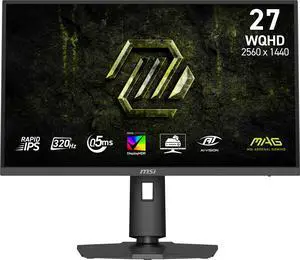
Best for: Premium competitive QD-OLED gaming
- Screen size
- 27 inches
- Resolution
- 2560 x 1440
- Refresh rate
- 360Hz
- Panel
- QD-OLED
- 360Hz refresh targets players who value maximum screen speed.
- QD-OLED offers vivid color and deep blacks.
- QHD resolution retains detail on a 27-inch screen.
- A 360Hz target needs a powerful gaming PC to take full advantage.
- OLED care features matter for desktop use.
Is the Dell Alienware AW2725DF 27-inch QD-OLED Gaming Monitor worth buying on Black Friday 2026?
The Dell Alienware AW2725DF 27-inch QD-OLED Gaming Monitor suits players who want QHD OLED contrast and a 360Hz refresh rate. Choose it when a capable PC and high competitive frame rates are priorities.
See today’s Black Friday price on Amazon
Which is better, AOC AGON PRO AG276QZD2 or ViewSonic XG2431?
AOC AGON PRO AG276QZD2 wins for QHD image detail and OLED contrast, while ViewSonic XG2431 favors compact 1080p competitive play; both reach 240Hz. The best choice depends on whether resolution and contrast or motion-focused play matters more.
AOC AGON PRO AG276QZD2 has a 27-inch QHD QD-OLED panel, offering more pixels and deeper blacks for cinematic games. ViewSonic XG2431 uses a 24-inch Full HD IPS panel, with PureXP+ strobing controls that help reduce perceived motion blur. The smaller resolution also asks less of a graphics card.
Choose AOC AGON PRO AG276QZD2 for single-player games, QHD detail and OLED image quality. Choose ViewSonic XG2431 for esports, a smaller desk or a PC that prioritizes high frame rates at 1080p. Skip it if a 24-inch Full HD panel feels too small or soft for your work and gaming mix.
Is a 240Hz monitor worth choosing for Black Friday 2026?
A 240Hz gaming monitor is a good fit for players whose PC can deliver high frame rates and who value responsive motion. Both AOC AGON PRO AG276QZD2 and ViewSonic XG2431 offer 240Hz, but their resolutions and panel technologies serve different setups.
A high refresh rate updates the screen more often than a 60Hz or 144Hz monitor, making movement look smoother when a game produces enough frames. Competitive shooters benefit most from that responsiveness. Strategy games and slower single-player titles place more value on resolution, color and contrast than on reaching the highest frame rate.
Check your graphics card and the games you play before choosing 240Hz. A 1080p monitor such as ViewSonic XG2431 is easier to drive at high frame rates than QHD OLED options. AOC AGON PRO AG276QZD2 balances a sharp 2560 x 1440 image with 240Hz, but full performance still depends on the PC.
Should you choose OLED, IPS or Mini LED for gaming?
OLED is the best fit for deep blacks, IPS is a versatile choice for fast LCD gaming, and Mini LED prioritizes brighter HDR highlights. AOC AGON PRO AG276QZD2, ViewSonic XG2431 and AOC Q27G3XMN show how these technologies change the gaming experience.
QD-OLED and OLED panels control light at the pixel level, creating strong contrast and fast response. Those strengths suit dark games and vivid scenes. OLED buyers should review the monitor's care features and consider how often their screen shows static desktop elements.
IPS panels such as ViewSonic XG2431 and GIGABYTE M27Q X offer broad viewing angles and a familiar LCD experience. AOC Q27G3XMN combines VA with Mini LED dimming zones for HDR highlights, but blooming around bright objects is a trade-off. Compare panel type alongside refresh rate rather than treating one technology as best for every player.
What resolution and screen size suit a gaming desk?
A 24-inch 1080p screen suits compact desks and competitive play, while 27-inch QHD screens provide more detail for mixed gaming and everyday use. ViewSonic XG2431 is the compact Full HD option; AOC AGON PRO AG276QZD2 and the other 27-inch picks offer QHD resolution.
At 24 inches, Full HD keeps menus and text readable while giving a gaming PC a manageable resolution to render. Players focused on esports often prefer that balance. At 27 inches, 2560 x 1440 adds workspace and a sharper image, making QHD a flexible choice for games, browsing and productivity.
Measure desk depth and check your viewing distance before buying. A larger panel needs room for comfortable viewing, and a QHD monitor benefits from a graphics card that can keep frame rates high. AOC Q27G3XMN and GIGABYTE M27Q X offer QHD at 27 inches; ViewSonic XG2431 takes less space.
What should you compare before buying a monitor on Black Friday 2026?
Compare the exact model, resolution, refresh rate and panel technology before choosing a Black Friday 2026 gaming monitor. AOC AGON PRO AG276QZD2 and ViewSonic XG2431 look similar on refresh rate, but their QHD QD-OLED and Full HD IPS panels are very different.
Confirm the complete model name and screen size in the retailer listing, then check the connection options against your PC or console. Also check whether the stand supports the height and tilt adjustments your desk needs. For consoles, confirm the monitor's input support against the console's output requirements.
Prioritize features you will notice every day: QHD resolution for detail, high refresh for fast action, OLED for contrast or Mini LED for HDR brightness. Review the included warranty and panel-care guidance, especially for OLED. A clear shortlist prevents a refresh-rate number from overshadowing the features that fit your setup.
Buying Guide
Set your resolution target
Choose 1920 x 1080 for a compact competitive setup and easier high frame rates. Choose 2560 x 1440 for greater detail on a 27-inch screen. Match the resolution to your graphics card and the games you play.
Match refresh rate to your games
A 240Hz screen suits players who value smooth motion and have a PC that produces high frame rates. A 360Hz model is a specialist choice for competitive play. Casual and slower games do not require the highest refresh rate.
Choose a panel by image priority
Pick OLED or QD-OLED for deep blacks and vivid contrast. Pick IPS for an LCD panel with broad viewing angles. Pick Mini LED when HDR highlights and local dimming lead your priorities.
Check size, desk space and connections
Measure your desk and viewing distance before settling on 24 or 27 inches. Confirm the monitor has the inputs your PC or console needs, and review stand adjustment options for your setup.
Review OLED care and warranty details
Read the manufacturer guidance on screen care and warranty coverage before choosing an OLED model. Consider your use of static desktop elements and enable the monitor's recommended protective features.
FAQ
Which monitor is better for gaming, AOC AGON PRO AG276QZD2 or ViewSonic XG2431?
AOC AGON PRO AG276QZD2 is better for QHD detail, OLED contrast and cinematic gaming. ViewSonic XG2431 is better for compact 1080p competitive play and motion clarity. Both offer a 240Hz refresh rate, so resolution and panel preference separate them.
Is 240Hz enough for competitive gaming?
A 240Hz refresh rate is a strong fit for competitive gaming when a PC produces high frame rates. ViewSonic XG2431 pairs 240Hz with Full HD, while AOC AGON PRO AG276QZD2 combines 240Hz with QHD. Choose according to graphics-card capability and preferred screen detail.
Is the AOC Q27G3XMN good for HDR gaming?
The AOC Q27G3XMN 27-inch QHD Mini LED Gaming Monitor is a notable HDR option because it uses 336 local dimming zones and a VA panel. Local dimming supports brighter highlights, while blooming around bright objects is a trade-off to consider.
Should I buy a QHD or 1080p gaming monitor?
Choose QHD for sharper detail and more desktop space on a 27-inch screen. Choose 1080p for a compact setup or easier high frame rates on less powerful hardware. AOC AGON PRO AG276QZD2 is QHD; ViewSonic XG2431 is 1080p.
Is OLED good for a gaming monitor?
OLED is a strong gaming choice for deep blacks, vivid contrast and fast response. AOC AGON PRO AG276QZD2, MSI MAG 271QPX QD-OLED E2 and LG 27GS95QE-B offer OLED-based panels. Review each monitor's care guidance and warranty before deciding.
What is the best high-refresh QHD monitor in this guide?
Dell Alienware AW2725DF offers the highest listed refresh rate at 360Hz while keeping QHD resolution and a QD-OLED panel. AOC AGON PRO AG276QZD2, MSI MAG 271QPX QD-OLED E2 and GIGABYTE M27Q X are QHD alternatives with 240Hz refresh.