

As an Amazon Associate we earn from qualifying purchases.
- Best overall: CORSAIR K70 MAX RGB Magnetic-Mechanical Gaming Keyboard
- Best budget: CORSAIR K70 CORE RGB Mechanical Gaming Keyboard (MLX Red)
- Best premium: CORSAIR K100 RGB Mechanical Gaming Keyboard (CHERRY MX SPEED)
- Best for travel: CORSAIR K70 PRO MINI WIRELESS 60% Mechanical Gaming Keyboard (CHERRY MX Red)
- Corsair K70 keyboards cover full-size, tenkeyless and compact layouts, with options for mechanical, magnetic and wireless play.
- Corsair K100 keyboards sit at the premium end, adding flagship features such as dedicated macro keys or an ultra-thin wireless design.
- The CORSAIR K70 MAX RGB Magnetic-Mechanical Gaming Keyboard is the strongest all-around pick for adjustable key actuation and full-size control.
- The CORSAIR K70 CORE RGB Mechanical Gaming Keyboard (MLX Red) is a straightforward, full-size choice for players who want a simpler setup.
- Choose your layout, switch feel and connection type before comparing Black Friday 2026 offers.
The Corsair K70 is the better fit for most players who want a choice of layouts and switch types, while the Corsair K100 is the premium pick for extra control or a slim wireless design. We researched and compared specs, reviews and owner feedback across 7 Corsair keyboards to make the choice easier.
Here's the bottom line: start with the way you play. A full-size board keeps the number pad and extra controls within reach; a tenkeyless or 60% board frees desk space. The 2026 guide below compares each model, explains the trade-offs and shows which Corsair keyboard fits your setup.
How We Picked
- Compared each model’s layout, switch design and connection options using manufacturer specifications.
- Reviewed owner feedback for recurring comments about comfort, key feel, software and daily usability.
- Separated useful differences between K70 and K100 models from features that matter less to most players.
- Considered PC gaming, console desk setups, streaming controls and compact play spaces.
- Selected products with distinct strengths so shoppers can match a keyboard to a clear use case.
Comparison Table
| Product | Best for | Layout | Switch type | Connection |
|---|---|---|---|---|
| CORSAIR K70 RGB PRO Mechanical Gaming Keyboard (CHERRY MX Red) | Full-size wired gaming | Full-size, 100% | CHERRY MX Red linear | Wired USB |
| CORSAIR K70 CORE RGB Mechanical Gaming Keyboard (MLX Red) | Everyday full-size gaming | Full-size, 100% | CORSAIR MLX Red linear | Wired USB |
| CORSAIR K70 MAX RGB Magnetic-Mechanical Gaming Keyboard | Adjustable actuation | Full-size, 100% | CORSAIR MGX magnetic-mechanical | Wired USB |
| CORSAIR K70 RGB TKL Champion Series Mechanical Gaming Keyboard (CHERRY MX Red) | Tenkeyless desk setups | Tenkeyless, 87 keys | CHERRY MX Red linear | Wired USB-C |
| CORSAIR K70 PRO MINI WIRELESS 60% Mechanical Gaming Keyboard (CHERRY MX Red) | Compact wireless gaming | 60% | CHERRY MX Red linear | 2.4GHz wireless, Bluetooth or wired USB |
| CORSAIR K100 RGB Mechanical Gaming Keyboard (CHERRY MX SPEED) | Premium macro controls | Full-size, 100% | CHERRY MX SPEED linear | Wired USB |
| CORSAIR K100 AIR WIRELESS Ultra-thin Mechanical Gaming Keyboard | Slim wireless setups | Full-size, 100% | CHERRY MX Ultra Low Profile Tactile | 2.4GHz wireless, Bluetooth or wired USB |
Best Picks Reviewed
#1
CORSAIR K70 RGB PRO Mechanical Gaming Keyboard (CHERRY MX Red)
The CORSAIR K70 RGB PRO Mechanical Gaming Keyboard (CHERRY MX Red) is the best full-size wired pick for players who want fast linear switches, with an 8,000Hz hyper-polling rate.

Best for: Full-size wired gaming
- Layout
- Full-size, 100%
- Switches
- CHERRY MX Red linear
- Polling rate
- Up to 8,000Hz
- Connection
- Wired USB
- Fast linear switches suit quick repeated inputs.
- Full-size layout includes a number pad.
- Dedicated media controls add useful convenience.
- Wired connection limits desk flexibility.
- Full-size footprint takes up more room than TKL models.
Is the CORSAIR K70 RGB PRO Mechanical Gaming Keyboard (CHERRY MX Red) worth buying on Black Friday 2026?
Yes. The CORSAIR K70 RGB PRO Mechanical Gaming Keyboard (CHERRY MX Red) is a strong Black Friday 2026 pick for players who want a full-size layout, linear mechanical switches and an 8,000Hz polling rate in a wired keyboard.
See today’s Black Friday price on Amazon
#2
CORSAIR K70 CORE RGB Mechanical Gaming Keyboard (MLX Red)
The CORSAIR K70 CORE RGB Mechanical Gaming Keyboard (MLX Red) is the best straightforward full-size pick for players who value a clean gaming setup, with a 1,000Hz polling rate.
Best for: Everyday full-size gaming
- Layout
- Full-size, 100%
- Switches
- CORSAIR MLX Red linear
- Polling rate
- Up to 1,000Hz
- Connection
- Wired USB
- Familiar full-size layout keeps the number pad.
- Linear switches provide a smooth keypress.
- Multifunction dial and media controls simplify adjustments.
- Lacks the K70 PRO’s 8,000Hz polling rate.
- No wireless connection option.
Is the CORSAIR K70 CORE RGB Mechanical Gaming Keyboard (MLX Red) worth buying on Black Friday 2026?
Yes. The CORSAIR K70 CORE RGB Mechanical Gaming Keyboard (MLX Red) is a sensible pick for everyday gaming and typing, especially for players who want a full-size layout, linear switches and convenient media controls without chasing flagship specifications.
See today’s Black Friday price on Amazon
#3 · Top pick
CORSAIR K70 MAX RGB Magnetic-Mechanical Gaming Keyboard
The CORSAIR K70 MAX RGB Magnetic-Mechanical Gaming Keyboard is the best adjustable-switch pick for competitive players who want personalized key response, with actuation adjustable from 0.4mm to 3.6mm.
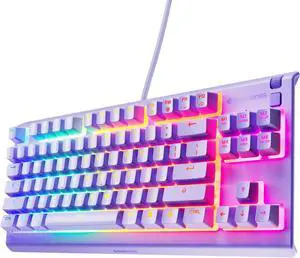
Best for: Adjustable actuation
- Layout
- Full-size, 100%
- Switches
- CORSAIR MGX magnetic-mechanical
- Actuation range
- 0.4mm to 3.6mm
- Polling rate
- Up to 8,000Hz
- Adjustable actuation lets players tune key response.
- Rapid Trigger support suits repeated movement inputs.
- Full-size layout retains the number pad and controls.
- Magnetic switches need more setup than standard mechanical switches.
- The full-size chassis is a poor fit for minimal desk space.
Is the CORSAIR K70 MAX RGB Magnetic-Mechanical Gaming Keyboard worth buying on Black Friday 2026?
Yes. The CORSAIR K70 MAX RGB Magnetic-Mechanical Gaming Keyboard is worth considering for competitive players who want adjustable actuation and Rapid Trigger support. The CORSAIR K70 MAX RGB Magnetic-Mechanical Gaming Keyboard's 0.4mm to 3.6mm range gives players detailed control over key response.
See today’s Black Friday price on Amazon
#4
CORSAIR K70 RGB TKL Champion Series Mechanical Gaming Keyboard (CHERRY MX Red)
The CORSAIR K70 RGB TKL Champion Series Mechanical Gaming Keyboard (CHERRY MX Red) is the best desk-saving wired pick for players who want a tournament-friendly layout, with 87 keys.
Best for: Tenkeyless desk setups
- Layout
- Tenkeyless, 87 keys
- Switches
- CHERRY MX Red linear
- Polling rate
- Up to 8,000Hz
- Connection
- Wired USB-C
- Tenkeyless layout leaves more room for mouse movement.
- Detachable USB-C cable makes transport simpler.
- Dedicated tournament mode reduces distractions.
- No number pad for spreadsheet-heavy work.
- Wired play is the only connection mode.
Is the CORSAIR K70 RGB TKL Champion Series Mechanical Gaming Keyboard (CHERRY MX Red) worth buying on Black Friday 2026?
Yes. The CORSAIR K70 RGB TKL Champion Series Mechanical Gaming Keyboard (CHERRY MX Red) is a solid choice for players who want a compact wired board with 87 keys, fast polling and extra mouse space. Choose another model if you need a number pad.
See today’s Black Friday price on Amazon
#5
CORSAIR K70 PRO MINI WIRELESS 60% Mechanical Gaming Keyboard (CHERRY MX Red)
The CORSAIR K70 PRO MINI WIRELESS 60% Mechanical Gaming Keyboard (CHERRY MX Red) is the best compact pick for players who want a portable wireless setup, with a 60% layout.
Best for: Compact wireless gaming
- Layout
- 60%
- Switches
- CHERRY MX Red linear
- Connection
- 2.4GHz wireless, Bluetooth or wired USB
- Battery life
- Up to 32 hours with RGB lighting
- Compact footprint suits smaller desks and travel.
- Three connection modes offer setup flexibility.
- Hot-swappable switches support compatible three-pin replacements.
- The 60% layout removes dedicated arrow and function keys.
- Wireless play requires battery management.
Is the CORSAIR K70 PRO MINI WIRELESS 60% Mechanical Gaming Keyboard (CHERRY MX Red) worth buying on Black Friday 2026?
Yes. The CORSAIR K70 PRO MINI WIRELESS 60% Mechanical Gaming Keyboard (CHERRY MX Red) is a good fit for compact desks and players who switch between wireless and wired play. The CORSAIR K70 PRO MINI WIRELESS 60% Mechanical Gaming Keyboard (CHERRY MX Red)'s 60% layout saves room, but requires shortcuts for several keys.
See today’s Black Friday price on Amazon
#6
CORSAIR K100 RGB Mechanical Gaming Keyboard (CHERRY MX SPEED)
The CORSAIR K100 RGB Mechanical Gaming Keyboard (CHERRY MX SPEED) is the best premium full-size pick for players who want extensive macro control, with 6 dedicated macro keys.
Best for: Premium macro controls
- Layout
- Full-size, 100%
- Switches
- CHERRY MX SPEED linear
- Macro keys
- 6 dedicated keys
- Polling rate
- Up to 4,000Hz
- Six macro keys support custom commands and shortcuts.
- Dedicated media controls and volume wheel are easy to reach.
- Full-size design suits gaming, streaming and productivity.
- Large chassis needs generous desk space.
- Premium feature set is excessive for players who want basic controls.
Is the CORSAIR K100 RGB Mechanical Gaming Keyboard (CHERRY MX SPEED) worth buying on Black Friday 2026?
Yes. The CORSAIR K100 RGB Mechanical Gaming Keyboard (CHERRY MX SPEED) is a worthwhile premium option for players who use macros, media controls and a number pad. The 6 dedicated macro keys are its clearest advantage over simpler K70 models.
See today’s Black Friday price on Amazon
#7
CORSAIR K100 AIR WIRELESS Ultra-thin Mechanical Gaming Keyboard
The CORSAIR K100 AIR WIRELESS Ultra-thin Mechanical Gaming Keyboard is the best slim wireless pick for players who want a full-size keyboard with multiple connection modes, at just 11.9mm thin.
Best for: Slim wireless setups
- Layout
- Full-size, 100%
- Switches
- CHERRY MX Ultra Low Profile Tactile
- Thickness
- 11.9mm
- Connection
- 2.4GHz wireless, Bluetooth or wired USB
- Ultra-thin design stands out from traditional gaming keyboards.
- Full-size layout retains the number pad.
- Three connection modes support varied devices and desks.
- Low-profile tactile switches feel different from standard-height switches.
- Slim design comes with a premium feature set.
Is the CORSAIR K100 AIR WIRELESS Ultra-thin Mechanical Gaming Keyboard worth buying on Black Friday 2026?
Yes. The CORSAIR K100 AIR WIRELESS Ultra-thin Mechanical Gaming Keyboard suits players who want a full-size wireless board with a slim profile. The CORSAIR K100 AIR WIRELESS Ultra-thin Mechanical Gaming Keyboard's 11.9mm chassis and three connection modes make it a distinctive fit for tidy, multi-device setups.
See today’s Black Friday price on Amazon
Corsair K70 vs Corsair K100: which keyboard should you buy?
The Corsair K70 range gives players 5 distinct layout and switch directions, while the Corsair K100 range focuses on 2 premium full-size designs. Choose a K70 for model variety, including magnetic switches, tenkeyless and compact wireless options. Choose a K100 for dedicated macro controls or an ultra-thin wireless build.
For most gaming desks, the CORSAIR K70 MAX RGB Magnetic-Mechanical Gaming Keyboard is a strong overall match because adjustable actuation helps tailor key response. The CORSAIR K100 RGB Mechanical Gaming Keyboard (CHERRY MX SPEED) makes more sense for players who rely on macro keys and media controls. A shorter desk setup points toward a TKL or 60% K70 instead.
Is the Corsair K100 worth choosing over the Corsair K70?
The Corsair K100 is worth choosing over a Corsair K70 when its 6 macro keys or 11.9mm wireless design solve a real setup need. The CORSAIR K100 RGB Mechanical Gaming Keyboard (CHERRY MX SPEED) delivers the most extra controls, while the CORSAIR K100 AIR WIRELESS Ultra-thin Mechanical Gaming Keyboard prioritizes a slim build and multi-device connectivity.
A higher-tier feature list does not automatically make the K100 the better fit. K70 models offer sharper variety across price tiers, layouts and switch technologies. Players who do not use macros or need an ultra-thin chassis can focus on a K70 model with the layout and switch feel they prefer.
Which Corsair K70 or K100 layout is best for gaming?
The 87-key TKL layout is best for players who want more mouse room, while the 60% layout is best for compact setups. The CORSAIR K70 RGB TKL Champion Series Mechanical Gaming Keyboard (CHERRY MX Red) keeps the main key cluster and function row, while the CORSAIR K70 PRO MINI WIRELESS 60% Mechanical Gaming Keyboard (CHERRY MX Red) cuts down desk footprint further.
Full-size models suit players who use a number pad, dedicated media controls or a broad set of commands. The CORSAIR K70 CORE RGB Mechanical Gaming Keyboard (MLX Red) offers a direct full-size wired option; the CORSAIR K100 AIR WIRELESS Ultra-thin Mechanical Gaming Keyboard adds wireless flexibility without removing the number pad.
Which switches should you pick on a Corsair K70 or K100?
Linear switches suit players who want smooth key travel, while magnetic switches suit players who want adjustable actuation. The CHERRY MX Red switches in several K70 models and the CHERRY MX SPEED switches in the K100 RGB are linear options. The CORSAIR K70 MAX RGB Magnetic-Mechanical Gaming Keyboard adds a 0.4mm to 3.6mm actuation range.
Switch feel is personal, so compare the switch type before choosing a keyboard around headline polling figures. The CORSAIR K100 AIR WIRELESS Ultra-thin Mechanical Gaming Keyboard uses tactile low-profile switches, a different feel from standard-height linear boards. Players who type as much as they game should weigh switch feel and layout together.
What should shoppers compare for Black Friday 2026?
Black Friday 2026 shoppers should compare 3 core details: layout, switch type and connection. Those factors shape daily use more than RGB effects or a spec-sheet number that does not match your setup. Check whether the product listing names the exact switch variant, since K70 and K100 model families include different configurations.
Next, match the keyboard to the desk and device. Wired full-size options suit permanent PC setups; wireless models suit multi-device desks, and compact boards suit smaller spaces. Compare the warranty and return terms shown by the retailer, too. The best offer is the model that fits your habits, not simply the keyboard with the longest feature list.
Buying Guide
Choose your layout first
The CORSAIR K70 RGB TKL Champion Series Mechanical Gaming Keyboard (CHERRY MX Red) has 87 keys for more mouse room, while the CORSAIR K70 PRO MINI WIRELESS 60% Mechanical Gaming Keyboard (CHERRY MX Red) saves more space. Pick full-size for a number pad.
Match the switch feel to your games
The CORSAIR K70 MAX RGB Magnetic-Mechanical Gaming Keyboard supports 0.4mm to 3.6mm actuation adjustment. Linear switch models suit smooth key presses, while the CORSAIR K100 AIR WIRELESS Ultra-thin Mechanical Gaming Keyboard uses tactile low-profile switches.
Decide whether wireless matters
The CORSAIR K70 PRO MINI WIRELESS 60% Mechanical Gaming Keyboard and CORSAIR K100 AIR WIRELESS Ultra-thin Mechanical Gaming Keyboard offer 2.4GHz, Bluetooth and wired modes. Choose wired models for a fixed desk and no battery upkeep.
Check the exact model name
The CORSAIR K70 family includes standard mechanical, magnetic-mechanical and compact wireless keyboards. Verify the full variant name and switch type in the Black Friday 2026 listing before ordering, since similar names identify different layouts and features.
Prioritize useful extras
The CORSAIR K100 RGB Mechanical Gaming Keyboard (CHERRY MX SPEED) has 6 dedicated macro keys. Pick those controls for streaming, shortcuts or custom commands; skip them if your setup needs a simpler keyboard rather than extra control layers.
FAQ
Corsair K70 vs Corsair K100 Black Friday 2026: which is better?
The Corsair K70 is better for shoppers who want more choice across layouts and switch styles, while the Corsair K100 is better for premium extras. Pick the K70 MAX for adjustable actuation or the K100 RGB for 6 dedicated macro keys.
Is the Corsair K70 MAX good for competitive gaming?
Yes. The CORSAIR K70 MAX RGB Magnetic-Mechanical Gaming Keyboard suits competitive players who want adjustable actuation and Rapid Trigger support. Its 0.4mm to 3.6mm range lets players tune key response around movement, aiming and repeated inputs.
Which Corsair K70 keyboard is best for a small desk?
The CORSAIR K70 PRO MINI WIRELESS 60% Mechanical Gaming Keyboard (CHERRY MX Red) is the best K70 choice for a small desk because its 60% layout takes up less space. The tenkeyless CORSAIR K70 RGB TKL Champion Series is a better fit when dedicated function keys matter.
Does the Corsair K100 AIR support wireless connections?
Yes. The CORSAIR K100 AIR WIRELESS Ultra-thin Mechanical Gaming Keyboard supports 2.4GHz wireless, Bluetooth and wired USB connections. The full-size layout keeps a number pad, while its 11.9mm profile makes it a distinctly slim alternative to standard gaming keyboards.
Is the Corsair K70 CORE a good first gaming keyboard?
Yes. The CORSAIR K70 CORE RGB Mechanical Gaming Keyboard (MLX Red) is a practical first gaming keyboard for players who want a full-size layout, linear switches and straightforward wired play. Its media controls and multifunction dial add convenience without requiring a compact layout or wireless setup.
Which Corsair keyboard has dedicated macro keys?
The CORSAIR K100 RGB Mechanical Gaming Keyboard (CHERRY MX SPEED) has 6 dedicated macro keys. Those controls suit players who use custom commands, streaming shortcuts or productivity macros. Players who do not need dedicated macro inputs can choose a simpler K70 model.