

As an Amazon Associate we earn from qualifying purchases.
- Best overall: Razer DeathAdder V3 Wired Gaming Mouse
- Best budget: Logitech Pebble Mouse 2 M350s Bluetooth Mouse
- Best premium: Razer DeathAdder V3 Pro Wireless Gaming Mouse
- Best for quiet travel: Logitech Pebble Mouse 2 M350s Bluetooth Mouse
- Logitech Pebble Mouse 2 M350s Bluetooth Mouse is the quiet, compact pick for everyday work and travel.
- Razer DeathAdder V3 Wired Gaming Mouse prioritizes low weight, a high-resolution sensor and responsive wired play.
- Choose a Logitech Pebble for portability and quiet clicks; choose a Razer DeathAdder V3 for competitive gaming control.
- Logitech G305 LIGHTSPEED Wireless Gaming Mouse and Razer Viper V3 HyperSpeed Wireless Esports Mouse offer gaming-focused wireless alternatives.
Logitech Pebble vs Razer DeathAdder V3 is a choice between quiet everyday portability and performance-focused gaming control. For Black Friday 2026, I researched and compared specs, reviews and owner feedback to find mice that suit work, travel and different play styles. The Logitech Pebble Mouse 2 M350s keeps things compact and quiet, while the Razer DeathAdder V3 Wired Gaming Mouse is built for fast, precise play.
Here's the bottom line: choose the Logitech Pebble for a small mouse that slips into a bag and stays unobtrusive at a desk. Choose the Razer DeathAdder V3 for a lightweight gaming shape and a high-resolution sensor. Worth it for most players. The right pick depends on whether comfort at work or control in games matters more to you.
How We Picked
- Compared sensor resolution, weight, connection type and battery details published for each mouse.
- Reviewed owner feedback for comfort, click noise, portability and everyday reliability.
- Considered how each model fits its intended use, from quiet office work to competitive gaming.
- Included both Logitech and Razer options across wired, Bluetooth and dedicated wireless connections.
- Prioritized products with clear strengths that help shoppers compare models quickly during Black Friday 2026.
Comparison Table
| Product | Best for | Weight | Sensor resolution | Connection |
|---|---|---|---|---|
| Logitech Pebble Mouse 2 M350s Bluetooth Mouse | Quiet work and travel | Not stated | 1,000 DPI | Bluetooth |
| Logitech Pebble M350 Wireless Mouse | Simple, quiet everyday use | Not stated | 1,000 DPI | Bluetooth or 2.4 GHz receiver |
| Razer DeathAdder V3 Wired Gaming Mouse | Competitive wired gaming | 59 g | 30,000 DPI | Wired USB |
| Razer DeathAdder V3 Pro Wireless Gaming Mouse | Premium wireless gaming | 63 g | 30,000 DPI | 2.4 GHz wireless |
| Logitech G305 LIGHTSPEED Wireless Gaming Mouse | Everyday wireless gaming | 99 g | 12,000 DPI | LIGHTSPEED 2.4 GHz |
| Logitech MX Anywhere 3S Compact Wireless Mouse | Productivity on the move | Not stated | 8,000 DPI | Bluetooth |
| Razer Viper V3 HyperSpeed Wireless Esports Mouse | Wireless esports play | 82 g | 30,000 DPI | 2.4 GHz wireless |
| Razer Basilisk V3 Customizable Ergonomic Gaming Mouse | Custom controls and comfort | 101 g | 26,000 DPI | Wired USB |
Best Picks Reviewed
#1
Logitech Pebble Mouse 2 M350s Bluetooth Mouse
The Logitech Pebble Mouse 2 M350s Bluetooth Mouse is the best quiet compact mouse for students, commuters and everyday laptop users, with a 1,000 DPI sensor and a slim, portable body.

Best for: Quiet work and travel
- Sensor resolution
- 1,000 DPI
- Buttons
- 3
- Connection
- Bluetooth
- Battery life
- Up to 24 months
- Quiet clicks suit shared spaces.
- Compact shape travels easily.
- Switches between 2 paired devices.
- Small shape is less suited to large hands.
- Not designed for competitive gaming.
Is the Logitech Pebble Mouse 2 M350s Bluetooth Mouse worth buying on Black Friday 2026?
Yes. The Logitech Pebble Mouse 2 M350s Bluetooth Mouse is a strong Black Friday 2026 choice for quiet work, school and travel. The Logitech Pebble Mouse 2 M350s Bluetooth Mouse's compact design, Bluetooth connection and long battery life suit everyday laptop use better than fast-paced gaming.
See today’s Black Friday price on Amazon
#2
Logitech Pebble M350 Wireless Mouse
The Logitech Pebble M350 Wireless Mouse is the best simple travel mouse for laptop users who want quiet clicks, with a 1,000 DPI sensor and both Bluetooth and USB receiver connectivity.
Best for: Simple, quiet everyday use
- Sensor resolution
- 1,000 DPI
- Buttons
- 3
- Connection
- Bluetooth or 2.4 GHz receiver
- Battery life
- Up to 18 months
- Quiet clicks reduce desk noise.
- Two connection options add flexibility.
- Slim profile fits a laptop bag.
- Limited buttons and customization.
- Small size is not ideal for every grip.
Is the Logitech Pebble M350 Wireless Mouse a good travel mouse?
Yes. The Logitech Pebble M350 Wireless Mouse is a good travel pick for people who value a slim shape, quiet clicks and simple setup. Bluetooth and its USB receiver offer flexible connections, though its small body and basic controls are less suited to gaming.
See today’s Black Friday price on Amazon
#3 · Top pick
Razer DeathAdder V3 Wired Gaming Mouse
The Razer DeathAdder V3 Wired Gaming Mouse is the best wired competitive mouse for players who want a light ergonomic shape, with a 30,000 DPI Focus Pro optical sensor.

Best for: Competitive wired gaming
- Sensor resolution
- 30,000 DPI
- Weight
- 59 g
- Connection
- Wired USB
- Polling rate
- Up to 8,000 Hz
- Lightweight body supports quick movement.
- High-resolution sensor offers fine control.
- Ergonomic shape suits palm and claw grips.
- Wired connection can add desk clutter.
- Large right-handed shape is not universal.
Is the Razer DeathAdder V3 Wired Gaming Mouse worth buying on Black Friday 2026?
Yes. The Razer DeathAdder V3 Wired Gaming Mouse is a compelling gaming pick for players who prefer a lightweight wired mouse and responsive tracking. The Razer DeathAdder V3 Wired Gaming Mouse's 59-gram body and 30,000 DPI sensor target precision play, while the cable keeps the mouse charged.
See today’s Black Friday price on Amazon
#4
Razer DeathAdder V3 Pro Wireless Gaming Mouse
The Razer DeathAdder V3 Pro Wireless Gaming Mouse is the best premium wireless ergonomic mouse for serious players, with a 30,000 DPI sensor and a 63-gram design.
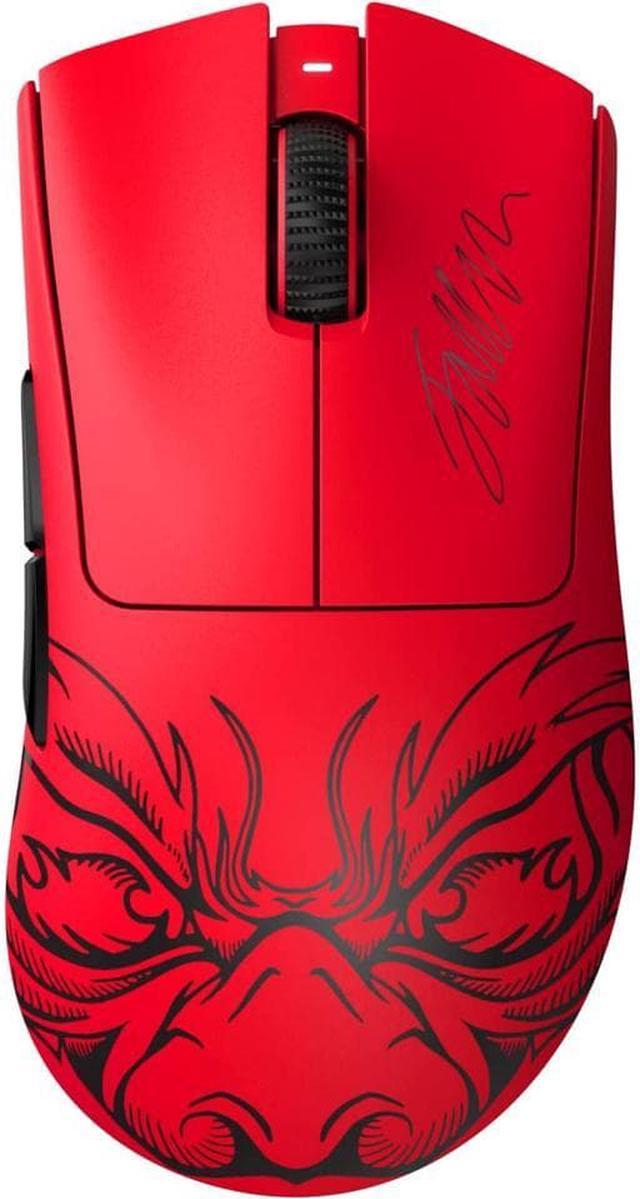
Best for: Premium wireless gaming
- Sensor resolution
- 30,000 DPI
- Weight
- 63 g
- Connection
- 2.4 GHz wireless
- Battery life
- Up to 90 hours
- Wireless play without a heavy shell.
- Ergonomic shape supports longer sessions.
- High-resolution sensor suits precise aiming.
- Costs more to equip than basic office mice.
- Charging adds another gaming setup task.
Is the Razer DeathAdder V3 Pro Wireless Gaming Mouse worth buying for gaming?
Yes. The Razer DeathAdder V3 Pro Wireless Gaming Mouse suits players who want a lightweight ergonomic shape without a cable. The Razer DeathAdder V3 Pro Wireless Gaming Mouse's 30,000 DPI sensor and stated battery life support demanding gaming sessions, while its larger right-handed body is less universal than a compact travel mouse.
See today’s Black Friday price on Amazon
#5
Logitech G305 LIGHTSPEED Wireless Gaming Mouse
The Logitech G305 LIGHTSPEED Wireless Gaming Mouse is the best value-focused wireless gaming pick for players who want a reliable receiver connection, with a 12,000 DPI HERO sensor.
Best for: Everyday wireless gaming
- Sensor resolution
- 12,000 DPI
- Weight
- 99 g
- Connection
- LIGHTSPEED 2.4 GHz
- Battery life
- Up to 250 hours
- Dedicated receiver supports responsive play.
- Long battery life reduces battery changes.
- Compact shape works for several grip styles.
- AA battery adds weight.
- No Bluetooth connection.
Is the Logitech G305 LIGHTSPEED Wireless Gaming Mouse good for gaming?
Yes. The Logitech G305 LIGHTSPEED Wireless Gaming Mouse is a practical wireless gaming mouse for players who want a dedicated receiver and long battery life. The Logitech G305 LIGHTSPEED Wireless Gaming Mouse's 12,000 DPI HERO sensor handles gaming and daily tasks, though the AA-powered design weighs more than ultralight models.
See today’s Black Friday price on Amazon
#6
Logitech MX Anywhere 3S Compact Wireless Mouse
The Logitech MX Anywhere 3S Compact Wireless Mouse is the best premium productivity mouse for users who work across devices, with an 8,000 DPI sensor and a MagSpeed scroll wheel.
Best for: Productivity on the move
- Sensor resolution
- 8,000 DPI
- Buttons
- 6
- Connection
- Bluetooth
- Battery life
- Up to 70 days
- MagSpeed wheel handles long documents.
- Tracks on many work surfaces.
- Pairs with multiple devices.
- Compact body can feel cramped for large hands.
- Not shaped for competitive gaming.
Is the Logitech MX Anywhere 3S Compact Wireless Mouse worth buying?
Yes. The Logitech MX Anywhere 3S Compact Wireless Mouse is a strong productivity choice for people who switch between devices or work in different locations. The Logitech MX Anywhere 3S Compact Wireless Mouse's 8,000 DPI sensor and MagSpeed scroll wheel make document work easier, but its compact shape favors portability over gaming comfort.
See today’s Black Friday price on Amazon
#7
Razer Viper V3 HyperSpeed Wireless Esports Mouse
The Razer Viper V3 HyperSpeed Wireless Esports Mouse is the best wireless esports option for players who prefer a symmetrical shell, with a 30,000 DPI optical sensor.
Best for: Wireless esports play
- Sensor resolution
- 30,000 DPI
- Weight
- 82 g
- Connection
- 2.4 GHz wireless
- Battery life
- Up to 280 hours
- Symmetrical shape suits several grip styles.
- High-resolution sensor supports precise tracking.
- Long stated battery life.
- AA battery increases weight.
- Wireless receiver is required for play.
Is the Razer Viper V3 HyperSpeed Wireless Esports Mouse good for FPS games?
Yes. The Razer Viper V3 HyperSpeed Wireless Esports Mouse is a strong FPS option for players who favor a symmetrical shape and wireless freedom. The Razer Viper V3 HyperSpeed Wireless Esports Mouse's 30,000 DPI sensor supports precise tracking, while the AA battery adds weight compared with rechargeable ultralight gaming mice.
See today’s Black Friday price on Amazon
#8
Razer Basilisk V3 Customizable Ergonomic Gaming Mouse
The Razer Basilisk V3 Customizable Ergonomic Gaming Mouse is the best feature-rich wired pick for players who want extra controls, with 11 programmable buttons and a 26,000 DPI sensor.
Best for: Custom controls and comfort
- Sensor resolution
- 26,000 DPI
- Weight
- 101 g
- Buttons
- 11 programmable
- Connection
- Wired USB
- Extra buttons suit complex games and shortcuts.
- Ergonomic right-handed shape adds palm support.
- Customizable scroll wheel offers multiple modes.
- Heavier than lightweight esports mice.
- Wired design limits desk flexibility.
Is the Razer Basilisk V3 Customizable Ergonomic Gaming Mouse good for MMO games?
Yes. The Razer Basilisk V3 Customizable Ergonomic Gaming Mouse suits MMO players and users who want extra shortcuts at hand. The Razer Basilisk V3 Customizable Ergonomic Gaming Mouse's 11 programmable buttons support custom commands, while its heavier wired build is less suited to players who prioritize quick, low-weight aiming.
See today’s Black Friday price on Amazon
Logitech Pebble vs Razer DeathAdder V3: which should you choose?
The Logitech Pebble Mouse 2 M350s Bluetooth Mouse is the better pick for quiet everyday use, while the Razer DeathAdder V3 Wired Gaming Mouse is the stronger choice for competitive play with its 30,000 DPI sensor. These mice target different jobs, so the right choice starts with your desk routine.
Choose the Logitech Pebble when you want portability, quiet clicks and a compact mouse for a laptop. Choose the Razer DeathAdder V3 when responsive tracking, a larger ergonomic shell and a wired connection matter more. The Pebble is not a gaming substitute, and the DeathAdder is less convenient for travel or silent shared spaces. Black Friday 2026 is a good time to compare these priorities alongside other mice in this guide.
Is the Logitech Pebble good for gaming?
The Logitech Pebble Mouse 2 M350s Bluetooth Mouse is best for everyday laptop tasks, while the Razer DeathAdder V3 Wired Gaming Mouse is better equipped for gaming with a 30,000 DPI sensor. The Pebble’s low-profile body and quiet clicks suit productivity more than fast repeated movements.
Casual games and simple controls are fine on the Pebble, but players who spend long sessions in shooters or action games benefit from a gaming-focused shape and sensor. Consider the Logitech G305 LIGHTSPEED Wireless Gaming Mouse for wireless gaming or the Razer Viper V3 HyperSpeed Wireless Esports Mouse for a symmetrical esports-style shape. Match the mouse to the games you play most.
What is the difference between Bluetooth and a gaming receiver?
The Logitech Pebble Mouse 2 M350s Bluetooth Mouse connects over Bluetooth, while the Razer DeathAdder V3 Wired Gaming Mouse uses USB and the Logitech G305 LIGHTSPEED Wireless Gaming Mouse uses a 2.4 GHz receiver. Connection type affects setup, portability and how you use a mouse across devices.
Bluetooth is convenient for laptops and travel because it avoids keeping a receiver plugged in. A dedicated gaming receiver prioritizes a focused connection for play, while wired USB avoids charging and battery changes. Check the exact model’s included accessories before buying, especially if you prefer wireless play. Multi-device workers should also consider whether their computer supports the mouse’s connection method.
Which mouse is best for travel and small hands?
The Logitech Pebble Mouse 2 M350s Bluetooth Mouse is the most travel-focused pick here, with a compact design and a battery life rated up to 24 months. The Logitech MX Anywhere 3S Compact Wireless Mouse is another portable choice, adding an 8,000 DPI sensor and MagSpeed scrolling.
Compact mice pack easily but offer less palm support than full-size gaming models. Small-handed users often appreciate a shorter shell, while larger-handed users should check dimensions and grip style before choosing. The Razer DeathAdder V3 models have ergonomic gaming shapes rather than flat travel profiles. For work on the move, prioritize size, connection and scroll controls over gaming-only specifications.
What should you check before buying a mouse on Black Friday 2026?
The Razer DeathAdder V3 Wired Gaming Mouse offers a 59-gram design and 30,000 DPI sensor, while the Logitech Pebble Mouse 2 M350s Bluetooth Mouse emphasizes quiet clicks and portability. Compare specifications against your actual use instead of treating a higher sensor number as an automatic upgrade.
Confirm the precise model name, connection type, included receiver and battery format before checkout. Read current owner feedback for comfort and click noise, since shape is personal. Think about whether you need silent operation, programmable buttons, multi-device pairing or a lightweight gaming shell. A Black Friday choice is strongest when its features solve a real daily need.
Buying Guide
Pick a mouse for its main job
Choose the Logitech Pebble Mouse 2 M350s Bluetooth Mouse for quiet work and travel. Choose the Razer DeathAdder V3 Wired Gaming Mouse for gaming control and a lightweight wired setup.
Compare shape and grip
Compact shells favor portability, while ergonomic gaming mice offer more palm support. Check product dimensions and owner comments if you have large hands or use a fingertip grip.
Choose the connection you need
Bluetooth suits laptop mobility. A 2.4 GHz receiver focuses on wireless gaming, and wired USB avoids battery management. Make sure your device supports the connection before you buy.
Look beyond DPI
A higher DPI ceiling does not guarantee a better fit. Weight, sensor behavior, button layout and shape matter more when choosing between an office mouse and a gaming mouse.
Check battery and included accessories
Confirm whether a mouse is rechargeable or uses replaceable batteries, and whether a wireless receiver comes in the box. Those details affect daily use and setup.
FAQ
Which is better, Logitech Pebble or Razer DeathAdder V3?
The Logitech Pebble Mouse 2 M350s Bluetooth Mouse is better for quiet work, portability and laptop use. The Razer DeathAdder V3 Wired Gaming Mouse is better for gaming, with a 59-gram design and 30,000 DPI sensor. Choose based on your main use, not the brand.
Is the Logitech Pebble Mouse 2 M350s Bluetooth Mouse silent?
The Logitech Pebble Mouse 2 M350s Bluetooth Mouse uses quiet-click buttons designed to reduce clicking noise. The quieter action suits libraries, shared offices and late-night laptop sessions. The mouse prioritizes unobtrusive everyday use rather than the tactile performance expected from a dedicated gaming mouse.
Does the Razer DeathAdder V3 Wired Gaming Mouse work without a cable?
No. The Razer DeathAdder V3 Wired Gaming Mouse connects through USB and is designed for wired use. Players who want a similar ergonomic gaming approach without a cable should compare the Razer DeathAdder V3 Pro Wireless Gaming Mouse and confirm its wireless receiver requirements.
Which mouse is best for FPS games?
The Razer DeathAdder V3 Wired Gaming Mouse is a strong FPS choice for players who prefer an ergonomic right-handed shape and low weight. The Razer Viper V3 HyperSpeed Wireless Esports Mouse suits players who want wireless freedom and a symmetrical design. Grip preference should guide the final choice.
Is the Logitech Pebble a good mouse for a laptop?
Yes. The Logitech Pebble Mouse 2 M350s Bluetooth Mouse suits laptop users who want a slim, quiet mouse that pairs over Bluetooth. Its compact body travels easily, and its simple button layout covers everyday navigation. Users who need more controls or gaming features should choose another model.
What is a good wireless gaming alternative to the DeathAdder V3?
The Razer DeathAdder V3 Pro Wireless Gaming Mouse offers an ergonomic wireless alternative with a 30,000 DPI sensor. The Logitech G305 LIGHTSPEED Wireless Gaming Mouse is another option for receiver-based play, while the Razer Viper V3 HyperSpeed Wireless Esports Mouse has a symmetrical shell.