

As an Amazon Associate we earn from qualifying purchases.
- Best overall: Apple iPad Air 11-inch (M3) Wi-Fi 128GB
- Best budget: Apple iPad (10th generation) Wi-Fi 64GB
- Best premium: Apple iPad Air 13-inch (M3) Wi-Fi 128GB
- Best for travel: Apple iPad mini (A17 Pro) Wi-Fi 128GB
- Apple iPad (10th generation) Wi-Fi 64GB does not support Apple Pencil Pro; it works with Apple Pencil (USB-C) and Apple Pencil (1st generation).
- Apple Pencil Pro works with select newer iPad models, including Apple iPad Air 11-inch (M3) Wi-Fi 128GB and Apple iPad mini (A17 Pro) Wi-Fi 128GB.
- Apple iPad (A16) Wi-Fi 128GB is a practical step-up choice for everyday browsing, streaming and note-taking.
- Compare stylus compatibility before choosing an iPad: Apple Pencil Pro features are tied to supported iPad models.
- Match screen size and storage to your everyday use, then compare Black Friday 2026 offers for the full device setup.
The iPad 10th generation and Apple Pencil Pro are not a compatible pair, so the key Black Friday 2026 question is which iPad fits your stylus needs. Apple iPad (10th generation) Wi-Fi 64GB supports Apple Pencil (USB-C) and Apple Pencil (1st generation), but not Apple Pencil Pro. Shoppers who already own the Pro stylus should choose a compatible iPad instead.
I’m Marcus Reed, and we researched and compared specs, reviews and owner feedback to build this practical buying guide. It covers seven iPads and Apple styluses, with clear compatibility notes, screen sizes and storage details. My pick for most people is the Apple iPad (A16) Wi-Fi 128GB for general use; artists and frequent note-takers should focus on a compatible iPad Air or iPad mini.
How We Picked
- We checked Apple Pencil compatibility for each iPad, including whether the device supports Apple Pencil Pro, Apple Pencil (USB-C) or Apple Pencil (1st generation).
- We compared screen size, storage capacity, chip family and connection type to show the practical differences between the products.
- We considered researched specs, reviews and owner feedback, prioritizing everyday usability for school, work, drawing and entertainment.
- We selected products that serve distinct budgets and needs, from entry-level tablet use to larger displays and advanced stylus features.
- We focused on useful Black Friday 2026 comparisons rather than speculative savings or price claims.
Comparison Table
| Product | Best for | Display | Storage | Apple Pencil Pro support |
|---|---|---|---|---|
| Apple iPad (10th generation) Wi-Fi 64GB | Everyday use with Apple Pencil (USB-C) | 10.9 inches | 64GB | No |
| Apple Pencil Pro | Advanced drawing and notes | N/A | N/A | Stylus |
| Apple Pencil (USB-C) | Basic writing and sketches | N/A | N/A | Stylus |
| Apple iPad (A16) Wi-Fi 128GB | Everyday use with more storage | 11 inches | 128GB | No |
| Apple iPad Air 11-inch (M3) Wi-Fi 128GB | Portable creative work | 11 inches | 128GB | Yes |
| Apple iPad mini (A17 Pro) Wi-Fi 128GB | Travel and compact note-taking | 8.3 inches | 128GB | Yes |
| Apple iPad Air 13-inch (M3) Wi-Fi 128GB | Large-screen drawing | 13 inches | 128GB | Yes |
Best Picks Reviewed
#1
Apple iPad (10th generation) Wi-Fi 64GB
The Apple iPad (10th generation) Wi-Fi 64GB is the best entry-level iPad for everyday browsing and video, with a 10.9-inch display. The tablet does not support Apple Pencil Pro, so choose a compatible stylus or another iPad for Pro features.

Best for: Everyday tablet use with Apple Pencil (USB-C)
- Display
- 10.9 inches
- Storage
- 64GB
- Connectivity
- Wi-Fi
- Stylus support
- Apple Pencil (USB-C), Apple Pencil (1st generation)
- Large, versatile 10.9-inch screen
- Works with Apple Pencil (USB-C)
- Landscape front camera suits video calls
- Apple Pencil Pro is not compatible
- 64GB storage is limiting for large media libraries
Does Apple iPad (10th generation) Wi-Fi 64GB work with Apple Pencil Pro?
No. Apple iPad (10th generation) Wi-Fi 64GB does not support Apple Pencil Pro. The tablet pairs with Apple Pencil (USB-C) or Apple Pencil (1st generation), so choose one of those styluses or a newer compatible iPad.
See today’s Black Friday price on Amazon
#2
Apple Pencil Pro
The Apple Pencil Pro is the best stylus for supported iPad artists and note-takers who want advanced controls. The Apple Pencil Pro's squeeze interaction and 4,096 levels of pressure sensitivity help make drawing and markup more expressive.
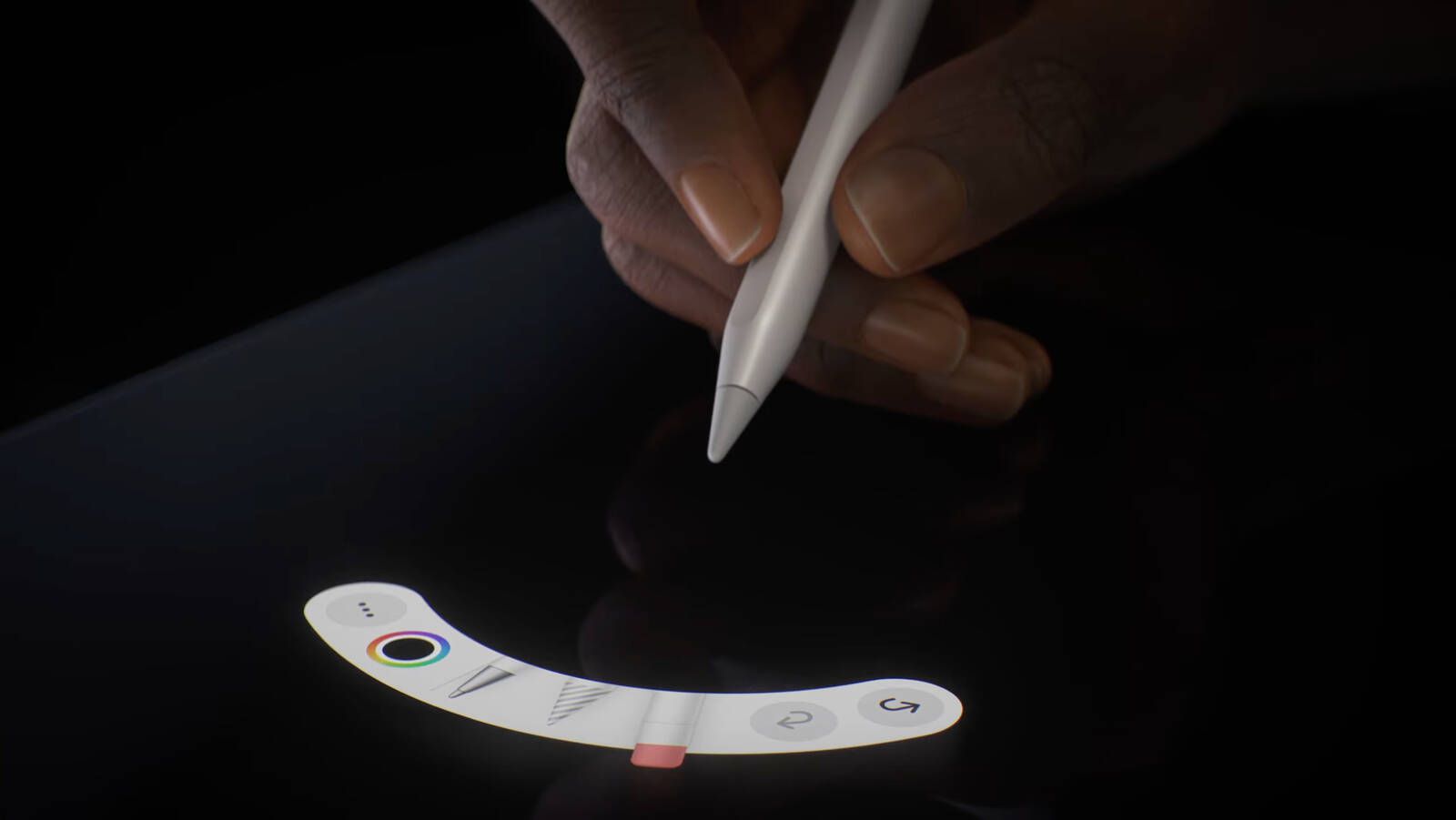
Best for: Drawing and advanced note-taking on a compatible iPad
- Pressure sensitivity
- 4,096 levels
- Controls
- Squeeze, barrel roll, haptic feedback
- Charging
- Magnetic attachment
- Supports squeeze and barrel roll controls
- Attaches magnetically to supported iPads
- Includes haptic feedback
- Does not work with Apple iPad (10th generation)
- Advanced features require a compatible iPad
Is Apple Pencil Pro worth buying on Black Friday 2026?
Apple Pencil Pro is worth considering for drawing, handwriting and markup on a compatible iPad. The Apple Pencil Pro's squeeze controls, barrel roll and 4,096 pressure levels add useful creative features, but it does not work with Apple iPad (10th generation).
See today’s Black Friday price on Amazon
#3
Apple Pencil (USB-C)
The Apple Pencil (USB-C) is the best straightforward stylus for Apple iPad (10th generation) Wi-Fi 64GB and other supported iPads. The Apple Pencil (USB-C)'s USB-C charging connection and tilt sensitivity cover core writing and sketching needs.

Best for: Basic notes and sketches on Apple iPad (10th generation)
- Charging
- USB-C
- Sensitivity
- Tilt sensitivity
- Pressure sensitivity
- Not supported
- Attachment
- Magnetic
- Compatible with Apple iPad (10th generation)
- USB-C charging is convenient
- Useful for handwriting and simple sketches
- No pressure sensitivity
- Does not include Apple Pencil Pro features
Does Apple Pencil (USB-C) work with Apple iPad (10th generation) Wi-Fi 64GB?
Yes. Apple Pencil (USB-C) works with Apple iPad (10th generation) Wi-Fi 64GB and supports writing, markup and tilt-sensitive drawing. The stylus lacks pressure sensitivity, so illustrators who need that feature should compare other compatible options.
See today’s Black Friday price on Amazon
#4
Apple iPad (A16) Wi-Fi 128GB
The Apple iPad (A16) Wi-Fi 128GB is the best everyday upgrade for shoppers who want a current entry-level iPad with 128GB of storage. The 11-inch display gives more room for reading, video and split-screen tasks.
Best for: Everyday use with more storage
- Display
- 11 inches
- Storage
- 128GB
- Connectivity
- Wi-Fi
- Chip
- A16
- 128GB base storage
- 11-inch display for multitasking
- Suitable for streaming, browsing and schoolwork
- Not compatible with Apple Pencil Pro
- Wi-Fi model lacks cellular connectivity
Is Apple iPad (A16) Wi-Fi 128GB a good Black Friday 2026 buy?
Apple iPad (A16) Wi-Fi 128GB is a strong everyday choice for browsing, streaming, reading and schoolwork. The Apple iPad (A16) Wi-Fi 128GB's 11-inch screen and 128GB capacity offer a balanced setup, but shoppers seeking Apple Pencil Pro support should verify compatibility before buying.
See today’s Black Friday price on Amazon
#5 · Top pick
Apple iPad Air 11-inch (M3) Wi-Fi 128GB
The Apple iPad Air 11-inch (M3) Wi-Fi 128GB is the best balanced pick for shoppers who want Apple Pencil Pro support and a portable 11-inch screen. The M3 chip suits creative work, multitasking and demanding apps.

Best for: Portable creative work with Apple Pencil Pro
- Display
- 11 inches
- Storage
- 128GB
- Chip
- M3
- Stylus support
- Apple Pencil Pro
- Supports Apple Pencil Pro
- Portable 11-inch screen
- M3 chip supports demanding apps
- Costs more than entry-level iPad models
- 128GB can fill quickly with large creative files
Does Apple iPad Air 11-inch (M3) Wi-Fi 128GB support Apple Pencil Pro?
Yes. Apple iPad Air 11-inch (M3) Wi-Fi 128GB supports Apple Pencil Pro, including its advanced controls. The 11-inch display and M3 chip make the tablet a practical option for drawing, handwritten notes and portable creative work.
See today’s Black Friday price on Amazon
#6
Apple iPad mini (A17 Pro) Wi-Fi 128GB
The Apple iPad mini (A17 Pro) Wi-Fi 128GB is the best compact iPad for readers, travelers and note-takers who want Apple Pencil Pro compatibility. The Apple iPad mini (A17 Pro) Wi-Fi 128GB's 8.3-inch display keeps the tablet easy to carry.

Best for: Travel and compact note-taking
- Display
- 8.3 inches
- Storage
- 128GB
- Chip
- A17 Pro
- Stylus support
- Apple Pencil Pro
- Compact 8.3-inch design
- Supports Apple Pencil Pro
- 128GB storage
- Smaller workspace than iPad Air models
- Compact screen is less suited to split-screen work
Is Apple iPad mini (A17 Pro) Wi-Fi 128GB compatible with Apple Pencil Pro?
Yes. Apple iPad mini (A17 Pro) Wi-Fi 128GB supports Apple Pencil Pro and offers a compact 8.3-inch screen. The smaller display suits portable notes and sketches, while larger iPad Air models provide more room for detailed creative work.
See today’s Black Friday price on Amazon
#7
Apple iPad Air 13-inch (M3) Wi-Fi 128GB
The Apple iPad Air 13-inch (M3) Wi-Fi 128GB is the best large-screen option for supported Apple Pencil Pro drawing and multitasking. The Apple iPad Air 13-inch (M3) Wi-Fi 128GB's 13-inch display gives more canvas space while the M3 chip handles demanding apps.
Best for: Large-screen drawing and multitasking
- Display
- 13 inches
- Storage
- 128GB
- Chip
- M3
- Stylus support
- Apple Pencil Pro
- Spacious 13-inch display
- Supports Apple Pencil Pro
- M3 chip for demanding creative apps
- Less compact than 11-inch tablets
- Larger size is less convenient for one-handed use
Is Apple iPad Air 13-inch (M3) Wi-Fi 128GB good for Apple Pencil Pro?
Yes. Apple iPad Air 13-inch (M3) Wi-Fi 128GB supports Apple Pencil Pro and offers a broad 13-inch workspace. The large screen suits detailed illustration, document markup and multitasking, while the 11-inch Air is easier to carry.
See today’s Black Friday price on Amazon
Does the iPad 10th generation work with Apple Pencil Pro?
Apple iPad (10th generation) Wi-Fi 64GB does not support Apple Pencil Pro, while it does work with Apple Pencil (USB-C) and Apple Pencil (1st generation). That compatibility difference is the most important point for shoppers comparing the tablet and stylus for Black Friday 2026. Apple Pencil Pro is not a universal iPad accessory.
Choose Apple iPad Air 11-inch (M3) Wi-Fi 128GB, Apple iPad mini (A17 Pro) Wi-Fi 128GB or Apple iPad Air 13-inch (M3) Wi-Fi 128GB for Apple Pencil Pro support. For basic writing on the 10th-generation iPad, Apple Pencil (USB-C) handles notes, markup and simple sketches without requiring a change of tablet.
Which iPad is the best Black Friday 2026 value?
Apple iPad (A16) Wi-Fi 128GB is the best all-around value pick for shoppers who want a current-feeling everyday tablet with 128GB of storage and an 11-inch display. The model balances a roomy screen and practical capacity for streaming, browsing, reading and schoolwork.
Apple iPad (10th generation) Wi-Fi 64GB fits shoppers who prioritize a basic tablet and already understand its smaller storage capacity and stylus limits. Compare the complete setup, including a keyboard or compatible Pencil, rather than choosing on tablet features alone. Buyers who need Apple Pencil Pro support should move to a compatible iPad Air or mini.
Which iPads support Apple Pencil Pro?
Apple iPad Air 11-inch (M3) Wi-Fi 128GB, Apple iPad Air 13-inch (M3) Wi-Fi 128GB and Apple iPad mini (A17 Pro) Wi-Fi 128GB support Apple Pencil Pro among the products in this guide. Their different screen sizes serve different needs: 8.3 inches for portability, 11 inches for balance and 13 inches for a larger creative workspace.
Apple Pencil Pro adds squeeze interaction, barrel roll, haptic feedback and pressure sensitivity. Those features serve illustration and precise markup better than a basic stylus. Check compatibility against the exact iPad model before buying; sharing the same brand does not guarantee that an iPad supports every Apple Pencil.
Should you buy an iPad 10th generation or an iPad Air?
Apple iPad (10th generation) Wi-Fi 64GB suits basic browsing, video and note-taking, while Apple iPad Air 11-inch (M3) Wi-Fi 128GB adds Apple Pencil Pro compatibility and an M3 chip. The Air is the stronger fit for creative apps, advanced stylus use and more demanding multitasking.
Choose the 10th-generation iPad when everyday tasks matter more than Pro Pencil features. Choose the Air when drawing, handwritten notes or creative workflows are central to the purchase. Apple iPad Air 13-inch (M3) Wi-Fi 128GB offers more workspace, while the 11-inch Air keeps the package more portable.
What should you compare before buying an iPad and stylus?
Check Apple Pencil compatibility first, then compare display size, storage, connection type and intended use. Apple iPad (10th generation) Wi-Fi 64GB and Apple Pencil (USB-C) make a practical basic writing combination; Apple iPad Air 11-inch (M3) Wi-Fi 128GB and Apple Pencil Pro suit more advanced creative work.
Think about where files, photos and downloaded shows will live: 64GB is more restrictive than 128GB for offline media and large projects. A compact tablet such as Apple iPad mini (A17 Pro) Wi-Fi 128GB travels easily, while the 13-inch Air gives more room for illustration and split-screen tasks. Compare the total setup during Black Friday 2026.
Buying Guide
Confirm stylus compatibility
Match the exact iPad model with the intended Apple Pencil before purchasing. Apple iPad (10th generation) Wi-Fi 64GB supports Apple Pencil (USB-C) and Apple Pencil (1st generation), not Apple Pencil Pro. Apple Pencil Pro requires a supported iPad model.
Pick a screen size for your routine
Apple iPad mini (A17 Pro) Wi-Fi 128GB has an 8.3-inch screen for portability. The 11-inch iPad options balance viewing space and carrying comfort, while Apple iPad Air 13-inch (M3) Wi-Fi 128GB gives drawing and multitasking more room.
Choose enough storage
Apple iPad (10th generation) Wi-Fi 64GB suits lighter use, while the 128GB models offer more space for apps, downloads and creative files. Consider how much media you keep offline before choosing a capacity.
Compare the complete setup
Include the stylus and any keyboard or case in your Black Friday 2026 comparison. A tablet and Pencil need to work together for your actual tasks, and the cheapest tablet alone is not always the best-fit purchase.
FAQ
Can I use Apple Pencil Pro with iPad 10th generation?
No. Apple iPad (10th generation) Wi-Fi 64GB does not support Apple Pencil Pro. The compatible choices include Apple Pencil (USB-C) and Apple Pencil (1st generation). Choose a supported iPad Air or iPad mini if Apple Pencil Pro features are essential.
Which Apple Pencil works with iPad 10th generation?
Apple iPad (10th generation) Wi-Fi 64GB works with Apple Pencil (USB-C) and Apple Pencil (1st generation). Apple Pencil Pro is incompatible. Apple Pencil (USB-C) is a straightforward option for handwriting, markup and simple sketches on this tablet.
Is Apple Pencil Pro worth it for students?
Apple Pencil Pro is worth considering for students who use a compatible iPad for handwritten notes, drawing and document markup. Its advanced controls are useful for creative work, but students with Apple iPad (10th generation) need a compatible stylus instead.
Which iPad is best for Apple Pencil Pro drawing?
Apple iPad Air 13-inch (M3) Wi-Fi 128GB is the best drawing choice in this guide for shoppers who want a larger canvas and Apple Pencil Pro support. Apple iPad Air 11-inch (M3) Wi-Fi 128GB offers a more portable alternative.
Is the iPad mini compatible with Apple Pencil Pro?
Yes. Apple iPad mini (A17 Pro) Wi-Fi 128GB supports Apple Pencil Pro. The 8.3-inch display makes the tablet easy to carry for mobile notes and sketches, although the iPad Air models provide a larger drawing workspace.
What is the main difference between Apple Pencil Pro and Apple Pencil USB-C?
Apple Pencil Pro adds features such as squeeze controls, barrel roll, haptic feedback and pressure sensitivity. Apple Pencil (USB-C) covers core writing and tilt-sensitive drawing but lacks pressure sensitivity and the Pro model's advanced controls.