

As an Amazon Associate we earn from qualifying purchases.
- The QNAP TS-464-8G 4-Bay NAS suits households and small offices that want shared storage, backups and media services in one four-bay system.
- Key specs include an Intel Celeron N5095 quad-core processor, 8GB DDR4 memory, four SATA drive bays, two 2.5GbE ports and two M.2 slots.
- For Black Friday 2026, compare the exact model number, included drive bundle, retailer stock and return terms before choosing a listing.
- The QNAP TS-464-8G 4-Bay NAS is a capable, expandable choice when its networking and storage features match your needs.
- The QNAP TS-464-8G 4-Bay NAS has four SATA bays, letting owners configure storage around capacity, redundancy or a mix of both.
- Dual 2.5GbE ports provide faster wired network options than standard gigabit Ethernet when the rest of the network supports them.
- The Intel Celeron N5095 processor and 8GB memory support common NAS workloads such as backups, file sharing and media management.
- Two M.2 slots add room for cache or storage expansion, while HDMI 2.0 supports a direct display connection.
- Black Friday listings can differ by included drives and accessories, so compare bundle contents rather than relying on the headline alone.
The QNAP TS-464-8G 4-Bay NAS is a four-drive network storage system for home users and small teams who want centralized files, backups and media access. For Black Friday 2026, the useful comparison is more than the listing headline: check the exact TS-464-8G model, included drive configuration, stock status and retailer support. I’m Marcus Reed, and we researched and compared specs, reviews and owner feedback to explain where this QNAP fits and what to check before buying.
My pick for most people who need a flexible four-bay NAS, the QNAP TS-464-8G 4-Bay NAS combines an Intel Celeron N5095 processor, 8GB of memory, dual 2.5GbE networking and two M.2 slots. Those specifications suit shared storage and everyday backup needs, with room to scale capacity over time. Buyers should still account for the cost and setup of drives, network equipment and backups; the NAS enclosure alone does not provide a complete storage plan.
How We Picked
- Compared the QNAP TS-464-8G 4-Bay NAS specifications with common home and small-office storage needs, including bay count, processor, memory and networking.
- Reviewed owner feedback and product information for recurring setup, software, noise and reliability considerations without treating individual reports as guarantees.
- Considered expansion options such as the two M.2 slots, memory configuration and dual 2.5GbE ports when assessing long-term usefulness.
- Focused Black Friday deal checks on exact model identification, bundle contents, retailer terms and stock rather than headline wording alone.
Our Verdict
#1 · Top pick
QNAP TS-464-8G 4-Bay NAS
The QNAP TS-464-8G 4-Bay NAS is a well-equipped storage hub for homes and small offices that need four drive bays, flexible networking and room for expansion. Choose it when you are comfortable selecting and managing NAS drives separately.
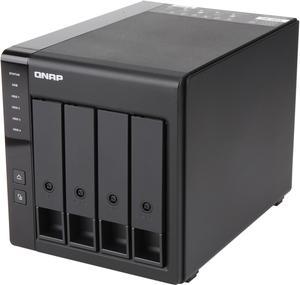
Best for: Home users and small teams building shared storage, backup and media libraries
- Processor
- Intel Celeron N5095 quad-core, 2.0GHz base and up to 2.9GHz burst
- Memory
- 8GB DDR4
- Drive bays
- 4 x 3.5-inch or 2.5-inch SATA
- Networking
- 2 x 2.5GbE
- M.2 slots
- 2 x M.2 PCIe Gen 3 x1
- Video output
- HDMI 2.0, up to 4K at 60Hz
- Four drive bays support flexible capacity and redundancy setups.
- Dual 2.5GbE ports offer faster wired networking with compatible equipment.
- Two M.2 slots provide additional cache or storage options.
- HDMI 2.0 enables a direct display connection.
- Drive selection and installation add setup work beyond buying the NAS enclosure.
- Using 2.5GbE requires compatible network hardware and suitable cabling.
Is the QNAP TS-464-8G 4-Bay NAS worth buying on Black Friday 2026?
The QNAP TS-464-8G 4-Bay NAS is worth considering if four drive bays, dual 2.5GbE and M.2 expansion match your storage plan. Compare the exact model and bundle contents, then account for the drives and network equipment needed to use its capabilities.
See today’s Black Friday price on Amazon
Who should buy the QNAP TS-464-8G 4-Bay NAS?
The QNAP TS-464-8G 4-Bay NAS fits households and small offices that need centralized storage for multiple computers, shared folders and backup jobs. Four SATA bays give owners more room to choose a capacity and redundancy plan than a smaller two-bay enclosure, while 8GB of DDR4 memory provides a useful starting configuration for everyday NAS services.
A NAS is most useful when several people or devices need dependable access to the same files. The QNAP TS-464-8G 4-Bay NAS can organize photo libraries, work documents and media in one network location, with user permissions and backup tasks configured through QNAP software. Buyers should plan the storage layout before installation and keep a separate backup of important files; RAID is not a substitute for backup.
Skip it if you only need a simple external drive or do not want to configure network storage. A four-bay system brings more flexibility, but also more setup decisions, drive management and ongoing maintenance.
What are the QNAP TS-464-8G 4-Bay NAS specifications?
The QNAP TS-464-8G 4-Bay NAS combines an Intel Celeron N5095 quad-core processor, 8GB DDR4 memory and four 3.5-inch or 2.5-inch SATA drive bays. The processor runs at 2.0GHz base frequency and reaches up to 2.9GHz burst frequency, according to the listed specifications.
Two 2.5GbE network ports give the enclosure a higher-speed wired connection option than gigabit Ethernet, provided the router, switch and client devices support faster links. Two M.2 PCIe Gen 3 x1 slots add options for cache or storage, depending on the configuration and QNAP’s compatibility guidance. HDMI 2.0 supports output up to 4K at 60Hz for a direct display connection.
These specifications describe hardware capability, not a guarantee of a particular transfer speed or application experience. Actual results depend on installed drives, network equipment, file sizes, system configuration and the workload running on the QNAP TS-464-8G 4-Bay NAS.
How does the QNAP TS-464-8G 4-Bay NAS work for backups?
The QNAP TS-464-8G 4-Bay NAS can act as a central destination for backups from computers and other supported devices on a home or office network. Four bays allow owners to select a drive layout that suits their capacity and redundancy priorities, and QNAP software provides tools for configuring storage and backup jobs.
A practical setup starts by deciding which devices and folders need protection, how often they should be copied and how long older versions should remain available. Schedule jobs for times that do not interrupt everyday use, then check completion reports and restore a sample file to confirm the process works. The installed drives and chosen storage setup determine the available capacity.
For stronger protection, maintain another copy away from the NAS, such as a separate external drive or supported remote destination. The QNAP TS-464-8G 4-Bay NAS can organize a backup plan, but a single enclosure does not protect files from every risk, including accidental deletion, theft or hardware failure.
Can the QNAP TS-464-8G 4-Bay NAS stream media?
The QNAP TS-464-8G 4-Bay NAS supports media storage and sharing, with an Intel Celeron N5095 processor and HDMI 2.0 output for users planning a direct display connection. Its suitability for a particular streaming or transcoding workflow depends on the media format, playback device, software and system configuration.
For a straightforward home library, users can store video, music and photos centrally and access compatible files from devices on the network. Wired connections help keep a media setup consistent, and the two 2.5GbE ports provide headroom when the rest of the network supports those speeds. Wireless playback still depends on router coverage and client capability.
Check the application’s current compatibility details before building a media workflow around a specific codec or transcoding feature. The QNAP TS-464-8G 4-Bay NAS is a flexible storage platform, but media playback quality also depends on source files and the devices used to view them.
What should you know about the QNAP TS-464-8G 4-Bay NAS network ports?
The QNAP TS-464-8G 4-Bay NAS includes two 2.5GbE ports, which can support faster wired transfers when the connected network equipment and client devices are compatible. A port rated for 2.5GbE does not make every file copy run at that speed; the slowest part of the full connection still matters.
Before buying, check whether your router or switch has 2.5GbE ports and whether the computers that access the NAS have a matching connection. Drive performance, network congestion, cable quality and file-transfer patterns also affect results. Owners with a gigabit-only network can still connect the NAS, but the link operates within the limits of that network.
The two ports also offer options for network configuration, subject to supported settings and equipment. The QNAP TS-464-8G 4-Bay NAS makes the most sense for faster networking when those ports support a real need rather than simply appearing on a specification sheet.
What should you check before buying the QNAP TS-464-8G 4-Bay NAS?
The QNAP TS-464-8G 4-Bay NAS should be matched to your drive plan, network and intended applications before you choose a Black Friday listing. Confirm that the listing identifies the TS-464-8G version, since model details and included items can vary across retailer pages and bundles.
Check whether the listing includes drives or only the enclosure, and confirm the drive capacity and model if a bundle is offered. Verify retailer return terms, warranty coverage, delivery details and stock status as part of the comparison. NAS drives are designed for storage workloads, so check QNAP’s compatibility information before selecting them.
Finally, map out your storage needs and backup plan. Four bays offer flexibility, but the usable capacity depends on the drives and storage arrangement. A suitable network switch and client connection also help owners take advantage of dual 2.5GbE ports on the QNAP TS-464-8G 4-Bay NAS.
Buying Guide
Confirm the exact QNAP model
The QNAP TS-464-8G 4-Bay NAS is the 8GB configuration with four drive bays, so check the full model name on the product page and invoice. Compare included accessories and any drive bundle separately. Retailer titles can shorten model names, making the full identifier an important detail before checkout.
Compare bundle contents
The QNAP TS-464-8G 4-Bay NAS needs compatible drives for storage, so identify whether a Black Friday listing is enclosure-only or includes drives. Check the number, capacity and model of any included drives, as well as whether the bundle includes required cables or accessories. Compare like-for-like listings.
Check retailer terms and availability
The QNAP TS-464-8G 4-Bay NAS listing should have clear stock, shipping, returns and warranty information before purchase. Review who handles customer support and whether the item is sold directly by the retailer or a marketplace seller. Keep the product page details for reference after ordering.
Plan the network and storage setup
The QNAP TS-464-8G 4-Bay NAS has four SATA bays and two 2.5GbE ports, so plan compatible drives and network gear in advance. Confirm that your switch or router supports the connection speeds you want. Also set aside another backup destination for important files.
Alternatives to Consider
- Synology DiskStation DS923+ 4-Bay NAS: Choose the Synology DiskStation DS923+ 4-Bay NAS if Synology’s software environment and supported workflows matter more to your setup. Check its specifications and networking needs against the QNAP TS-464-8G before deciding.
- ASUSTOR Lockerstor 4 Gen2 AS6704T 4-Bay NAS: The ASUSTOR Lockerstor 4 Gen2 AS6704T 4-Bay NAS is an alternative for shoppers who want to compare a different four-bay platform and expansion feature set. Review the exact configuration and software support for your intended tasks.
- TerraMaster F4-423 4-Bay NAS: Consider the TerraMaster F4-423 4-Bay NAS if its operating system, connections and drive support align better with your setup. Compare current model details with the QNAP TS-464-8G rather than assuming the two enclosures include identical features.
FAQ
How many drives fit in the QNAP TS-464-8G 4-Bay NAS?
The QNAP TS-464-8G 4-Bay NAS has four SATA drive bays that accept 3.5-inch or 2.5-inch drives. The installed drive sizes and storage configuration determine the system’s capacity. Check QNAP’s drive compatibility information before purchase, especially if you plan to use a specific drive model.
Does the QNAP TS-464-8G 4-Bay NAS include hard drives?
The QNAP TS-464-8G 4-Bay NAS is sold in listings that can differ by bundle, so confirm the exact contents of the retailer offer. An enclosure-only package requires separate drive purchases, while a bundle should identify the included drive models and capacities. Do not infer drive inclusion from product photos alone.
Does the QNAP TS-464-8G 4-Bay NAS support 2.5GbE?
The QNAP TS-464-8G 4-Bay NAS has two 2.5GbE network ports. To use connections at that speed, the router or switch and the client device also need compatible networking. Transfer performance varies with drives, network configuration, file type and other activity on the network.
Can the QNAP TS-464-8G 4-Bay NAS be used for Plex?
The QNAP TS-464-8G 4-Bay NAS can store and serve media, but suitability for a Plex setup depends on the software version, media formats, playback devices and transcoding needs. Review current QNAP and Plex compatibility details before purchase, especially if your library relies on on-the-fly conversion.
Is the QNAP TS-464-8G 4-Bay NAS suitable for home use?
The QNAP TS-464-8G 4-Bay NAS suits homes that need shared storage, backups or a centralized media library. Four bays and 8GB of memory give room for a capable setup, while drive installation and network configuration require some planning. A simpler external drive suits basic single-device storage needs better.
What should I check on Black Friday for the QNAP TS-464-8G 4-Bay NAS?
For the QNAP TS-464-8G 4-Bay NAS, verify the full model number, whether drives are included, the drive capacities, retailer stock and return terms. Check warranty coverage and seller details, too. Comparing the contents of each listing helps distinguish an enclosure-only offer from a bundle.