

As an Amazon Associate we earn from qualifying purchases.
- The Synology DiskStation DS923+ 4-Bay NAS suits home offices, creators and small teams that want shared storage, backups and private-cloud tools.
- The Synology DiskStation DS923+ 4-Bay NAS has four drive bays, a dual-core AMD Ryzen R1600 processor, 4GB of ECC memory and two 1GbE ports.
- For Black Friday 2026, compare the Synology DiskStation DS923+ 4-Bay NAS by included drives, memory, warranty, seller and stock; check whether a bundle matches your needs.
- The Synology DiskStation DS923+ 4-Bay NAS is a capable, expandable storage hub for buyers who value Synology's software and are comfortable supplying compatible drives.
- The Synology DiskStation DS923+ 4-Bay NAS provides four SATA drive bays and supports expansion to nine drives with a compatible DX517 unit.
- The Synology DiskStation DS923+ 4-Bay NAS includes 4GB of ECC memory and supports up to 32GB, according to its specifications.
- Two 1GbE ports come standard, while an optional network upgrade supports 10GbE connectivity.
- The Synology DiskStation DS923+ 4-Bay NAS is sold without storage drives, so factor in the drives and setup costs when judging a Black Friday deal.
- The DS923+ is a strong fit for file sharing, backups and business storage, but its processor is not designed for demanding video transcoding.
The Synology DiskStation DS923+ 4-Bay NAS is a four-drive network storage system for people who want one place to back up computers, organize files and share data across a home or small office. We researched and compared specs, reviews and owner feedback to identify what matters most when shopping for this model, including its memory, network connections, expansion options and drive requirements.
For Black Friday 2026, focus on the complete package rather than a headline discount: check whether drives are included, confirm the seller and warranty, and compare any memory or accessory bundle with what you actually need. My pick for most people who want a dependable Synology platform is the standard diskless DS923+ paired with drives selected for the intended workload.
How We Picked
- Compared the Synology DiskStation DS923+ 4-Bay NAS's core specifications, including processor, memory, drive bays and network connections.
- Reviewed owner feedback and product documentation for common setup considerations, noise, software use and storage expansion.
- Judged potential Black Friday value by the full bundle: included drives, memory, warranty, seller terms and stock availability.
- Considered which workloads fit the DS923+ and noted practical limits, including its lack of built-in 10GbE and its modest processor for video transcoding.
Our Verdict
#1 · Top pick
Synology DiskStation DS923+ 4-Bay NAS
The Synology DiskStation DS923+ 4-Bay NAS is a flexible network-storage choice for backups, shared files and small-business workflows, with room to expand beyond its four internal bays. The diskless configuration makes drive selection your responsibility, so compare the complete setup rather than the enclosure alone.
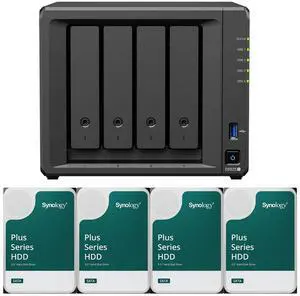
Best for: Home offices, creators and small teams seeking expandable Synology storage
- Drive bays
- 4 internal SATA bays; expansion to 9 drives with a DX517
- Processor
- AMD Ryzen R1600, 2 cores, 2.6GHz base and up to 3.1GHz boost
- Included memory
- 4GB DDR4 ECC SODIMM
- Maximum memory
- 32GB
- Network
- 2 x 1GbE; optional 10GbE upgrade
- M.2 slots
- 2 x M.2 NVMe
- Four bays allow flexible capacity and redundancy configurations.
- ECC memory and Synology DSM software suit shared storage and backup workflows.
- Expansion support adds up to five additional drive bays with a compatible unit.
- Two M.2 NVMe slots and an optional 10GbE upgrade provide room to tune performance.
- The standard configuration does not include storage drives.
- The dual-core processor is not a strong fit for demanding video transcoding.
Is the Synology DiskStation DS923+ 4-Bay NAS worth buying on Black Friday 2026?
Yes, the Synology DiskStation DS923+ 4-Bay NAS is worth considering if you need a four-bay system for backups, shared storage or a small office. Choose a deal that fits your drive plan and warranty needs; skip the model if your priority is intensive video transcoding.
See today’s Black Friday price on Amazon
What should you look for in Synology DS923+ Black Friday deals?
A worthwhile Synology DiskStation DS923+ 4-Bay NAS deal is one with the right configuration, seller and warranty—not simply a low listing price. The standard unit is diskless, so confirm whether a retailer's bundle adds drives, extra memory or accessories, and verify that every included component suits the NAS.
Check listings from Synology's store and established retailers such as Amazon, B&H Photo and Newegg, then compare shipping, return terms and stock status. A drive bundle saves shopping steps only when the drive models and capacities match your intended setup. Read the product title and specifications carefully: similarly named listings can describe the enclosure alone, a drive bundle or refurbished inventory.
What are the Synology DS923+ specifications?
The Synology DiskStation DS923+ 4-Bay NAS combines four SATA drive bays, a dual-core AMD Ryzen R1600 processor and two 1GbE network ports. Synology supplies 4GB of DDR4 ECC SODIMM memory, with a stated maximum of 32GB, plus two M.2 NVMe slots for compatible storage or cache uses.
The enclosure can expand to nine drives when paired with a compatible DX517 expansion unit. An optional network module provides a path to 10GbE, while the two built-in Ethernet ports support standard 1GbE connections. Keep in mind that the DS923+ does not include drives, and total usable capacity depends on installed drive sizes and the chosen storage arrangement.
Who should buy the Synology DiskStation DS923+?
The Synology DiskStation DS923+ 4-Bay NAS is a good match for households, freelancers and small offices that need centralized files, scheduled computer backups and shared folders. Four bays give owners options for capacity and redundancy, while Synology DSM brings management and backup tools into one interface.
The DS923+ also suits buyers who plan to expand storage over time or want ECC memory in a desktop NAS. Skip it if your main need is a simple single-drive backup, a low-cost plug-and-play enclosure, or frequent transcoding of demanding video formats. For that workload, compare processing requirements and software support before committing to this model.
Does the Synology DS923+ include hard drives?
The Synology DiskStation DS923+ 4-Bay NAS is generally sold without hard drives, so plan to purchase compatible storage separately unless a listing clearly identifies a bundle. Confirm the number, model and capacity of any included drives in the retailer's item details rather than relying on a product image.
Choose drives based on capacity, workload and the storage arrangement you intend to use. The number printed on a drive does not equal the usable capacity after formatting and redundancy choices. Check Synology's current compatibility information before ordering, and consider whether your setup needs all four bays populated at once or leaves room for later expansion.
Can the Synology DS923+ handle video editing and media streaming?
The Synology DiskStation DS923+ 4-Bay NAS can store and serve media files, but its dual-core AMD Ryzen R1600 processor is not built for demanding video transcoding. Direct playback of compatible files and file storage are different from converting video formats on the fly, so check the devices and apps in your media setup.
For creative work, the DS923+ can provide shared storage and backups, with network speed and drive performance affecting file transfers. Standard 1GbE ports are adequate for many home and office workflows, while an optional 10GbE upgrade targets faster wired networks. Match your editing workload, client devices and network infrastructure before buying.
How expandable is the Synology DiskStation DS923+?
The Synology DiskStation DS923+ 4-Bay NAS supports up to nine total drives when expanded with a compatible five-bay DX517 unit. That gives owners a way to add capacity without replacing the main enclosure, although the expansion unit and additional drives are separate purchases.
The two M.2 NVMe slots and optional 10GbE module offer further configuration choices, while memory can be upgraded from the included 4GB to a stated maximum of 32GB. Confirm compatible modules and the exact supported configuration before checkout. Add upgrades only when a real workload benefits from them; extra components do not automatically improve every storage task.
Buying Guide
Check the exact Black Friday listing
A correct Synology DiskStation DS923+ 4-Bay NAS listing identifies the model and whether drives are included. Compare the item title, specifications and seller notes, and look for clear details on condition, warranty and return eligibility.
Compare bundles with a diskless setup
A Synology DiskStation DS923+ 4-Bay NAS bundle makes sense when its included drives match your capacity and compatibility needs. Compare the full contents against buying the enclosure and drives separately, and avoid paying for accessories you do not plan to use.
Review the seller and warranty
A reliable Synology DiskStation DS923+ 4-Bay NAS purchase includes clear seller information, warranty coverage and support terms. Check whether the seller is authorized, who handles returns and whether the warranty applies to every item in a bundle.
Match the NAS to your network and workload
The Synology DiskStation DS923+ 4-Bay NAS has two 1GbE ports and four drive bays, so verify that those specifications fit your workflow. Factor in drive costs, network upgrades and any expansion hardware before deciding that a Black Friday listing is a strong value.
Alternatives to Consider
- QNAP TS-464 4-Bay NAS: Pick the QNAP TS-464 4-Bay NAS if its ports, media features or QTS software better match your setup. Compare supported drive and memory configurations against the Synology DiskStation DS923+ 4-Bay NAS before choosing.
- ASUSTOR Lockerstor 4 Gen2 AS6704T 4-Bay NAS: The ASUSTOR Lockerstor 4 Gen2 AS6704T 4-Bay NAS is an option for buyers who prefer ASUSTOR's feature set and connectivity choices. Choose it over the Synology DiskStation DS923+ 4-Bay NAS only after checking software support and workload fit.
- TerraMaster F4-423 4-Bay NAS: Consider the TerraMaster F4-423 4-Bay NAS if its hardware and operating system meet your storage needs. Buyers who value Synology DSM and its established backup workflows should stay with the Synology DiskStation DS923+ 4-Bay NAS.
FAQ
What is the Synology DS923+ used for?
The Synology DiskStation DS923+ 4-Bay NAS centralizes files for homes, creators and small offices. Common uses include computer backups, shared folders, private-cloud access and media storage. Its four drive bays support flexible capacity plans, while Synology DSM provides the software for managing storage and connected users.
How many drives does the Synology DS923+ support?
The Synology DiskStation DS923+ 4-Bay NAS has four internal SATA drive bays. A compatible Synology DX517 expansion unit adds five bays, for up to nine drives in total. Drive compatibility, usable capacity and redundancy depend on the installed drives and storage configuration.
Does the Synology DS923+ come with drives?
The Synology DiskStation DS923+ 4-Bay NAS is commonly sold as a diskless enclosure. Some retailer listings bundle drives, so confirm the exact contents, drive models and capacities before ordering. Factor compatible drives into your full setup plan if the listing includes only the NAS enclosure.
How much memory does the Synology DS923+ have?
The Synology DiskStation DS923+ 4-Bay NAS ships with 4GB of DDR4 ECC SODIMM memory and supports up to 32GB according to its specifications. Check Synology's compatibility information before purchasing an upgrade, since module support and configuration matter.
Does the Synology DS923+ support 10GbE?
The Synology DiskStation DS923+ 4-Bay NAS includes two 1GbE ports, not built-in 10GbE. An optional network upgrade provides a 10GbE path. Buyers should confirm module compatibility and ensure the rest of the wired network supports higher speeds before adding that component.
Is the Synology DS923+ good for video transcoding?
The Synology DiskStation DS923+ 4-Bay NAS can store and serve media, but its dual-core AMD Ryzen R1600 processor is not aimed at demanding video transcoding. Check whether your playback devices support direct playback of your file formats, and compare workload requirements before purchase.